
The fastest path to reactivating dormant customers or patients is a voice-first AI workflow layered with strict segmentation and SMS or email fallback. This approach consistently books more appointments and qualifies more leads with less staff time than email-only campaigns, provided you already hold phone consent and current numbers. A platform like 42voice offers fast deployment, enabling teams to have a working reactivation engine quickly, often within days rather than months.
Table of Contents
- Why Automated Reactivation Calls Work (And When to Use Them)
- How Automated Reactivation Call Systems Actually Work
- When Should You Call Dormant Customers or Patients?
- What Should a Reactivation Call Script Actually Say?
- How Do Calls, SMS, and Email Work Together in a Reactivation Sequence?
- What KPIs Prove Reactivation Automation Is Working?
- What Do You Need Before Launching a Reactivation Campaign?
- 42Voice in Practice: Deployment and Integration Fit
- What Actually Breaks These Campaigns
- How 42Voice Can Get Your Reactivation Campaign Live This Week
- Sources
- FAQ
Why Automated Reactivation Calls Work (And When to Use Them)
A phone call cuts through in a way a fourteenth marketing email never does. Dormant contacts have already trained themselves to ignore your inbox, but a ringing phone still demands a decision: answer, ignore, or send to voicemail. That decision point is itself useful data. Answer rates, callback timing, and voicemail duration all become live intent signals that a read receipt on an email simply cannot match.
AI voice agents can pull a contact’s history at the moment of the call, open with something personalized instead of a generic greeting, qualify the person’s current interest, and either book a meeting or route to a human rep. That combination of personalization and real-time qualification is why voice tends to outperform cold email for lapsed contacts, especially in segments where the lifetime value of a single reactivated customer or patient justifies the higher cost per contact attempt.
Not every dormant contact deserves a call, though. Use this rough filter before committing phone resources:
- Choose calls first for high-LTV customers, patients overdue for recurring care, or leads that previously showed strong buying signals before going cold.
- Choose email or SMS first for low-value transactional customers, very old leads with unverified numbers, or segments where you lack documented call consent.
- Choose a hybrid sequence when the segment is mixed. Lead with a call attempt, then fall back to text or email for non-responders instead of retrying the same channel repeatedly.
The decision usually comes down to unit economics: if reactivating one contact is worth more than a few minutes of AI-driven call time, voice belongs at the front of the sequence.
How Automated Reactivation Call Systems Actually Work
Underneath the phone call sits a data and orchestration layer that determines whether the whole system feels smart or spammy. Four components do the real work.
- Data pipeline and hygiene. The system syncs with your CRM to pull contact records, validates phone numbers against known-bad or disconnected lists, and stamps each record with a last-contact timestamp. Dirty data here is the single most common reason reactivation campaigns underperform before they even start.
- Trigger logic. Most platforms fire on a simple inactivity window (say, 60 or 90 days since last purchase or visit), but more mature setups add predictive scoring that flags which dormant contacts are statistically likely to respond, letting you skip low-probability records entirely. Predictive winback models score inactive customers on their likelihood of returning and push the highest-value segments straight into your CRM or ad platform for targeted outreach.
- Call orchestration. This is the mechanical layer: auto-dialing, answer detection (human voice versus voicemail versus disconnected line), a personalized voicemail drop when no one picks up, and a retry schedule that spaces follow-up attempts instead of hammering the same number twice in one afternoon.
- CRM updates and warm handoff. Every outcome, a booked appointment, a callback request, a flat decline, gets written back to the CRM automatically. When a contact qualifies for a live conversation, the system should warm-transfer the call with a short summary so a human rep doesn’t force the caller to repeat everything they just told the AI agent.
Get those four pieces talking to each other and the rest of the campaign, scripting, cadence, measurement, is comparatively easy to tune.
When Should You Call Dormant Customers or Patients?
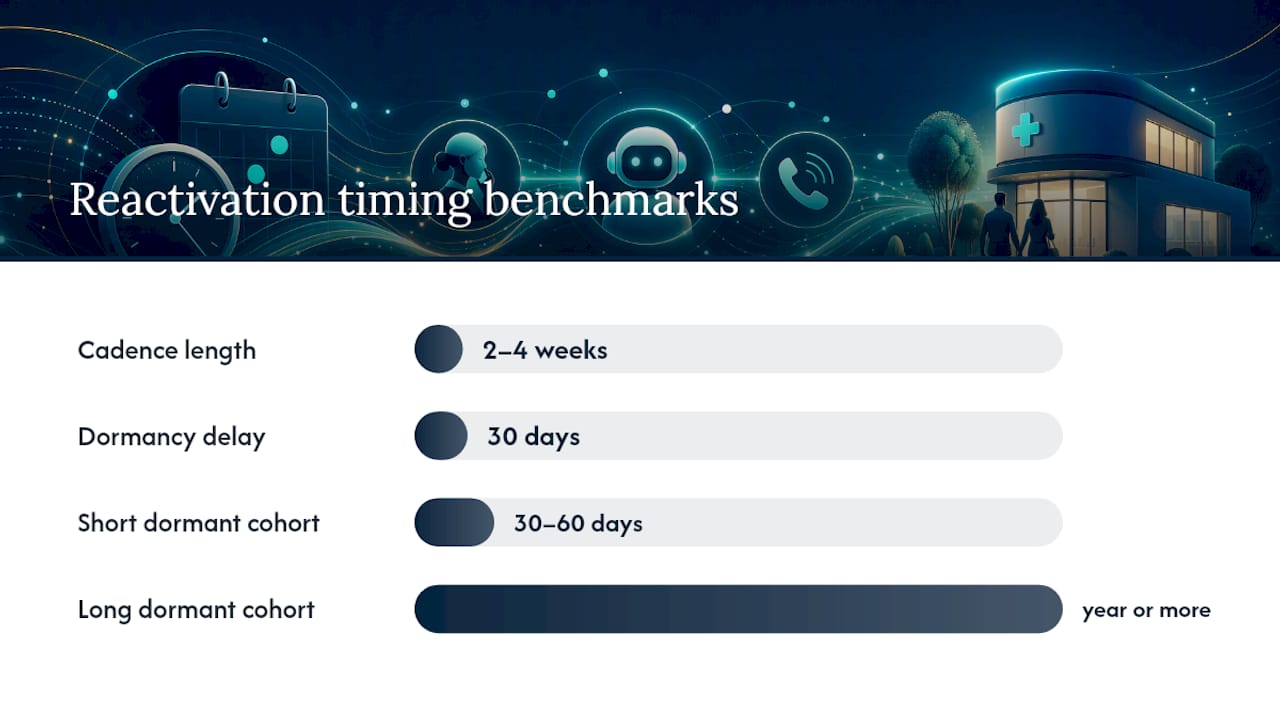
Timing decides whether a reactivation call feels timely or intrusive, and the research on this is more specific than most teams expect. Omnisend’s reactivation preset defaults to a 30-day delay before a contact is considered dormant enough to trigger a win-back sequence, and that delay block has to run first if you want retrospective triggering to work correctly on contacts who went quiet before the automation existed.
Segment before you dial. Not every dormant contact deserves the same urgency or the same script:
- Lead age: Contacts inactive 30 to 60 days respond differently than those dormant for a year or more; treat them as separate cohorts with separate messaging.
- Source: A lead who came from a paid ad campaign behaves differently than a referral or a former active patient, so keep source tags intact through the reactivation flow.
- Lifetime value: Reserve your best scripts and fastest retry cadence for the segment where a single reactivated contact is worth the most.
- Prior engagement: Someone who opened every email but never converted needs a different opener than someone who went completely silent.
On cadence, win-back sequences typically run 3 to 5 touches spread across 2 to 4 weeks, with reactivation rates in the 8% to 15% range for well-targeted campaigns. Cap retry attempts at two or three call tries per contact before shifting to text or email, and avoid calling before 9 AM or after 8 PM local time regardless of how eager the system is to hit its daily volume target.
Pro Tip: Run retrospective triggers only after your delay block is confirmed working on new contacts. Otherwise you risk blasting your entire dormant list in one afternoon instead of spacing it out the way the workflow intended.
What Should a Reactivation Call Script Actually Say?
A reactivation script fails for one of two reasons: it either sounds like a robot reading a form, or it buries the value proposition under three sentences of preamble before getting to the point. Neither works.
Open by naming the relationship directly. “This is calling on behalf of [business/clinic] because it’s been a while since your last visit” does more work in one sentence than a generic “Hi, how are you today?” ever will. Follow immediately with a reason to stay on the line, an offer, an overdue reminder, a scheduling opportunity, something concrete rather than vague.
From there, the script needs three clear paths:
- Qualification questions that confirm interest and gather the minimum detail needed to book (preferred day, service needed, insurance or account status).
- A direct booking pathway that lets the AI agent schedule on the spot when the calendar integration supports it.
- A graceful decline or callback option so contacts who aren’t ready can opt into a later touch instead of being pushed to a hard no.
When a call goes to voicemail, a personalized message referencing the contact’s history performs better than a generic script, and it should run under 20 seconds. Pair every voicemail with a same-day SMS fallback that repeats the offer in under 160 characters, since SMS tends to outperform voicemail for follow-through on low-answer cohorts.
Consent has to be built into the script logic, not bolted on afterward. Reactivation campaigns should screen against Do Not Call lists and enforce time-of-day windows automatically, and every call needs a clean opt-out path that flags the record so the system stops calling immediately. For teams building scripts from scratch, a signal-driven follow-up playbook offers a useful starting structure for qualification logic.
How Do Calls, SMS, and Email Work Together in a Reactivation Sequence?
No single channel should carry the whole reactivation burden. The strongest sequences treat the phone call as the lead move and everything else as reinforcement.
A call-first sequence makes sense for high-value segments: attempt a call, drop a personalized voicemail if unanswered, follow with SMS within the hour, then close with an email recap if there’s still no response after 48 hours. An email-first sequence works better for lower-value or unverified-number segments: send email, escalate to SMS for opens without clicks, and reserve calls only for contacts who show a strong signal, like clicking a booking link but not completing it.
Bloomreach’s reengagement model compares a customer’s average purchase frequency against their current recency to decide when to trigger outreach across email, push, SMS, and ads simultaneously rather than in strict sequence. That frequency-based logic is worth borrowing even outside retail: a patient who normally visits every six months and is now at nine months is a very different priority than one who is only a month past due.
- Check consent state per channel before each send. Phone consent does not automatically imply SMS or email consent.
- Use ads to re-warm segments with low answer rates instead of continuing to call them.
- Reserve your highest-touch, highest-cost channel (live calls) for contacts who have already shown some engagement elsewhere in the sequence.
What KPIs Prove Reactivation Automation Is Working?
Three numbers tell you almost everything: contact rate (percentage of dials that reach a live person), qualification rate (percentage of contacts who meet your booking criteria), and booked-appointment conversion rate (percentage of qualified contacts who actually schedule). Track staff-time saved and retry success rate as secondary operational metrics to justify the investment internally.
By the numbers: Well-targeted win-back campaigns typically land reactivation rates between 8% and 15%, and layering multiple channels into the sequence can lift that result by 25% to 40% compared to relying on a single channel alone.
To prove incremental impact rather than just activity, run a holdout test: split your dormant segment, automate outreach to one group, leave the other untouched for the test window, then compare booking rates between the two. Multiply the difference by average revenue per booking to get a real incremental-revenue figure instead of guessing at attribution.
What Do You Need Before Launching a Reactivation Campaign?
Rushing the setup is the most common way these campaigns underdeliver. Work through this order:
- Clean your data. Strip disconnected numbers, deduplicate records, and confirm consent status before anything else runs.
- Audit consent and DNC status for every segment you plan to call, not just the largest one.
- Define segments by age, source, value, and engagement history so scripts can be tailored per group.
- Write and test scripts, including voicemail and SMS fallback copy, before the first real call goes out.
- Complete integrations: CRM sync, calendar access for booking, and analytics tracking for the KPIs above.
- Run a pilot on a few hundred contacts with a defined measurement window, typically two to three weeks, before expanding.
- Set scale criteria in advance, a minimum qualification rate or cost-per-booking threshold, so the decision to expand isn’t just a gut call.
Most teams can move from pilot to full-scale rollout within six to eight weeks if the integrations were solid from the start.
42Voice in Practice: Deployment and Integration Fit
42voice builds this entire workflow around a platform that connects to existing calendars and CRMs rather than asking teams to migrate systems first. The company states its agents can go live in 3 to 5 days, which maps directly onto the pilot phase in the checklist above: data cleanup and script drafting happen while integration work runs in parallel, so the pilot segment can start dialing almost immediately after setup. Role-based agents, reception, outbound sales, support, and collections, mean a reactivation campaign can start narrow with one agent type and expand into adjacent use cases like automated appointment reminders without rebuilding the underlying system.
What Actually Breaks These Campaigns
Segment strictly, pilot small, and measure lift against a real holdout, not against last year’s average. Those three habits separate reactivation campaigns that scale from ones that get shut down after a few angry opt-outs. The failures I see repeated most often: teams overcall a segment because the system defaults to aggressive retry settings, they treat consent as a legal checkbox instead of a targeting variable, or they skip the human handoff entirely and lose a warm lead to a clumsy transfer. One clinic-style deployment I reviewed lost half its qualified callbacks simply because the booking handoff dropped the caller into a generic queue instead of a live scheduler.
The technology is rarely the bottleneck. The discipline around who gets called, how often, and what happens the moment someone says yes, that’s where campaigns actually win or lose.
— Jesse
How 42Voice Can Get Your Reactivation Campaign Live This Week
42voice is built specifically for teams that need reactivation calling running fast, not a six-month CRM overhaul. If your dormant list is sitting in a spreadsheet while your team debates vendors, that gap is costing you bookings every day it stays open. The AI Sales Development Rep agent handles outbound qualification and booking for cold or aged leads, while the AI Receptionist picks up the inbound callbacks those campaigns generate, so reactivated contacts never hit a busy signal on their way back in.

Deployment runs on the 3 to 5 day timeline described above, with calendar and CRM integrations completed before the pilot segment starts calling. A demo walks through your actual dormant-list volume and shows how the segmentation and retry logic would apply to your specific data, not a generic sample. Plans are structured as Starter, Growth, and Scale tiers on the pricing page, so you can size the commitment to your pilot before deciding whether to expand. Book a demo and bring your dormant-contact count. That’s the only number needed to scope the first pilot.
Sources
- Customer Reactivation Automation | Omnisend Help Center
- Personalized reengagement journey — Bloomreach documentation
- Flowbots
- Customer Winback Predictive Analytics Software | Pecan AI
FAQ
How Long Should You Wait Before Calling a Dormant Contact?
A 30-day inactivity window is a common default for triggering reactivation outreach, though high-frequency businesses may set it shorter and long-cycle services longer based on typical purchase or visit intervals.
Do You Need Consent to Make Automated Reactivation Calls?
Yes. Every contact needs documented phone consent, and campaigns should screen against Do Not Call lists and enforce time-of-day restrictions before any call goes out.
What Does 42Voice Cost for Reactivation Call Automation?
42voice offers Starter, Growth, and Scale plans, with current pricing details available on the pricing page.
How Do You Measure ROI on a Reactivation Call Campaign?
Track contact rate, qualification rate, and booked-appointment conversion, then run a holdout test comparing automated outreach against an untouched control group to isolate incremental bookings.
Can Reactivation Calls Integrate With an Existing CRM and Calendar?
Yes. Platforms built for this typically sync contact records, log call outcomes, and push booked appointments directly into your existing CRM and calendar rather than requiring a separate system.