
Overflow call handling is the process of routing calls that agents can’t answer, whether from full queues, long holds, or after-hours volume, to a backup path instead of letting them ring out. The fastest fix is turning on automated overflow routing paired with a callback option or an AI receptionist. Do that first, and you’ll cut missed calls, lift customer satisfaction, and take pressure off your team almost immediately.
Table of Contents
- What Counts as an Overflow Call, and When Does It Happen?
- What’s the Best Order to Fix Call Overflow?
- How Do You Actually Configure Overflow Routing?
- Which Metrics Tell You Overflow Is Getting Worse?
- How Do You Roll Out Overflow Handling in Practice?
- How 42voice Handles Overflow in the Real World
- How Do You Train Overflow Agents to Sound Like Your Business?
- What Goes Wrong Most Often With Overflow Handling?
- What Does Successful Overflow Handling Look Like for a Small Business?
- How Do You Choose the Right Overflow Provider?
- The Conventional Advice Gets the Order Backward
- Stop Losing Callers to Voicemail
- Sources
- FAQ
What Counts as an Overflow Call, and When Does It Happen?
An overflow call is any call your team can’t take right now and can’t send to voicemail either. Zendesk defines this precisely: it happens when all agents are offline, agents decline the call, the call goes unanswered, the maximum wait time is exceeded, or the queue simply fills up. Five triggers, one outcome: a caller hangs up frustrated, or worse, calls a competitor instead.
The common scenarios look like this:
- Agents offline — nobody’s logged into the phone system, often overnight or during a shift change.
- Queue full — too many callers are already waiting and the system won’t add more.
- Max wait time exceeded — a caller has waited past your configured threshold and gets bumped.
- Agents decline — everyone’s mid-call or marked unavailable.
- Outside business hours — the office is closed, but the phone still rings.
There’s a real distinction between after-hours overflow (predictable, happens every night) and in-hours overflow (spiky and often unpredictable). A landscaping company might see in-hours overflow only during the first warm week of spring, while a dental office sees after-hours overflow every single weeknight after 5 p.m. Marketing campaigns, seasonal sales, and service outages all create the same in-hours crunch: more calls arriving than your team can absorb in real time.
What’s the Best Order to Fix Call Overflow?
Not every fix costs the same or takes the same time to launch. Here’s the order that gets you the fastest reduction in missed calls for the least operational lift.
-
Configure automated overflow routing and dedicated overflow numbers. This is the quickest win. Most phone systems let you set a secondary number or queue that activates the moment your primary line hits capacity. Setup usually takes an afternoon, costs little beyond your existing platform, and works for almost any business with more than one incoming line.
-
Add a callback option. Rather than making callers sit on hold, let them request a callback and hang up. Callbacks matter because most callers abandon after waiting somewhere between two and five minutes, and offering a callback recovers a meaningful share of those calls. This takes a few days to configure properly and needs minimal ongoing cost.
-
Build a smart IVR around your top five questions. If a third of your calls are “what are your hours” or “do you have an opening this week,” self-service handles that instantly. Moderate setup effort, but it pays off fast for repetitive requests.
-
Bring in on-demand remote agents or a BPO partner. When a caller genuinely needs a live human and your team is maxed out, an outsourced partner fills the gap without a permanent hire. Outsourced overflow services typically bill per minute or per call, which keeps costs tied to actual volume instead of headcount. Some partners can now onboard trained agents in as little as nine days, a fraction of the traditional ramp time.
-
Deploy AI voice agents for elastic, always-on capacity. Unlike human staff, AI agents scale to dozens of simultaneous calls without a hiring cycle, covering after-hours and traffic spikes alike.
Pro Tip: Don’t deploy all five at once. Start with routing and callbacks in week one, then layer in IVR or AI capacity once you know exactly which calls you’re losing and why.
How Do You Actually Configure Overflow Routing?
Three triggers drive most overflow routing decisions: queue depth (how many callers are waiting), max wait time (how long someone’s been on hold), and agent occupancy (what percentage of your team is busy). Set thresholds too tight, and you’ll overflow calls your team could have handled fine. Set them too loose, and callers hang up before the system reacts.
There’s also a meaningful difference between routing to a dedicated overflow number and routing within an omnichannel queue that shifts calls to chat or messaging. Zendesk notes that toll-free numbers carry specific overflow limitations that don’t apply to standard lines, so check your provider’s fine print before you build your routing map.
Statistic Callout: Callers typically abandon a call after waiting two to five minutes on hold. If your average wait time creeps past that window, overflow routing isn’t optional anymore.
Before you go live, confirm these integration points:
- CRM phone integration so overflow calls log automatically instead of vanishing into a separate system.
- Calendar sync for any overflow path that books appointments.
- Ticket tagging so overflow calls are identifiable later for reporting.
- Recording and consent policies, especially if calls cross state or country lines with different consent laws.
- Caller ID preservation when routing to an external number or partner, so your team (and the caller) still recognizes the business on the line.
Test the fallback path too. If a callback fails or an overflow number doesn’t pick up, does the call drop to voicemail cleanly, or does it just ring out?
Which Metrics Tell You Overflow Is Getting Worse?
Five numbers matter more than the rest: abandonment rate, average speed of answer (ASA), queue depth growth, agent occupancy, and first-call resolution (FCR). Watching these lets you activate overflow measures automatically instead of waiting until customers start complaining.
| KPI | Trigger threshold | Why it matters |
|---|---|---|
| Abandonment rate | Above typical acceptable levels | Signals callers are giving up before reaching an agent |
| Average speed of answer | Between two and five minutes | Beyond this, hang-ups climb sharply |
| Queue depth growth | Rapid, sustained increase | Early warning before wait times spike |
| Agent occupancy | High | Team has no slack left to absorb spikes |
| First-call resolution | Declining trend | Overflow paths may be routing calls poorly |
CloudTalk’s research on overflow management points to dashboards that fire alerts at key thresholds, shifting teams from reacting after the fact to catching the spike as it starts. Once a trigger fires, the response should already be decided: escalate to callback, activate the AI agent, or pull in an on-demand remote agent. Deciding that in the moment wastes the exact minutes you’re trying to save.
How Do You Roll Out Overflow Handling in Practice?
A clean rollout follows six steps, and none of them need to take more than a couple of weeks for a small team.
- Audit your peak windows. Pull call logs for the last 90 days and find exactly when queues fill up, and why.
- Decide your strategy mix. Pick the combination of routing, callback, AI, and human backup that fits your call volume and budget.
- Configure the system. Set thresholds, activate overflow numbers, connect callbacks, and link your CRM and calendar.
- Test under simulated load. Run a mock spike, confirm recordings and tickets tag correctly, and check what the caller actually hears.
- Train your team and go live. Brief agents on handoff rules: when a call escalates, who owns the follow-up, and how tickets get closed.
- Measure daily for the first week, then shift to weekly reviews once the pattern stabilizes.
Pro Tip: Run your load test at the exact time your real spikes happen, not during a quiet Tuesday morning. A system that handles ten simulated calls calmly at 10 a.m. can behave very differently under a genuine Monday rush.
How 42voice Handles Overflow in the Real World
42voice builds AI voice agents that pick up the calls your team can’t, in more than nine languages, connected directly to your calendar and CRM. Most clients are live within three to five days, which matters when a queue is already overflowing and you don’t have weeks to spare on a technical rollout.
The calls that matter most during overflow aren’t the routine ones. They’re the after-hours booking request, the lead who calls once and won’t call back, and the customer question that could’ve been answered in thirty seconds if someone had picked up.
Typical use cases include after-hours appointment booking for home service businesses, lead qualification for firms that can’t staff a 24-hour sales desk, and routine scheduling calls that would otherwise sit in a queue. The after-hours agent handles the overnight gap specifically, while CRM phone integration keeps every overflow call logged and searchable instead of disappearing into a call log nobody checks.
How Do You Train Overflow Agents to Sound Like Your Business?
Whether your overflow path uses human backup agents or an AI voice agent, the failure mode is the same: a caller reaches someone who clearly doesn’t know your business, and the experience feels like a downgrade. Avoiding that starts with a short, specific brand brief, not a generic script.

Write down your actual greeting, your tone (formal versus casual), and the five questions your overflow contact will almost certainly get asked. A plumbing company answering “we’re currently unavailable” in a flat monotone loses trust instantly; one that says “thanks for calling [Business Name], we’re either on another call or it’s after hours, but let’s get you booked” keeps the relationship intact.
For outsourced human agents, that means a written style guide plus a short recorded call review each month. For AI voice agents, it means feeding the system your actual FAQs, common objections, and calendar rules rather than accepting a default script. Preserving custom greetings and a consistent voice across every overflow interaction is what separates a backup that protects your brand from one that quietly damages it.
Whatever path you choose, review real call transcripts weekly for at least the first month. Overflow paths that never get audited tend to drift, agents relax their tone, scripts go stale, and small inconsistencies pile up until a customer notices.
What Goes Wrong Most Often With Overflow Handling?
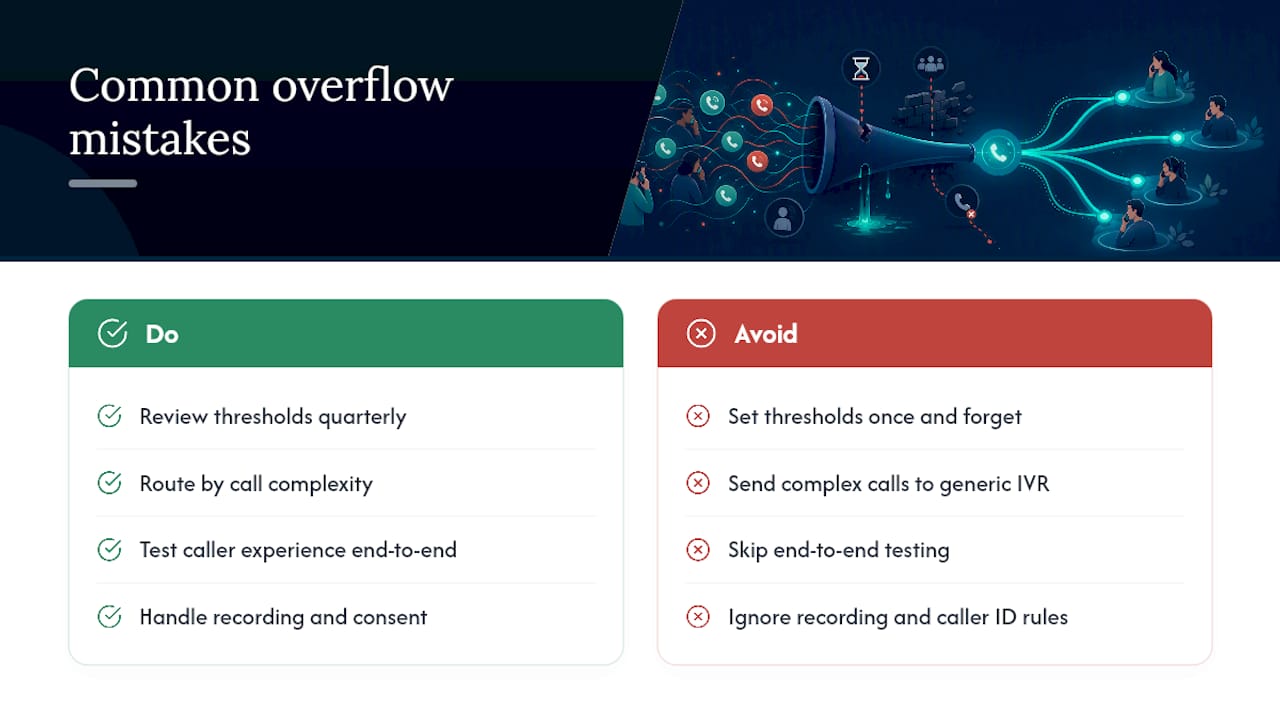
The most common mistake is setting thresholds once and never revisiting them. A queue depth trigger that made sense in January often breaks down completely once your call volume doubles after a marketing push. Review your thresholds quarterly, not never.
The second pitfall is routing overflow calls somewhere that can’t actually handle them. Sending a complex billing dispute to a generic IVR menu, or a callback system with no real agent behind it, just delays the frustration instead of solving it. Match the complexity of the call to the capability of the overflow path.
Third, businesses often skip testing the caller experience end to end. A routing rule can technically work while sounding broken. Dead air, a robotic voicemail greeting, or a callback that never actually calls back does more damage than no overflow system at all.
Fourth, teams frequently forget recording consent and caller ID handling when routing to an external number or partner. If a call crosses state lines or goes to a different provider, the recording and consent rules can change, and ignoring this creates a real compliance risk.
Finally, some businesses treat overflow as a one-time project instead of an ongoing practice. The best setups get reviewed monthly against real call data, not configured once and forgotten.
What Does Successful Overflow Handling Look Like for a Small Business?
A home services company running a single dispatcher line often loses evening calls entirely once the office closes. Adding after-hours AI call answering means a homeowner calling about a burst pipe at 9 p.m. still gets an appointment booked before the plumber even wakes up.
A dental practice with two front-desk staff frequently sees overflow spike during lunch hours when both staff members step away simultaneously. Routing those calls to a callback queue instead of letting them ring out preserves the appointment instead of losing it to a competing practice down the street.
A seasonal retailer running a holiday sale can see call volume triple for two weeks and then drop back to normal. Rather than hiring temporary staff for a short window, pairing an outsourced overflow partner with automated routing absorbs the spike without a long-term staffing commitment. Verint’s research on overflow handling points to exactly this kind of flexible coverage as the core reason overflow systems reduce both missed calls and agent burnout at the same time.
Across all three examples, the pattern repeats: the business didn’t add permanent headcount. It added a flexible layer that activates only when volume demands it, then steps back once things normalize.
How Do You Choose the Right Overflow Provider?
Pricing model matters first. Outsourced human backup agents typically bill per minute or per call, which keeps costs tied to actual usage rather than a fixed headcount. AI voice agent platforms more often use subscription or usage-based SaaS pricing, so compare the total cost at your actual call volume, not just the sticker price.
Service level agreements come next. Ask any provider exactly what response time they guarantee, what happens if their system goes down during your peak hours, and whether there’s a real answer if a caller reports a bad experience.
Scalability is the third filter, and it’s where the biggest gap between options shows up. A human backup team has a hard ceiling. Beyond a certain call volume, you need more agents, and hiring takes time. An AI voice agent can typically handle many simultaneous calls without an incremental hiring decision, which matters most during exactly the spikes overflow handling exists to solve.
Finally, ask about deployment speed and integration depth. A provider that takes six weeks to connect to your CRM and calendar defeats the purpose if you’re trying to stop losing calls this month. Look for documented deployment timelines, not vague promises, and ask to see how the system handles a real calendar booking before you sign anything.
The Conventional Advice Gets the Order Backward
Most guides on overflow call handling lead with staffing: hire more agents, build a bigger team, add shifts. That’s backward for most small businesses. Staffing up for a call spike that might happen twice a year is expensive and slow, and it leaves you overstaffed the other fifty weeks.
The smarter starting point is elastic capacity: routing rules and AI voice agents that scale up during a spike and scale back down without anyone getting laid off or sitting idle. The research bears this out. Hybrid approaches combining routing, callbacks, and AI consistently outperform pure staffing plays because they match capacity to actual demand instead of guessing at it months in advance.
What gets underrated is deployment speed. A perfect overflow strategy that takes two months to configure has already cost you two months of missed calls. Prioritize the fix you can have live this week, callback and routing, over the fix that looks more sophisticated but sits in a project queue. Sophistication that arrives late doesn’t help the caller who hung up yesterday.
— Jesse
Stop Losing Callers to Voicemail
42voice gives you elastic phone coverage without the two-week hiring cycle that outsourced staffing usually demands. Instead of choosing between an expensive full-time hire and a callback queue that just delays the problem, you get an AI voice agent that answers every overflow call, books directly into your calendar, and stays live 24 hours a day, in whichever languages your customers actually speak.

Most businesses are live within three to five days, connected to their existing CRM and calendar, with no separate system to manage. If you’re currently watching calls ring out during your busiest hours, or after your office closes for the night, explore 42voice’s solutions and see exactly which use case fits your call volume, or start your setup directly through the client onboarding form.
Sources
- Managing overflow calls and after-hours call routing – Zendesk help
- What is Call Overflow Handling? 4 Reasons Your Call Center Needs it Now | Verint
- 8 Efficient Overflow Call Handling Strategies for High Call Volume | Bland AI
- Overflow Call Handling Services | Inbound Call Support – Whistl
FAQ
What is the 80/20 rule in call centers?
The 80/20 rule typically refers to a service level target, often stated as answering 80% of calls within 20 seconds. Many overflow triggers are set relative to this benchmark, activating backup capacity before wait times drift too far past it.
What are the four types of calls a business typically handles?
Most businesses categorize calls as inbound sales inquiries, customer support requests, appointment or booking calls, and administrative or informational calls. Overflow systems should route each type differently since a billing dispute needs different handling than a simple hours-and-location question.
How do you handle a difficult customer call during overflow?
Route complex or emotionally charged calls to a live human whenever possible rather than an automated system, since IVR and basic AI scripts handle routine requests far better than escalations. A good overflow setup flags these calls early and prioritizes them for direct agent handoff instead of a long queue.
What is the highest position in a call center?
Call center hierarchies typically top out at director or VP of customer experience, overseeing operations, quality, and technology, including overflow and routing strategy. Below that sit operations managers, team leads, and quality assurance staff who manage day-to-day performance.
Can AI voice agents replace human overflow agents entirely?
AI voice agents handle a large share of overflow volume, especially after-hours bookings and routine inquiries, but complex or sensitive calls still benefit from human backup. A hybrid setup, like the one 42voice provides, typically performs better than relying on either option alone.