
Level 1 support can be largely automated with agentic AI and workflow automation. You should expect measurable ticket deflection within your first 30 to 60 days, faster response times, and a clear path to round-the-clock coverage without adding headcount. CompTIA’s 2026 industry outlook names automation and AI adoption as the top trend shaping IT staffing and budget decisions this year, and the shift is already visible in how service desks measure themselves. Vendor products in this space commonly advertise 20 to 60% immediate automation of Tier 1 tickets after deployment, with that rate climbing as the knowledge base matures and the system learns your environment. Platforms built for phone-first automation, like 42voice, extend that same logic to voice, handling inbound calls, appointment bookings, and basic troubleshooting without a human on the line.
Here’s what to do before you read another paragraph, if you’re already convinced and want to move:
- Audit your last 90 days of L1 tickets by type and volume.
- Pick three pilot use cases with high repetition and low risk (password resets, account unlocks, basic KB lookups are the classic starting trio).
- Schedule a 30 to 60 day pilot with defined success criteria before you touch anything else.
If you want the reasoning behind that checklist, keep reading. The rest of this guide covers what belongs in L1, how the automation actually works under the hood, what to measure, and where teams get it wrong.
Table of Contents
- What Counts as Level 1 Support Automation?
- Why Automate Level 1 Support? The Business Case
- Which L1 Tasks Should You Automate First?
- How Does Level 1 Support Automation Actually Work?
- What Systems and Data Does This Require?
- How Do You Roll Out L1 Automation Without Breaking Things?
- What KPIs Actually Matter for L1 Automation?
- What Goes Wrong With L1 Automation, and How Do You Avoid It?
- What Do Real L1 Automation Deployments Look Like?
- Should You Build or Buy Your L1 Automation?
- Ready to Pilot Phone-First L1 Automation?
- Sources
- FAQ
What Counts as Level 1 Support Automation?
Level 1 support is the first point of contact for a technical issue. It covers triage, basic diagnostics, and simple fixes that don’t require deep system access or specialized engineering knowledge. Think of it as the front door: the job is to resolve what’s resolvable quickly and route everything else to someone who can actually fix it.
InvGate’s breakdown of Tier 1 responsibilities frames the role as gathering diagnostic context and applying known fixes from documented procedures, not inventing solutions on the fly. That distinction matters when you’re deciding what to automate. A system that follows a documented decision tree is a good automation candidate. A judgment call that requires interpreting ambiguous symptoms usually isn’t, at least not yet.
Typical L1 tasks include:
- Password resets and account unlocks
- Basic network connectivity checks (Is the VPN client running? Is the Wi-Fi adapter enabled?)
- Application restarts and cache clears
- Knowledge-base lookups and how-to answers
- Initial call or ticket triage and categorization
Some things should stay out of L1 automation entirely, at least in the current generation of tools. Red River’s tier comparison draws a useful line: once an issue requires code-level debugging, infrastructure changes, or forensic investigation, it belongs to L2 or L3. Automating past that line without a human checkpoint is how you turn a minor outage into a bigger one. Complex remediation, security incident response, and any change with irreversible consequences (deleting data, modifying firewall rules) should always route to a person, even if an AI agent flags the likely cause first.
Why Automate Level 1 Support? The Business Case
The financial argument for L1 automation rests on a handful of measurable levers, and they compound. Ticket deflection is the most visible one: when a virtual agent resolves a password reset or answers a KB question without opening a ticket, that’s one less item in your queue and one less interruption for a technician who was probably working on something else.
Cost per interaction drops for the same reason. A human-handled ticket costs more in labor time than a fully automated resolution, and the gap widens as your ticket volume grows. TechTarget’s analysis of service desk automation notes that automation reduces manual intervention across intake, classification, routing, and resolution, but only when the underlying processes are standardized first. Automating a messy process just makes the mess move faster.
Industry reporting on mature AI-driven support deployments shows substantial ticket deflection and productivity gains are achievable, but those results depend on unified tools and clean integrations across channels rather than disconnected point solutions bolted together after the fact.
That last part is easy to skip past, but it’s the difference between a pilot that works and one that stalls. A chatbot that can’t see your CRM history or your ticketing system’s status field will frustrate customers faster than it helps them.
Beyond raw cost, automation buys you things that are harder to put a dollar figure on:
- 24/7 coverage without night-shift staffing, which matters most for after-hours calls and support tickets filed outside business hours
- Consistent responses — every customer gets the same accurate answer, not whatever the technician remembers off the top of their head
- Audit trails for every interaction, useful for compliance reviews and for spotting patterns in recurring issues
- Agent productivity gains, since technicians spend less time on repetitive resets and more time on work that actually needs their expertise
These gains tie directly to broader goals: headcount efficiency as ticket volume grows without proportional hiring, faster onboarding for new support staff who lean on the automated system for common cases, and a service desk that doesn’t buckle during a spike in demand.
Which L1 Tasks Should You Automate First?
Not every L1 task is a good automation candidate, and picking the wrong ones first is the fastest way to sour stakeholders on the whole initiative. Run your candidate list through four filters before committing a pilot slot to anything:
- Volume. Low-frequency tasks aren’t worth the integration effort, no matter how simple they seem.
- Repeatability. If the resolution steps are identical every time, automation shines. If every case needs a different approach, it won’t.
- Low-risk impact. A failed automation attempt should be annoying, not dangerous. Password resets fail safely. Firewall changes don’t.
- Existing documentation. If your team doesn’t have a runbook for it, an AI agent can’t follow one either.
Anything below that threshold probably belongs later in your roadmap, after you’ve proven the concept on easier ground.
Defer automation when the data involved is sensitive (HR records, financial systems), when compliance rules require human sign-off, or when you simply don’t have enough historical ticket data to train reliable classification. Automating on thin data produces a system that guesses wrong often enough to erode trust before it ever gets a fair shot.
How Does Level 1 Support Automation Actually Work?
Most systems in this category rely on one of three patterns: conversational virtual agents that use natural language processing to understand and resolve requests, scripted execution through RMM or automation tools that run predefined fixes, or a hybrid agentic approach that picks between the two based on the request.
The orchestration flow is fairly consistent across implementations. A request comes in through chat, email, or a phone call. The system classifies intent, decides whether it’s a scripted fix or a conversational resolution, executes the action, verifies the outcome, and either closes the ticket or escalates with full context attached. Vendor documentation for agentic L1 workflows describes exactly this split between script execution and interactive troubleshooting, with escalation triggered whenever the confidence score drops below a set threshold.
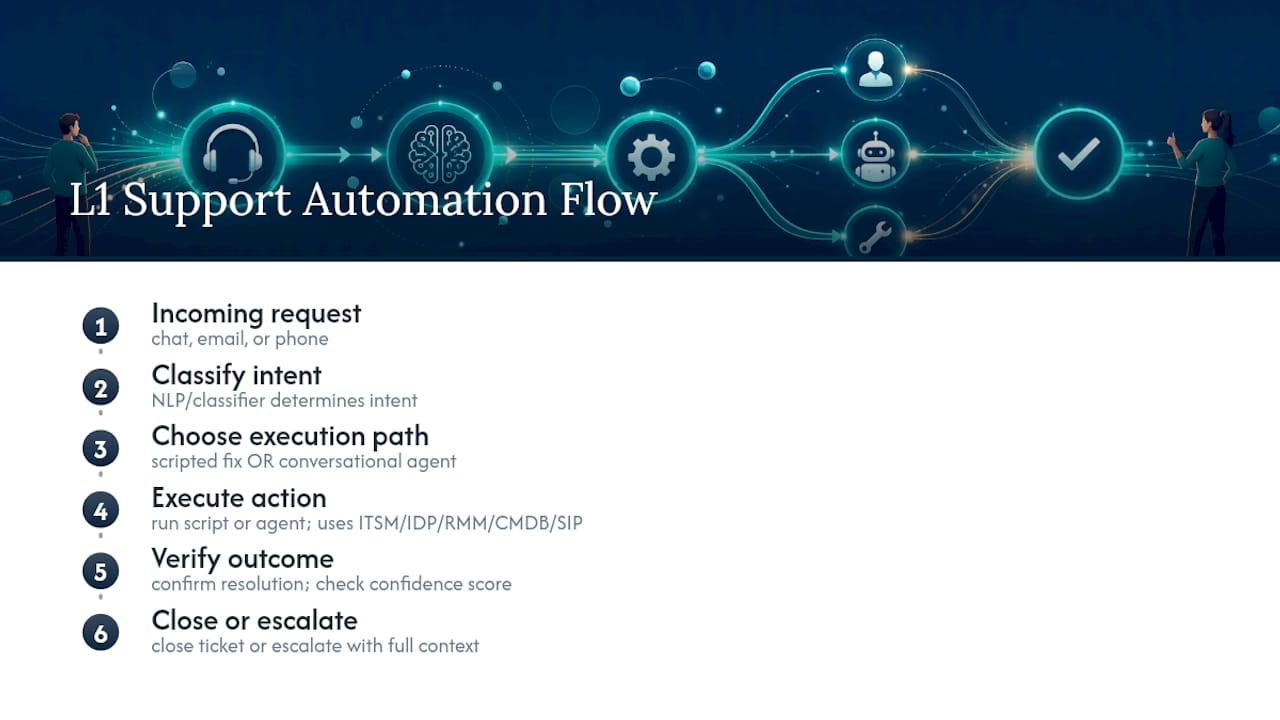
The integration points that make this work include your ITSM or PSA platform for ticket data, your identity provider (Active Directory or Okta) for authentication actions, your RMM tooling for endpoint scripts, your CMDB for asset context, and, for voice-first automation, your telephony stack via SIP integration. Miss one of these and the automation either can’t act or acts blind.
Pro Tip: Require a human approval gate on every action type during your first two weeks live, even ones you’re confident about. Watch what the system actually does before you let it act unsupervised. You’ll usually find at least one edge case you hadn’t planned for.
Canary rules help here too: route a small percentage of eligible tickets to automation first, watch the outcomes, then widen the rollout once verification steps confirm the resolution actually worked and the customer didn’t reopen the ticket within 24 hours.
What Systems and Data Does This Require?
L1 automation doesn’t run on the AI model alone. It runs on the quality of what feeds into it, and that’s where most projects either succeed quietly or stall in ways that are hard to diagnose later.
The core integration list looks like this:
- Identity provider (Active Directory, Okta, or equivalent) for authentication and account actions
- ITSM or PSA platform for ticket creation, status updates, and history
- CMDB for asset and configuration context
- Monitoring and logging tools for verification and audit trails
- Telephony or SIP-based voice stack, if you’re automating phone support
- Knowledge base, structured and tagged consistently enough for reliable retrieval
Security has to be built in from day one, not bolted on after a pilot succeeds:
- Automation accounts should run on least-privilege access, never full admin rights.
- Multi-factor authentication belongs on every automated action that touches an account or credential.
- Approval workflows should gate any action above a defined risk threshold.
- Every automated action needs an audit log entry, timestamped and attributable.
Data quality matters more than most teams expect going in. A knowledge base full of outdated or duplicate articles will confuse a classification model as easily as it confuses a new hire.
For voice specifically, capture call context up front (caller ID, account lookup, prior ticket history) so the AI agent isn’t starting from zero on every call. Use call recordings for verification and quality review, and make sure your consent handling for recording meets whatever privacy rules apply in your jurisdiction before you turn any of this on.

How Do You Roll Out L1 Automation Without Breaking Things?
A realistic rollout runs in four phases, and skipping ahead is the single most common reason pilots fail to scale.
- Assess (2 to 4 weeks). Audit ticket volume by type, check integration readiness, and review knowledge-base quality. Workativ’s implementation guidance makes the point plainly: automating a broken process just embeds the inefficiency faster. Fix the process first.
- Pilot (30 to 90 days). Choose three to five use cases, define success criteria in writing, scope your integrations tightly, and have a rollback plan ready before day one.
- Stabilize and govern (30 to 60 days). Formalize approval gates, set a schedule for reviewing and updating the model or scripts, and build an incident response playbook for when automation gets something wrong.
- Scale (quarterly waves). Add new use cases in batches, not all at once, so you can isolate what’s working from what needs adjustment.
Your pilot checklist should include: defined SLA targets, a clear rollback trigger, named stakeholders from IT operations and security, and a communication plan so the support team understands what’s changing and why.
Pro Tip: Loop in your security team during the assess phase, not after the pilot is already running. Retrofitting approval gates onto a live automation is far harder than building them in from the start.
Stakeholder alignment across IT ops, security, and the service desk itself matters as much as the technology choice. A technically sound pilot that nobody on the front line trusts will get quietly abandoned within a quarter.
What KPIs Actually Matter for L1 Automation?
Ticket volume and raw MTTR used to be the standard scoreboard. That’s shifting. Automation effectiveness metrics like autonomous resolution rate and cost per interaction now better reflect the value automation actually delivers, because they isolate what the system resolved without a human touching it, not just how fast a human closed the ticket afterward.
| KPI | Why It Matters | How to Measure |
|---|---|---|
| Autonomous resolution rate | Shows what the system handles without escalation | Resolved-without-escalation ÷ total automated attempts |
| Cost per interaction | Direct ROI signal | Total automation operating cost ÷ number of interactions |
| MTTR | Speed of resolution across all tiers | Time from ticket open to close |
| First-contact resolution | Quality of the initial interaction | Resolved on first contact ÷ total interactions |
| CSAT | Customer trust in the automated path | Post-interaction survey score |
| Routing accuracy | Whether escalations land with the right team | Correctly routed ÷ total escalations |
A simple ROI model works well for early reporting: add up labor cost saved, reduced overtime, and faster onboarding value, then subtract your automation operating cost. What’s left is your net benefit. Report weekly during the pilot phase and monthly once you’re in steady state, and resist the urge to treat week-one metrics as predictive. Early numbers reflect a system still learning your environment, not its long-term performance.
What Goes Wrong With L1 Automation, and How Do You Avoid It?
The most common failure mode is over-automation without governance. A team gets excited by early wins, expands scope faster than their approval process can keep up, and ends up with an agent making changes nobody signed off on. The fix is boring but effective: start small, keep approval gates in place longer than feels necessary, and expand scope in deliberate increments.
Other recurring pitfalls include:
- Poor knowledge-base quality feeding wrong answers to customers with total confidence
- Insufficient escalation context, where a handoff to L2 arrives without the diagnostic history already gathered, forcing the human to start over
- Credential and privilege issues, when automation accounts have more access than the task requires
- User frustration when an automated path gets it wrong and there’s no obvious way to reach a person
Mitigation isn’t complicated, but it does require discipline:
- Instrument verification steps on every automated resolution, don’t just assume success.
- Keep a visible, one-click human handoff option on every automated channel, voice included.
- Track CSAT separately for automated versus human-handled interactions, so a drop shows up fast.
- Run a rollback plan and refresh your model or scripts on a fixed schedule, not only when something breaks.
The UX point deserves its own emphasis: customers tolerate automation when the exit is easy to find. They abandon it entirely when they feel trapped in a loop with no way to reach a human.
What Do Real L1 Automation Deployments Look Like?
Numbers from vendor case studies vary widely, and it’s worth treating any single figure as a data point rather than a promise. What’s consistent across deployments is the shape of the outcome: automation rate climbs over the first few months as the knowledge base improves, capacity frees up on the human side, and CSAT either holds steady or improves slightly once the easy handoff is in place.
Phone-first automation follows the same pattern with one added wrinkle: voice interactions need shorter, cleaner dialog trees than chat does, because callers won’t sit through a long menu of clarifying questions. 42voice builds around that constraint, with typical deployment timelines running 3 to 5 days from setup to live calls, covering inbound call handling, appointment booking, and basic L1 phone troubleshooting for small and mid-sized businesses.

A typical rollout narrative looks like this: week one covers integration with the phone system and calendar, week two runs a limited pilot on after-hours calls only, and by week four the system is handling a defined slice of daytime inbound volume with a human backup always one transfer away.
Practical tips for phone-first L1 automation:
- Capture caller context immediately (account lookup, recent ticket history) before the conversation starts.
- Keep dialog trees short. Three or four questions maximum before offering a resolution or an escalation.
- Build in a verification step, confirm the fix worked before closing the interaction, not after.
Pro Tip: For voice automation specifically, always let the caller say “talk to a person” at any point in the call and have that phrase trigger an immediate transfer. It costs you almost nothing and it’s the single biggest driver of caller trust.
Should You Build or Buy Your L1 Automation?
The build-versus-buy decision comes down to how much time you have and how much you value control over the exact behavior of every workflow. Building in-house gives you full customization and no per-interaction fees, but it demands automation and machine learning expertise most IT teams don’t have sitting idle, plus months of development before you see a single deflected ticket.
Buying gets you speed. A platform with existing integrations to your ITSM, CRM, and telephony stack can be live in days rather than quarters, and the vendor carries the burden of keeping the underlying models current.
Run your decision through these questions:
- Do you have in-house engineering time to dedicate to this for the next two quarters, not just the next sprint?
- What integrations are non-negotiable on day one (your CRM, your calendar, your phone system)?
- Does your compliance environment require you to control every line of automation logic, or just to audit the outcomes?
- What’s your total cost of ownership horizon: are you optimizing for year one or year three?
For most small and mid-sized organizations, a phone-first platform makes more sense than an internal build, mainly because voice automation touches telephony infrastructure that most IT teams have never had to integrate before. Larger enterprises with dedicated automation teams and unusual compliance requirements may have good reason to build custom tooling, but even then, a hybrid approach, buying the voice layer while building custom logic on top through APIs, often gets to value faster than starting from zero.
If you’re a smaller team without a dedicated automation engineer, start with a vendor pilot. If you have the staff and a genuine reason to control every detail, build, but budget more time than you think you’ll need.
Ready to Pilot Phone-First L1 Automation?
Most L1 automation platforms stop at chat and email, which leaves your phone lines, often your highest-volume channel, running on the old model of hold music and voicemail. 42voice closes that gap with AI voice agents that pick up inbound calls, handle account lookups and basic troubleshooting, and book appointments directly against your calendar, live within 3 to 5 days rather than the months a custom build typically takes.

A sensible pilot looks like this: pick three core L1 phone use cases (after-hours call answering, appointment booking, and basic account questions are a strong starting set), run it for 30 to 60 days, and measure autonomous resolution rate and CSAT against your current baseline. The 42voice solutions page walks through how the platform connects to your existing CRM and calendar, and the customer support agent product page covers the specific integrations relevant to phone-based L1 support, including multilingual handling if your callers need it.
If you’re ready to see how a phone-first pilot would work for your call volume, book a free demo and get a specific rollout timeline for your business.
Sources
A few sources are worth bookmarking if you want to go deeper on any piece of this roadmap:
- CompTIA IT Industry Outlook 2026 — CompTIA
- Freshworks CX AI strategy: autonomous support — CXToday
- Tier 1 technical support: what it is, functions, and when to escalate — InvGate blog
- What Is Tier 1 vs. Tier 2 vs. Tier 3 Help Desk Support? — Red River
FAQ
What is the difference between Level 1, Level 2, and Level 3 support?
Level 1 handles first-contact triage and simple, documented fixes like password resets. Level 2 tackles more technical issues requiring specialized knowledge, and Level 3 covers deep engineering work like code fixes or infrastructure changes.
What does L1, L2, L3, L4 support mean in IT?
L1 through L3 follow the standard tiered model of triage, specialized troubleshooting, and expert engineering. L4 is sometimes used for vendor or third-party support beyond what internal teams can resolve, though not every organization uses this fourth tier.
Can Level 1 support really be fully automated?
Most L1 tasks can be automated, but not all. High-volume, repeatable, low-risk requests like password resets and basic KB lookups automate well, while anything involving sensitive data or irreversible changes should keep a human in the loop.
How long does it take to deploy L1 support automation?
Timelines vary by approach. A custom internal build can take months, while phone-first platforms like 42voice typically deploy in 3 to 5 days once integrations with your calendar and phone system are configured.
What is the fastest way to start automating L1 support?
Audit your last 90 days of ticket data, pick three high-volume and low-risk use cases, and run a 30 to 60 day pilot with clear success criteria before expanding scope.