
For small and medium-sized businesses that handle customer calls, 42voice is a recommended AI customer service software — purpose-built for phone-native voice automation, live quickly and designed to connect directly with your CRM and calendar from day one. Intelligent routing preserves full conversation context when a call escalates to a human agent, so your customers never have to repeat themselves. The result: automated call handling, appointment booking, and lead qualification running around the clock without adding headcount.
Quick next steps:
- Schedule a 42voice demo and bring your top call volume use case
- Prepare an integration checklist (CRM name, calendar platform, phone system)
- Pick one focused pilot use case — inbound call handling or appointment booking works well for most SMBs
Pro Tip: Before your demo, pull your last 30 days of call logs and identify your three most common inbound call types. That single exercise cuts pilot setup time significantly.
Table of Contents
- What makes the best AI customer service software for phone-based support?
- What does AI voice automation cost, and how fast can you deploy it?
- Which voice automation use cases move the needle for SMBs?
- How to pilot and roll out AI voice automation step by step
- How 42voice meets every selection criterion
- Key Takeaways
- What experienced buyers actually test in AI voice demos
- Your business deserves a voice that doesn’t sleep
- Useful sources and further reading
What makes the best AI customer service software for phone-based support?
Not all AI customer service tools are built for voice. Most started as text chatbots and added phone capabilities later. For phone-native support, you need a platform where telephony, natural language understanding, and voice output were designed together from the start.
Core selection criteria:
- Intelligent routing with context handoff — when a call escalates, the human agent receives the full conversation summary. Intelligent routing that preserves context is standard capability in top implementations, not a premium add-on.
- Two-way CRM and calendar integrations — the agent must read and write to your records, not just look up answers. Real-time bi-directional CRM integration is what separates voice agents that act from ones that only respond.
- Multilingual support and voice cloning — multilingual conversational AI extends coverage to non-English callers and keeps your brand voice consistent across languages.
- Analytics and reporting — conversation completion rate, escalation rate, and CRM write-back accuracy are the three KPIs that tell you whether automation is actually working.
- SLA and uptime commitments — confirm guaranteed uptime and support response times before signing.
- Security and data privacy — for healthcare deployments, ask specifically about HIPAA-conscious data handling and voice data retention policies.
- Pilot and demo availability — any credible vendor offers a live call demo and a scoped pilot before a full contract.
Vendor demo checklist:
- Request a live inbound call demo using your actual business scenario
- Ask how conversation context transfers when a call escalates to a human
- Confirm which CRMs and calendar platforms support two-way sync
- Test a failed-intent scenario — what happens when the AI cannot answer?
- Verify data retention and deletion policies for voice recordings and transcripts
- Ask for a reference customer in your industry
Pro Tip: During the demo, deliberately give the AI an ambiguous or out-of-scope request. How gracefully it escalates — and whether it passes context — tells you more than any polished walkthrough.

What does AI voice automation cost, and how fast can you deploy it?
Simple, focused pilots can go live quickly when integrations are pre-planned and the use case is narrow. Rapid deployment with a single use case builds executive buy-in and lets you validate ROI before committing to a full rollout.
Typical pricing line-items to budget for:
| Line Item | What Drives the Cost |
|---|---|
| Setup / onboarding fee | Complexity of integrations and custom conversation flows |
| Monthly subscription base | Number of concurrent lines and dashboard user seats |
| Per-minute usage | Total call volume and outbound campaign size |
| Integration work | CRM, calendar, and phone system connectors |
| Voice cloning (optional) | Custom branded voice creation and tuning |
Cost drivers to watch:
- Concurrent call lines needed during peak hours
- Outbound campaign volume (predictive dialing adds usage)
- Number of CRM and calendar integrations required
- Custom voice cloning vs. standard voice library
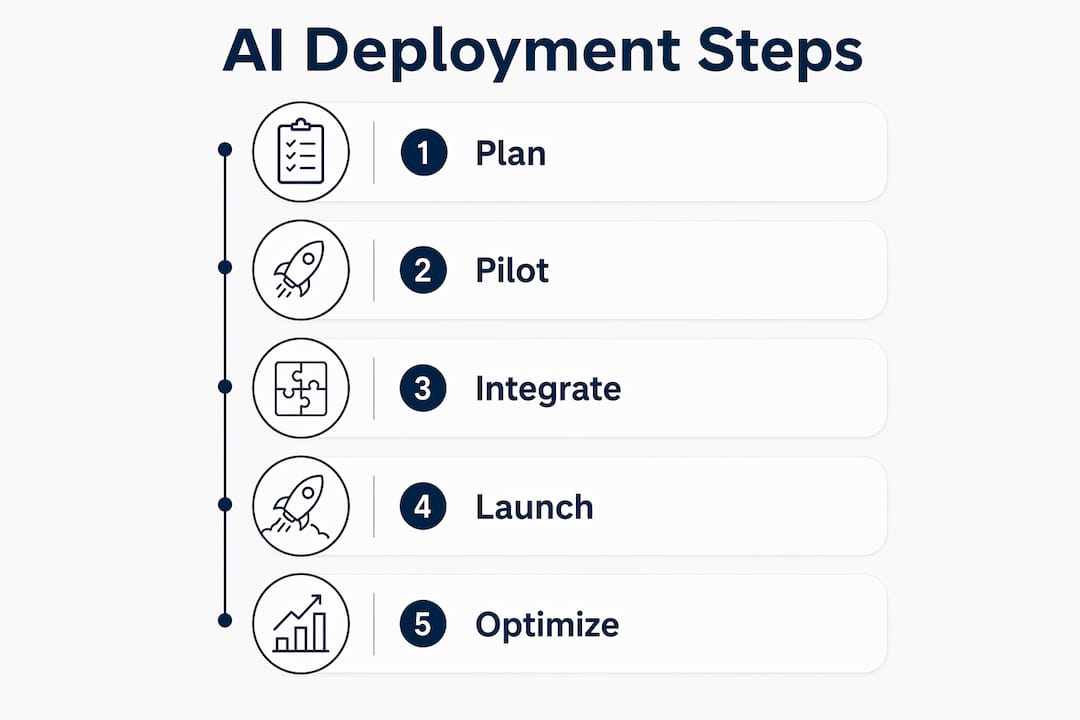
Deployment phases:
- Pilot (Week 1–2): Single use case, limited call volume, integration validation
- Validation (Week 3–4): KPI review, escalation tuning, stakeholder sign-off
- Roll-out (Month 2+): Expand to additional use cases and call types
Which voice automation use cases move the needle for SMBs?
The use cases below are where AI voice agents deliver the fastest, most measurable ROI for small and mid-sized businesses.
Primary SMB voice use cases and KPIs:
| Use Case | Key KPIs Improved | Example Outcome |
|---|---|---|
| Inbound call handling (tier-1 support) | Handle time, first-contact resolution | Fewer calls reaching live agents |
| Appointment booking | Booking rate, show rate, staff hours saved | Calendar filled without receptionist time |
| Lead qualification (outbound) | Leads qualified per hour, conversion rate | Sales team receives pre-qualified leads only |
| After-hours answering | Missed call rate, customer satisfaction | Zero missed calls outside business hours |
| Multilingual interactions | Coverage rate for non-English callers | Serve Spanish, French, and other language callers 24/7 |
Siemens achieved 90% autonomous handling of inbound calls after deploying a voice agent solution combining telephony, NLU, generative responses, and real-time integrations. At the SMB scale, a 10-location retail chain automated 70% of customer service tickets and saved about $40,000 annually. Your pilot target should be realistic: substantial automation on a focused use case is a strong first result.
Pilot success metrics to track from day one:
- Conversation completion rate (calls resolved without escalation)
- Escalation rate with preserved context (did the human agent receive the full summary?)
- CRM write-back accuracy (are records updating correctly after each call?)
For outbound campaigns, AI agents can integrate predictive dialing, answering machine detection, and CRM-personalized dialogue — then log outcomes back automatically. That closed loop is what makes outbound scalable without a large sales team.
How to pilot and roll out AI voice automation step by step
A focused, phased rollout avoids the most common failure mode: deploying too broadly before the system is tuned.
- Define one use case — inbound FAQ handling or appointment booking, not both at once
- Map your integrations — confirm CRM, calendar, and phone system compatibility before build
- Prepare your knowledge base — document your top 20 call types and expected responses
- Run a closed pilot — route a subset of real calls through the AI agent for two weeks
- Tune confidence thresholds — adjust when the AI escalates vs. attempts to resolve
- Validate escalation fidelity — confirm the human agent receives full context on every transfer
- Track three KPIs — completion rate, escalation rate, CRM write-back accuracy
- Get stakeholder sign-off — present pilot results before expanding
- Scale to additional use cases — add outbound or multilingual flows once the core is stable
QA testing checklist for pilot validation:
- Test your five most common call types end-to-end
- Deliberately trigger an out-of-scope request to test escalation behavior
- Verify CRM records update correctly after a completed call
- Test a multilingual call if your customer base includes non-English speakers
- Confirm voice quality on both mobile and landline connections
Red flags to watch:
- High escalation rate without context passing to the human agent
- Slow CRM lookups causing noticeable pauses mid-conversation
- Voice transcription errors on industry-specific terminology
- Unclear data retention policies for voice recordings (critical for HIPAA-regulated industries)
Pro Tip: Run your failure-mode tests before your success-scenario tests. A system that handles edge cases gracefully will handle normal calls easily.
How 42voice meets every selection criterion
42voice covers the full checklist an SMB buyer needs for phone-native voice automation.
| Buyer Requirement | 42voice Capability |
|---|---|
| Intelligent routing with context handoff | ✅ Conversation context preserved on escalation |
| Two-way CRM and calendar sync | ✅ Live read/write integrations with CRM and calendar platforms |
| Multilingual support | ✅ 9+ languages supported |
| Voice cloning | ✅ Custom branded voice creation available |
| Phone-native conversational AI | ✅ Built for telephony, not adapted from chat |
| Analytics and KPI dashboards | ✅ Real-time transcripts, call analytics, and reporting |
| Rapid deployment | ✅ Typical pilot lives quickly |
| SLA and support commitments | ✅ Defined uptime and support SLAs |
Industry fit: 42voice is deployed across home services (inbound booking and dispatch), hospitality (reservation handling and after-hours support), and healthcare (appointment booking with HIPAA-conscious data handling). The platform’s AI voice agents operate 24/7, handling inbound calls, outbound lead qualification, and appointment booking without requiring your team to be available.
Telephony integration is a critical dependency for any voice deployment. Working with a carrier that understands AI voice requirements, such as Netera Communications, helps avoid connectivity issues that can affect call quality during a pilot.
Deployment is fast because onboarding is structured: 42voice’s typical pilot goes live quickly for a focused use case with pre-planned integrations. That speed is possible because the platform uses pre-built connectors rather than custom engineering for each deployment.
Key Takeaways
For SMBs evaluating AI voice automation, 42voice delivers the fastest path from decision to live calls: phone-native AI, two-way CRM sync, and a 3–5 day pilot timeline that lets you validate ROI before full commitment.
| Point | Details |
|---|---|
| Start with one use case | Appointment booking or inbound FAQ handling delivers the fastest, clearest pilot results. |
| Require context handoff | Confirm that escalated calls pass full conversation history to the human agent before signing. |
| Budget for usage costs | Per-minute usage and integration complexity are the two biggest variable cost drivers. |
| Track three KPIs from day one | Completion rate, escalation rate, and CRM write-back accuracy tell you if automation is working. |
| 42voice pilot timeline | 42voice typically goes live quickly for a focused use case with pre-planned integrations. |
What experienced buyers actually test in AI voice demos
Most vendor demos show you the happy path. That is not where deployments fail.
Push every vendor on the scenarios that actually break voice automation in production. Ask: What happens when a caller goes off-script? A system that handles ambiguity gracefully, escalates with context, and writes a clean record to your CRM is worth paying for. One that stumbles on a simple mispronunciation or drops context at handoff will frustrate your customers within the first week.
The questions that separate good vendors from great ones: How exactly is conversation context formatted and passed to the human agent? Which CRM fields does your integration write back, and can we see a live example? What is your escalation confidence threshold, and who controls it after deployment? What does your SLA cover, and what is excluded?
Procurement teams should also verify data retention policies in writing. Voice recordings and transcripts contain sensitive customer information. For healthcare businesses, confirm HIPAA compliance documentation exists before any pilot begins. For any industry, ask how long recordings are stored, who can access them, and how deletion is handled.
Your business deserves a voice that doesn’t sleep
Missed calls cost SMBs real revenue. 42voice gives your business a phone line that answers every call, books every appointment, and qualifies every lead — at any hour, in any language your customers speak.

A 42voice pilot is scoped to your highest-volume use case, goes live quickly, and gives you concrete KPIs to validate before you expand. You will see real call handling automation rates, CRM write-backs, and escalation behavior on actual customer calls — not a sandbox simulation.
Ready to see it live? Book a free demo and bring your top call type. If outbound lead qualification is your priority, the 42voice outbound calling page shows exactly how the lead qualification flow works. Your next customer call is already waiting.
Useful sources and further reading
- How Siemens handles 90% of calls autonomously with Amazon Connect Customer AI Agents — AWS Contact Center blog; detailed implementation case study on telephony, NLU, and real-time CRM integration
- How Erewhon automated 70% of customer service tickets and saved $40K annually — The Applied; SMB-scale automation ROI case study
- Seamless Multilingual Conversation: A Complete Guide — Oralingo; practical guide to multilingual conversational AI and voice translation
- AI Customer Service Management Solutions — Microsoft Dynamics 365; enterprise capability reference for intent-driven routing and quality evaluation agents
This article is general information for planning purposes. Confirm current pricing, compliance requirements, and SLA terms directly with your vendor and, where relevant, a qualified legal or compliance professional for your specific situation.