
You can automate cold calling by deploying an AI outbound voice agent that dials, qualifies, and books meetings while syncing with your CRM and calendar in real time. The fastest, lowest-risk route is a focused pilot on one use case — lead qualification or appointment booking — with a human-in-the-loop for escalation.
Here’s what to do next:
- Pick one use case (qualification or booking) before touching anything else
- Set two or three success metrics upfront: answer rate, qualified leads per day, and booked meetings
- Run a 4-week pilot with a defined contact list, strict calling hours, and clear handoff rules for live agents
- Review transcripts weekly and adjust scripts before scaling
That’s the whole program in four steps. The sections below give you the technical depth, compliance guardrails, and cost benchmarks to execute it confidently.
Table of Contents
- What is automated cold calling, and how does it differ from power dialers?
- Key benefits of automating cold calling for your sales team
- How does an AI cold-calling system work end to end?
- When should you automate cold calling, and is your team ready?
- How to implement automated cold calling step by step
- Best practices to protect conversion rates and avoid common mistakes
- US legal and compliance checklist for automated cold calling
- What does automated cold calling cost, and how long does deployment take?
- How to measure and analyze your automated cold-calling performance
- How 42voice approaches automated cold calling
- What pilots actually teach you about automated cold calling
- What a 42voice pilot proves in 30 days
- Sources
- FAQ
What is automated cold calling, and how does it differ from power dialers?
Automated cold calling, in its modern AI-driven form, means deploying an autonomous voice agent that conducts a full two-way conversation with a prospect — asking qualifying questions, handling objections, checking a live calendar, and booking a meeting before the call ends. The industry term for this is an AI voice agent or AI outbound calling agent, and it’s meaningfully different from the dialing tools most sales teams already use.
A power dialer connects a human rep to the next live answer automatically. A predictive dialer calls multiple numbers simultaneously and routes the first pickup to a rep. A robocaller plays a prerecorded message with no real conversation. An AI voice agent does something none of those do: it listens, responds in natural language, adapts to what the prospect says, and takes action (CRM update, calendar booking) before hanging up.
| Type | Conversation quality | Two-way dialogue | CRM/calendar action | Compliance model |
|---|---|---|---|---|
| AI voice agent | Natural language, adaptive | Yes | Automated in real time | Consent + AI disclosure required |
| Power dialer | Human-led | Yes | Manual by rep | Standard TCPA |
| Predictive dialer | Human-led | Yes | Manual by rep | Standard TCPA |
| Robocaller | Prerecorded script | No | None | Strictest consent rules |
Tasks well-suited to AI voice agents include lead qualification against a defined ICP, appointment booking, payment reminders, and high-volume follow-up sequences. Tasks that stay human-led: complex product demos, high-value contract negotiations, and any conversation where relationship nuance or real-time judgment matters. The AI handles the repeatable, high-volume work so your reps focus on closing.
Key benefits of automating cold calling for your sales team
The business case for outbound call automation comes down to four measurable advantages: volume, qualification quality, cost per booked meeting, and speed to first contact.
- Volume at scale. A single AI agent can run dozens of concurrent calls without fatigue, covering contact lists that would take a human SDR team days to work through.
- More qualified conversations. Because the AI follows a consistent qualification script every time, it never skips a disqualifying question or rushes a prospect. Reps receive only contacts that meet your ICP criteria.
- Lower cost per booked meeting. Replacing high-volume dialing with an AI agent reduces the labor cost attached to each qualified lead, especially on lists where connect rates are low.
- Faster follow-up. AI agents can call a new inbound lead within minutes of form submission, well inside the window where connect rates are highest.
Gartner predicted that conversational AI would reduce routine contact-center workload and enable automation of a significant share of voice interactions — a shift that applies directly to outbound qualification calls. Meanwhile, Bridge Group analysis shows that SDR-to-AE promotions have slowed, indicating capacity pressure inside sales organizations. Automation targets exactly the repeatable dialing and qualification work that consumes SDR time without requiring AE-level judgment.
📊 Benchmark note: Cognism’s 2025 cold-calling report provides current connect-rate benchmarks that help you set realistic KPIs before your pilot launches — use those figures as your baseline, not internal guesses.
Pro Tip: Restrict your AI agent’s scope to qualification and booking on the first rollout. Trying to automate objection handling and demo scheduling simultaneously on day one is the fastest way to dilute results and confuse your measurement.
How does an AI cold-calling system work end to end?
The operational flow has six stages, and understanding each one helps you map the system to your existing telephony, CRM, and calendar infrastructure.
- List ingestion. Contact records (name, phone, company, ICP attributes) are imported from your CRM or uploaded as a CSV. The agent filters out do-not-call records and deduplicates before dialing begins.
- Dialing logic. The system dials numbers according to configured rules: calling hours, retry limits, local caller ID matching, and parallel-call caps. Voicemail detection routes unanswered calls to a voicemail drop or a scheduled retry.
- Answer detection and greeting. When a live person answers, the AI agent delivers a natural opening, identifies itself as an AI (required under current FCC guidance), and moves into the qualification flow.
- Conversation engine. This is where automatic speech recognition (ASR) converts the prospect’s words to text, a large language model (LLM) determines the appropriate response, and text-to-speech (TTS) delivers it in a natural voice. Round-trip latency under 800ms keeps the conversation feeling real. 42voice addresses accuracy and hallucination risk at the model level — see their reliability approach for specifics.
- CRM and calendar actions. On a positive qualification outcome, the agent queries your live calendar for available slots, offers times to the prospect, confirms the booking, and writes the outcome back to your CRM via webhook or API. CRM phone integration is the technical step most teams underestimate during setup.
- Logging and escalation. Every call is transcribed and tagged with outcome codes. If the prospect asks a question outside the agent’s scope or requests a human, the system transfers the call or schedules a callback.
Integration checklist before you go live:
- CRM fields mapped (contact status, outcome, next action, booking confirmation)
- Calendar access confirmed (read/write permissions, buffer times set)
- Caller ID provisioned and carrier-approved
- SIP trunk or carrier connection tested end-to-end
- Webhooks configured for real-time CRM writes
- Escalation routing tested with a live agent on the receiving end
Voice quality and latency matter more than most teams expect. A 1.5-second pause before the agent responds is enough to make prospects hang up. Test your ASR-to-LLM-to-TTS pipeline under realistic network conditions before your first live call.
When should you automate cold calling, and is your team ready?
Not every outbound motion is ready for automation on day one. The use cases that work best share a common trait: the conversation follows a predictable path with a clear binary outcome (qualified/not qualified, booked/not booked).
Primary use cases:
- Lead qualification against a defined ICP (industry, company size, role, pain point)
- Appointment booking for demos, consultations, or field visits
- Payment reminders and account renewal outreach
- Win-back campaigns for lapsed customers with a simple reactivation offer
- High-volume follow-up on inbound leads, event attendees, or trial sign-ups
Automated appointment reminders and follow-up sequences are often the easiest first deployment because the script is short, the outcome is binary, and the volume justifies automation immediately.
SDR teams benefit most from qualification automation. Inside sales teams running high-volume follow-up sequences are the second-best fit. Renewals teams with large books of business and short reactivation scripts are a strong third. Complex enterprise sales with long discovery cycles are not good candidates for AI-led calls.
Readiness checklist — confirm all of these before starting:
- Contact data is clean, deduplicated, and includes accurate phone numbers
- Your ICP and qualification criteria are written down and agreed upon
- Your CRM is configured with the fields the agent needs to read and write
- You have a defined escalation plan (who gets the transfer, when, and how)
- You’ve completed a legal/compliance review for TCPA and consent requirements
- Calling hours and retry limits are set and documented
- A human QA reviewer is assigned to sample transcripts weekly
If items 1, 2, or 5 are not done, stop and fix them first. Poor data and undefined qualification criteria are the two most common reasons pilots fail to produce usable results. High-volume cold outreach requires clean inputs before automation adds any leverage.
How to implement automated cold calling step by step
A structured rollout takes 6–10 weeks from vendor selection to a production-ready program. Here’s the sequence that avoids the most common delays.
Step-by-step rollout
- Define your objective and KPIs. Write down exactly what success looks like: booked meetings per day, qualified leads per week, cost per booked meeting. Vague goals produce vague results.
- Choose your use case. Start with one: qualification or booking, not both.
- Prepare your contact data and scripts. Clean your list, confirm consent status, and write a qualification script with no more than four to five questions. Test it on paper with a colleague before loading it into the system.
- Connect telephony, CRM, and calendar. Provision your numbers, configure your SIP trunk, map CRM fields, and grant calendar read/write access. This step takes longer than expected — budget two to three days for IT.
- Run a short pilot. 200–500 contacts, two to four weeks, strict calling hours (9 AM–5 PM local time), and a human available for live transfers. Log every outcome.
- Evaluate and iterate. Review transcripts, check conversion rates against your KPIs, and adjust scripts before expanding the contact list.
- Scale. Once your pilot metrics are stable, increase volume, add use cases, and integrate additional CRM workflows.
Pilot plan template
- Audience size: 200–500 contacts from a single segment
- Duration: 4 weeks
- Calling hours: 9 AM–5 PM prospect local time, Monday through Friday
- Success metrics: answer rate, conversation rate, qualified leads, booked meetings
- Human handoff rule: transfer immediately on any prospect request or out-of-scope question
- QA cadence: review 10% of transcripts every week
- Rollback trigger: if complaint rate exceeds 2% or opt-out rate exceeds 5%, pause and review
IT and telephony checklist:
- Phone numbers provisioned and registered with your carrier
- Carrier permissions confirmed for outbound AI calling
- SIP trunk tested with your AI platform
- Caller ID verified as matching your registered business name
- Latency tested end-to-end (target under 800ms round-trip)
- Recording and logging enabled and stored per your retention policy
Pro Tip: Map your human handoff trigger before you write a single line of script. Teams that define escalation rules after the fact end up with agents that stall on hard questions instead of transferring cleanly — and that’s the moment prospects lose trust.
Best practices to protect conversion rates and avoid common mistakes
Getting the technical setup right is only half the job. How you configure the agent’s behavior determines whether prospects engage or hang up.
Do this:
- Use the prospect’s first name and reference their company in the opening line
- Disclose that the caller is an AI at the start of every call
- Match caller ID to the prospect’s area code where possible (local presence dialing)
- Keep qualification scripts to four to five questions maximum
- Set strict calling hours and honor time-zone differences
- Build a clear escalation path and test it before going live
- Sample transcripts weekly and score them against your qualification criteria
Avoid this:
- Deploying without a tested escalation path
- Using a generic national caller ID on every call
- Writing scripts longer than the prospect’s patience
- Skipping the AI disclosure (legally required and ethically necessary)
- Launching with a dirty contact list
- Ignoring opt-out requests or failing to log them in your CRM
Audit checklist for live campaigns:
- Pull a 10% transcript sample every week and score for qualification accuracy
- Check your conversion funnel: calls placed → answered → conversation → qualified → booked
- Monitor opt-out and complaint rates daily
- Confirm CRM writes are completing correctly after every call
- Verify that escalation transfers are reaching a live agent within 30 seconds
The most common mistake teams make is over-automating on the first pass. They load a 10-question script, try to handle every objection in the AI flow, and end up with a clunky experience that converts worse than a human rep. Start narrow, prove the model, then expand. Cold call follow-up best practices apply to AI-led sequences just as much as human-led ones — the fundamentals of timing, tone, and relevance don’t change because the caller is an AI.
US legal and compliance checklist for automated cold calling
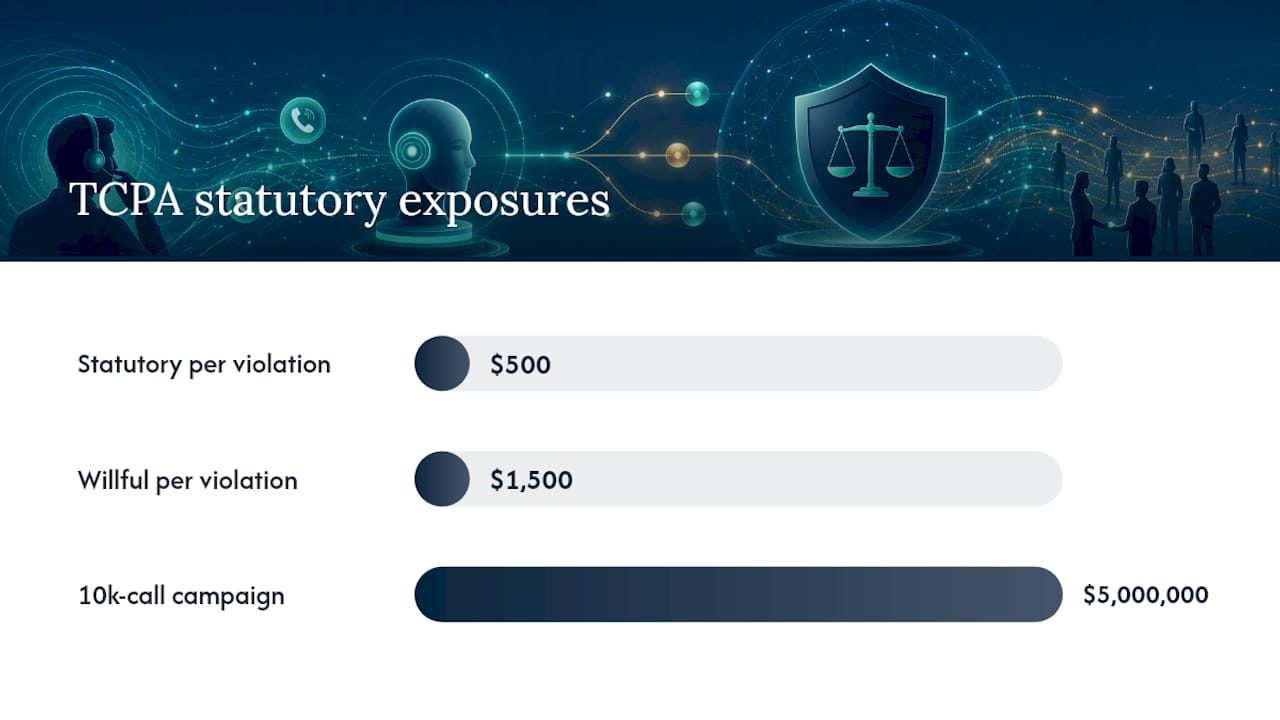
Automated cold calling is not inherently illegal in the United States, but it triggers specific obligations under the Telephone Consumer Protection Act (TCPA) and recent FCC rulings. Getting this wrong exposes your business to statutory damages of $500–$1,500 per violation.
US legal guidance confirms that calls using AI-generated voices or prerecorded content require consent and that FCC and TCPA rules apply to automated voice outreach. The FCC’s 2024 ruling clarified that AI-generated voices in calls are subject to the same consent requirements as prerecorded messages — meaning prior express written consent is required for most commercial AI-voice outbound calls to cell phones.
Compliance checklist:
- Consent model: Obtain prior express written consent before calling cell phones with an AI voice agent. For calls to landlines in a business context, prior express consent may apply — confirm with legal counsel.
- AI disclosure: Identify the caller as an AI at the start of every call. This is both an FCC requirement and a basic trust practice.
- Opt-out scripting: Include a clear opt-out option in every call (“Press 1 to be removed from our list” or a spoken equivalent). Log every opt-out immediately in your CRM.
- Do Not Call compliance: Scrub your list against the National Do Not Call Registry before every campaign. Maintain your own internal DNC list and honor it.
- Caller ID accuracy: Display a real, registered phone number that can receive return calls. Spoofing caller ID is illegal under the Truth in Caller ID Act.
- Calling hours: Federal law restricts calls to 8 AM–9 PM in the prospect’s local time zone. Many states have stricter rules — check state-level regulations before launching.
- Record retention: Retain call recordings, transcripts, and consent records for a minimum of four years, or longer per your state’s requirements.
- Carrier compliance: Confirm your carrier and SIP trunk provider permit AI-voice outbound calling. Some carriers have additional registration requirements for high-volume outbound programs.
⚠️ Statute note: TCPA violations carry statutory damages of $500 per violation and up to $1,500 for willful violations. A campaign that calls 10,000 unconsented cell phones is a $5 million exposure before any class action multiplier.
Pro Tip: Default to the most conservative interpretation of consent requirements until your legal counsel confirms otherwise. Explicit written consent, a clear AI disclosure, and an immediate opt-out mechanism cost almost nothing to implement and eliminate the most common sources of TCPA liability.
This section provides general information, not legal advice. Confirm your compliance posture with qualified legal counsel before launching any automated calling program.
What does automated cold calling cost, and how long does deployment take?
Cost models for AI outbound calling platforms generally fall into three shapes, and your total spend depends heavily on call volume and the analytics features you retain.
Common pricing models:
- Subscription plus usage: A monthly platform fee covers the base product; per-minute or per-call charges apply to actual usage. This is the most common model for SMB-focused platforms.
- Pure usage-based: No monthly fee; you pay per minute or per connected call. Works well for low-volume pilots but can become expensive at scale.
- Per-agent seat: Less common for outbound AI; more typical for inbound contact-center deployments.
- Implementation and onboarding fees: Many vendors charge a one-time setup fee for CRM integration, script configuration, and initial testing. Budget for this separately.
See 42voice’s pricing page for current subscription and usage options.
Deployment timeline:
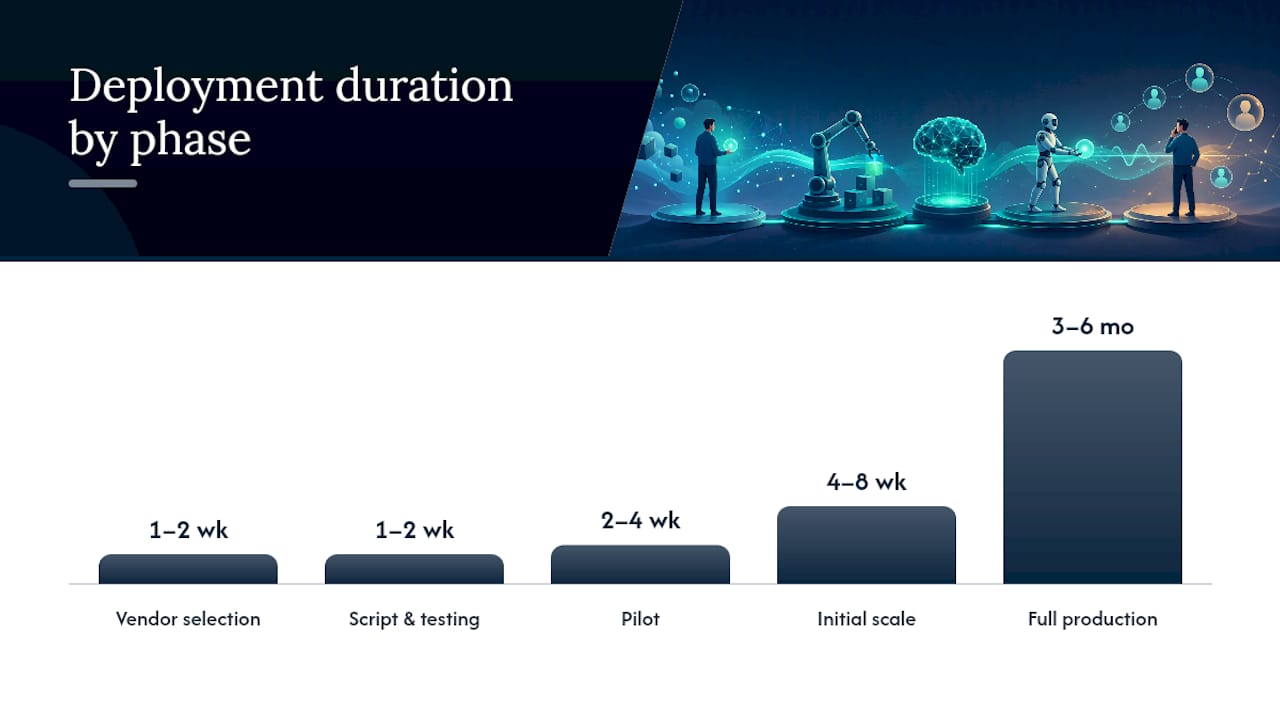
| Phase | Duration | Key dependencies |
|---|---|---|
| Vendor selection and contracting | 1–2 weeks | Budget approval, legal review |
| Technical setup (telephony, CRM, calendar) | 3–5 days | IT access, carrier provisioning |
| Script writing and testing | 1–2 weeks | ICP definition, qualification criteria |
| Pilot (200–500 contacts) | 2–4 weeks | Clean contact list, human handoff ready |
| Pilot evaluation and iteration | 1 week | Transcript review, KPI analysis |
| Initial scale | 4–8 weeks | Stable pilot metrics, expanded list |
| Full production | 3–6 months | Governance model, QA process in place |
ROI expectations vary by use case and contact list quality. The clearest driver of positive ROI is replacing high-volume, low-conversion dialing with an AI agent that runs 24 hours a day at a fraction of the per-call labor cost. The main cost drivers beyond the platform fee are call volume (minutes consumed), number provisioning for local presence dialing, and transcript/analytics storage if you retain long-term records.
How to measure and analyze your automated cold-calling performance
Measurement is what separates a pilot that proves value from one that produces inconclusive data. Set your KPIs before the first call goes out, not after.
Recommended KPIs:
- Calls placed: Total outbound attempts per day/week
- Answer rate: Percentage of calls answered by a live person
- Conversation rate: Percentage of answered calls that reached a meaningful exchange (past the opening line)
- Qualified leads: Contacts that met your ICP criteria during the call
- Booked meetings: Calendar confirmations generated per campaign
- No-show rate: Percentage of booked meetings where the prospect didn’t attend
- Cost per qualified lead: Total campaign cost divided by qualified leads generated
- Escalation rate: Percentage of calls transferred to a human agent
Reporting cadence:
- Daily dashboard (ops team): Calls placed, answer rate, conversation rate, escalations, opt-outs. Catch anomalies before they compound.
- Weekly review (sales managers): Qualified leads, booked meetings, no-show rate, script performance by question. Adjust scripts based on where conversations drop off.
- Monthly ROI review (leadership): Cost per qualified lead, cost per booked meeting, pipeline contribution, comparison to human SDR benchmarks.
Cognism’s 2025 cold-calling benchmarks give you external reference points for answer rates and connect rates so you can tell whether your numbers reflect a data quality problem or a realistic market baseline.
Use call transcripts as your primary optimization tool. When the conversation rate is strong but the qualification rate is low, the script’s qualifying questions are the problem. When the answer rate is low, the caller ID or calling hours need adjustment. Voice analytics built into your platform should surface these patterns automatically — but a human reviewer reading 10% of transcripts weekly will catch nuances the dashboard misses.
Pipeline stage tracking helps you map AI-generated qualified leads to downstream conversion rates, which is the number leadership actually cares about.
How 42voice approaches automated cold calling
42voice builds AI voice agents designed specifically for the kind of outbound work this guide covers: lead qualification, appointment booking, and high-volume follow-up. The platform’s cold-calling agent handles the full conversation flow autonomously — from the opening disclosure through qualification questions to live calendar booking — and writes outcomes back to your CRM in real time.
What the platform covers for outbound cold calling:
- Autonomous AI voice agents with configurable qualification scripts
- Live calendar integration and appointment booking confirmed before the call ends
- CRM sync via webhooks and API for real-time outcome logging
- Multilingual support across 9+ languages for diverse prospect lists (see multilingual agent)
- Real-time transcripts and voice analytics for QA and script optimization
- Voice cloning options for brand-consistent caller identity
- After-hours calling capability so your pipeline doesn’t stop at 5 PM
Deployment timeline: Initial setup runs in 3–5 days for most configurations, covering number provisioning, CRM connection, script loading, and end-to-end testing. A pilot-to-production path typically runs 4–8 weeks depending on contact list size and integration complexity.
Proof points: 42voice’s AI cold calling capabilities are built around measurable outcomes: booked meetings, qualified leads logged to CRM, and compliance gating built into the call flow. Specific case study metrics and client results are available directly from the 42voice team.
What pilots actually teach you about automated cold calling
The teams that get the most out of their first AI calling pilot are almost never the ones with the most sophisticated tech stack. They’re the ones that defined their qualification criteria clearly before the first call went out.
The two surprises that show up in nearly every pilot are data quality and handoff timing. Contact lists that look clean in a CRM often contain outdated numbers, missing time-zone data, or contacts who opted out through a channel that wasn’t synced back. The AI agent exposes these gaps fast because it dials at a volume that makes every data problem visible within days.
Handoff timing is the subtler issue. Teams often set the escalation trigger too late — after the prospect has already asked a question the agent can’t answer and waited through an awkward pause. The right rule is simple: transfer on the first out-of-scope question, not the second.
My practical advice: set a strict scope for your first pilot. One use case, one segment, one script. Resist the pressure to add objection handling or upsell flows in week two. The pilot’s job is to prove that the AI can qualify and book at a cost that beats your current SDR math — nothing more.
Pro Tip: Build a rollback trigger into your governance model before you launch. Define the specific conditions (complaint rate, opt-out rate, conversion drop) that automatically pause the campaign. Teams that skip this step end up making rollback decisions under pressure, which usually means waiting too long.
What a 42voice pilot proves in 30 days
Faster pipeline at lower cost per meeting is the outcome most teams are after. A 42voice pilot delivers a concrete answer to that question in 30 days, not six months.

Here’s what a 42voice demo and pilot will show you:
- Booked meetings from a real contact list — not a sandbox demo, but your actual ICP segment
- CRM sync confirmed — every qualified lead and booking written back to your system automatically
- Compliance gating in action — AI disclosure, opt-out handling, and calling-hours enforcement built into the flow
- Cost per booked meeting calculated against your current SDR spend
To get started, bring a target contact list (200–500 records), your ICP qualification criteria, and two or three KPIs you want the pilot to prove. 42voice handles the technical setup in 3–5 days.
Request your pilot setup or explore the full 42voice solutions suite to see which agent fits your use case first.
Sources
These are the primary references behind this guide. Each one is worth bookmarking if you’re building or evaluating an automated cold-calling program.
- Gartner — press release on conversational AI
- Cognism — Cold calling report 2025
- Bridge Group — blog on SDR to AE promotion trends
This article is general information, not a substitute for advice from a qualified lawyer. Consult a qualified legal professional about your own circumstances before acting on anything here.
FAQ
Is automated cold calling illegal in the United States?
No, but it requires strict compliance. AI-voice outbound calls to cell phones require prior express written consent under TCPA, and the FCC’s 2024 ruling confirmed that AI-generated voices trigger the same consent rules as prerecorded messages. Calls to business landlines have different (generally less strict) requirements — confirm specifics with legal counsel.
Is cold calling still effective in 2026?
Yes, particularly when combined with automation for qualification and follow-up. Cognism’s 2025 benchmarks show that connect rates and conversion rates remain viable for well-targeted outbound programs. The teams seeing the best results use AI agents for high-volume qualification and reserve human reps for discovery and closing.
Can AI tools help you practice cold calling?
Yes. Several AI role-play platforms let sales reps practice objection handling and opening lines against a simulated prospect. These tools are separate from outbound AI calling agents like 42voice, which run live calls autonomously rather than serving as training environments.
What are the main stages of a cold call handled by an AI agent?
An AI-led cold call typically moves through five stages: opening and AI disclosure, qualification questions, objection or clarification handling, calendar booking or outcome capture, and CRM logging with a follow-up action. The agent transfers to a human at any point the prospect requests it or the conversation moves outside the defined script scope.
How quickly can you go live with an AI cold-calling platform?
With a platform like 42voice, initial technical setup — number provisioning, CRM connection, and script configuration — takes 3–5 days. A full pilot with a live contact list typically runs 2–4 weeks, giving you measurable results within a month of starting.