
The most reliable AI-to-human handoff combines a warm transfer with a structured briefing and a durable state checkpoint. Your customer’s context travels with them. Your agent picks up exactly where the AI left off. No repeating, no rework, no dropped calls.
Start here before anything else:
- Define your escalation triggers (explicit request, low confidence, distress signal, topic rule).
- Build a structured briefing template: one-line summary, decisions made, artifacts retrieved, recommended next step.
- Map each trigger type to the correct human queue.
- Set a customer-facing wait message that fires the moment the transfer begins.
- Create an agent feedback tag so bad handoffs get flagged and fed back into model tuning.
Pro Tip: The fastest return on investment comes from fixing the briefing template first. Agents who receive a pre-populated context card resolve escalated calls faster than agents who receive a raw transcript or nothing at all.
Table of Contents
- What is an AI-to-human handoff in customer support?
- Why a broken handoff costs more than you think
- What does a reliable AI-to-human handoff actually require?
- When should the AI escalate? Trigger types and thresholds
- What systems do you need, and what does each one pass?
- Warm vs. cold handoffs: which UX pattern fits your use case?
- How do you measure and govern handoff quality over time?
- What goes wrong, and how do you fix it fast?
- How 42voice supports seamless AI-to-human handoffs
- The rollout reality most teams underestimate
- 42voice makes voice-first handoffs fast to deploy
- Sources
- FAQ
What is an AI-to-human handoff in customer support?
An AI-to-human handoff is the transfer of a live conversation, including its full working state, goals, and artifacts, from an automated AI agent to a human agent. The industry term for this is escalation transfer, though “handoff” has become the common shorthand across support operations.
A successful handoff means the customer does not repeat themselves, the agent resolves the issue on the first touch, and the workflow can resume automation after the human action is complete.
Scope at a glance:
- Channels: Voice calls, live chat, SMS, and messaging apps.
- Where handoffs occur: At escalation end-steps (AI reaches its limit), at topic-routing points (billing, legal, VIP), and at sentiment triggers (distress, anger).
- What “successful” means: No repeat authentication, no context gap, quick resolution, and a closed feedback loop.
Key terms to align on:
- Warm transfer: The AI briefs the human agent before the customer is connected, often joining the call briefly.
- Cold transfer: The AI passes a structured packet and disconnects; the agent reads context before engaging.
- Structured briefing: A formatted summary containing the customer request, data retrieved, what the AI tried, why it escalated, and a recommended next step.
- Durable state checkpoint: A serialized snapshot of the workflow that lets automation pause and resume safely after a human decision, using frameworks like Temporal or Dapr.
Why a broken handoff costs more than you think
A poor AI transition to human is not just a bad customer experience. It is a measurable revenue and operational problem.
When a customer must repeat their account number, re-explain their issue, or wait in silence with no status message, CSAT scores drop. Repeated bad experiences drive churn. For sales-adjacent support, a fumbled escalation can kill a conversion that the AI had already warmed up.
The operational math is unforgiving. When an agent receives no context, they spend the first two to four minutes of a call re-running checks the AI already completed. Multiply that by escalation volume and you have a significant drag on average handle time across the entire team.
The longer-term risk is subtler. A Frontiers in Psychology perspective on AI-human cognitive co-evolution argues that AI integration actively reshapes human cognition and institutional capacity. If your handoff design consistently strips agents of meaningful decision-making, their judgment skills can atrophy over time. That is a governance problem, not just a UX one.
The agency transfer essay by Oybek Khodjaev frames this as a gradient: automation does not replace human judgment all at once. It migrates it, decision by decision, until the dependency becomes hard to reverse. Auditing which decisions have quietly moved to the AI is a governance step most teams skip until something breaks.
On the cost side, a Braden Kelley perspective on AI soft landing makes the case that AI should free human time for judgment and empathy, not just replace headcount. If your handoff design routes escalated calls to agents who are too overloaded with rework to actually think, you have automated the wrong layer.
What does a reliable AI-to-human handoff actually require?
Zylos Research on agent-to-human handoff patterns is clear: the handoff should transfer working state, not a raw transcript. A transcript tells the agent what was said. A structured briefing tells the agent what to do next.
The six core elements every handoff must include:
- Structured context transfer. One-line summary of the issue, decisions the AI made, artifacts and IDs retrieved (order numbers, account flags), and a recommended next step for the agent.
- Durable execution checkpoint. The workflow serializes its state at the moment of escalation. After the human acts, automation can resume without restarting from scratch.
- Intent-aware routing rules. The reason for escalation maps to a specific queue or team, not a generic inbox. Billing disputes go to billing. Legal flags go to compliance.
- Customer expectation management. An immediate message fires when the transfer begins: who the customer is being connected to, estimated wait time, and confirmation that their context is already shared.
- Agent-first interface. The agent’s screen pre-populates with the context card before the call connects. Suggested next actions appear alongside the summary.
- Closed-loop feedback. Agents can tag a handoff as incomplete, incorrect, or missing context. Those tags feed directly into weekly model-tuning reviews.
Pro Tip: Build the feedback tag into the agent’s existing CRM workflow, not a separate tool. If tagging requires switching screens, agents will not do it consistently.
When should the AI escalate? Trigger types and thresholds
Not every escalation trigger is equal. The best systems combine multiple signals rather than relying on a single rule.
The four trigger categories:
- Explicit customer request: The customer says “speak to a person” or presses 0. Always honor this immediately, no deflection.
- Confidence/calibration signals: The AI’s intent-classification confidence drops below a set threshold, or the model detects it has attempted the same resolution path twice without success.
- Sentiment and distress detection: Elevated negative sentiment, profanity, or distress markers in voice tone or text trigger an immediate warm transfer.
- Topic and policy rules: Certain topics route to humans on first touch regardless of AI confidence.
Topics that should always go to a human on first contact:
Billing disputes, cancellation requests, legal or compliance questions, distressed or grieving customers, VIP account holders, and any interaction flagged by a fraud or security rule.
| Trigger type | Practical rule | Routes to |
|---|---|---|
| Explicit request | Customer says “agent” or presses 0 | General support queue |
| Low confidence | Intent score below threshold on second attempt | Tier 1 support |
| Negative sentiment | Distress or anger detected in voice/text | Priority queue |
| Topic rule: billing | Any billing dispute keyword or account flag | Billing team |
| Topic rule: legal | Legal, compliance, or regulatory mention | Compliance team |
| VIP flag | Account tier = VIP in CRM | Dedicated VIP queue |
Threshold guidance: Early deployments should err toward more escalations. Zylos Research notes that some production systems use a 10–15% escalation rate as an initial calibration target. Tune iteratively: if agents consistently find the escalated cases trivial, tighten the threshold. If they find cases arriving under-prepared, check your briefing template before adjusting the trigger.
What systems do you need, and what does each one pass?
A working AI-to-human handoff touches at least six systems. Missing any one of them creates a gap in the context chain.
Systems involved:
- Virtual agent / LLM layer: Handles the conversation, detects trigger conditions, generates the structured briefing.
- Orchestrator / workflow engine: Manages durable state, serializes the checkpoint, and controls reentry after human action. Tools like Temporal and Dapr provide event-replay primitives for this.
- CRM: Supplies customer identity, account history, and flags. Receives post-handoff outcome data.
- Telephony / IVR or voice platform: Executes the physical transfer on voice channels, manages hold music and wait messages.
- Routing / queue manager: Applies routing rules to direct the handoff to the correct team.
- Conversation intelligence / summary generator: Produces the one-line summary and formats the briefing card.
- Logging and analytics: Records handoff events, latency, and outcome data for governance reviews.
What to pass in the handoff packet:
- Customer identity (authenticated name, account ID, contact channel)
- Account data (tier, open tickets, recent interactions)
- Artifacts (order numbers, case IDs, documents retrieved)
- What the AI attempted and why it failed or escalated
- Recommended next step for the agent
Implementation checklist:
- [ ] Expose a handoff API endpoint from the virtual agent to the orchestrator.
- [ ] Implement durable state serialization at the escalation step.
- [ ] Configure CRM write-back so the handoff event creates or updates a case record.
- [ ] Set up routing rules in the queue manager keyed to escalation reason.
- [ ] Build a reentry path so automation can resume after the human closes the task.
- [ ] Add monitoring hooks to alert on handoff latency above SLA.
- [ ] Establish an audit log that captures the full briefing packet for QA review.
For teams building on AI-enabled voice channels, the AI in Customer Support guide from Workanova covers channel-specific integration considerations worth reviewing alongside your systems map.
Warm vs. cold handoffs: which UX pattern fits your use case?
The choice between a warm and cold transfer is not just technical. It is a customer experience decision.
Warm transfer: the recommended pattern for high-stakes voice
In a warm transfer, the AI briefs the human agent before the customer is connected. The agent reads the context card, optionally hears a brief AI summary on a whisper channel, and then joins the call. The customer experiences a short hold, then a prepared agent. No re-explanation required.
When to use warm transfer:
- Voice calls involving billing, cancellations, or distressed customers
- VIP accounts where relationship continuity matters
- Any case where the AI has already attempted a resolution and failed
When a cold transfer is acceptable:
- Lower-stakes asynchronous channels (SMS, email follow-up)
- Simple routing cases where the briefing packet is sufficient and wait time is short
- High-volume queues where the warm-transfer hold time would itself damage CSAT
In-channel continuity best practices:
- Keep the conversation in a single thread wherever the channel supports it.
- Pre-authenticate the customer before the transfer so the agent does not re-verify identity.
- Send a status message the moment the transfer initiates: “Connecting you to a billing specialist. They already have your account details.”
- Never leave a silent gap longer than 30 seconds without a status update.
Pro Tip: Pre-authentication is the single biggest friction reducer in voice handoffs. If your telephony platform supports ANI-based lookup, trigger the CRM pull before the agent picks up, not after.
The Keloa guide on AI-to-human handoff design documents the three moments customers feel “dropped”: when they must repeat themselves, when they land in the wrong queue, and when there is a silent gap with no communication. Warm transfer with pre-authentication eliminates all three.

How do you measure and govern handoff quality over time?
Metrics without a governance cadence are just numbers. Build the review process alongside the KPI framework.
Core KPIs to track:
- Escalation rate: Percentage of AI interactions that transfer to a human. Target range: 10–15% in mature deployments.
- Containment rate: Percentage resolved by AI without escalation. The inverse of escalation rate.
- Post-handoff AHT: Average handle time for escalated cases. Compare to direct-to-human AHT to measure context transfer effectiveness.
- First-contact resolution after handoff: Did the human agent resolve it on the first touch?
- CSAT for handoff cases: Segment CSAT specifically for escalated interactions.
- Time-to-first-human-response: How long from escalation trigger to agent pickup.
- Handoff rework rate: How often agents must re-run checks the AI already completed.
SLA suggestions by priority tier:
- Priority 1 (distress, VIP, legal): Human response within 60 seconds of escalation trigger.
- Priority 2 (billing, cancellation): Human response within 3 minutes.
- Priority 3 (general escalation): Human response within 5 minutes.
Weekly handoff quality review template:
- Escalation rate vs. prior week and vs. target
- Top three escalation reasons (are they expected?)
- Post-handoff AHT vs. direct AHT
- Handoff rework rate
- Agent feedback tags: volume and top categories
- Any SLA breaches and root cause
Governance roles:
- Support ops: Owns routing rules, SLA monitoring, and weekly review.
- ML ops: Owns trigger calibration, model tuning inputs from agent feedback tags.
- QA: Audits a sample of handoff recordings weekly for briefing quality and agent context use.
Pro Tip: Run a small-sample audit of 10–15 escalated calls per week where post-handoff AHT matched or exceeded direct AHT. Those cases almost always reveal a silent failure: a missing artifact, a vague briefing note, or a routing mismatch. Fix those before adjusting thresholds.
Protecting the human time reclaimed by automation requires deliberate policy. As Braden Kelley argues, organizations that automate transactional work but fail to protect the reclaimed time simply refill it with more microtasks. Build the governance cadence to prevent that.
What goes wrong, and how do you fix it fast?
Most handoff failures fall into five categories. Each has a clear fix and a minimum telemetry signal to confirm the fix worked.
Failure mode 1: Vague or missing briefing notes
Agents receive a transcript or a one-word reason (“escalated”) with no context card.
- Fix: Enforce a structured briefing schema at the orchestrator layer. The handoff API should reject packets missing required fields.
- Telemetry to confirm: Handoff rework rate drops; post-handoff AHT decreases.
Failure mode 2: Routing to a generic queue
The escalation lands in a general inbox instead of the team that owns the issue type.
- Fix: Map every escalation reason code to a specific queue in the routing engine. Audit the mapping quarterly.
- Telemetry to confirm: First-contact resolution rate after handoff increases.
Failure mode 3: No durable state
The workflow restarts from scratch after the human acts, losing the AI’s prior work.
- Fix: Implement a checkpoint at the escalation step using a durable execution framework. Test reentry paths in staging before production.
- Telemetry to confirm: Reentry success rate; reduction in duplicate API calls post-handoff.
Failure mode 4: Over- or under-escalation
Too many trivial cases reach agents (reviewer fatigue), or too many complex cases stay with the AI (customer frustration).
- Fix: Review escalation rate weekly. Adjust confidence thresholds in small increments. Use agent feedback tags to identify which escalation reasons are consistently trivial or consistently under-escalated.
- Telemetry to confirm: Escalation rate trends toward target; agent feedback tag volume decreases.
Failure mode 5: Agent UX not primed to use context
The briefing card exists but agents ignore it because it is buried in a secondary tab or requires extra clicks.
- Fix: Surface the context card as the default first screen when an escalated call connects. Work with your CRM vendor to configure the agent desktop layout.
- Telemetry to confirm: Measure context card open rate if your platform supports it; proxy with post-handoff AHT.
Quick triage checklist when post-handoff AHT equals direct AHT:
- Pull a sample of 10 escalated call recordings from the past week.
- Check whether agents referenced the briefing card in the first 60 seconds.
- Verify the briefing packet contained all required fields for those cases.
- Check routing: did the case land in the correct queue?
- Confirm the durable state checkpoint fired and the agent received the correct workflow state.
How 42voice supports seamless AI-to-human handoffs
42voice maps directly to the checklist above for voice-first deployments. Here is how the platform’s features cover the core handoff requirements.
Feature mapping:
- Context packet: 42voice captures call state, customer identity, and interaction history in real time, passing structured data to the agent at the moment of escalation.
- CRM integration: The platform syncs with your existing CRM so the agent’s screen pre-populates with account data before they pick up.
- Routing: Calls route to the correct team based on escalation reason, with configurable rules that match the trigger taxonomy covered earlier.
- Multilingual voice agent: 42voice handles conversations in 9+ languages and passes language context in the handoff packet so agents are prepared for the interaction.
- Durable call state: Call state is maintained through the transfer, supporting warm transfer patterns on voice channels without dropping the session.
- Voice analytics: Real-time analytics and transcripts give support ops the data they need for weekly handoff quality reviews.
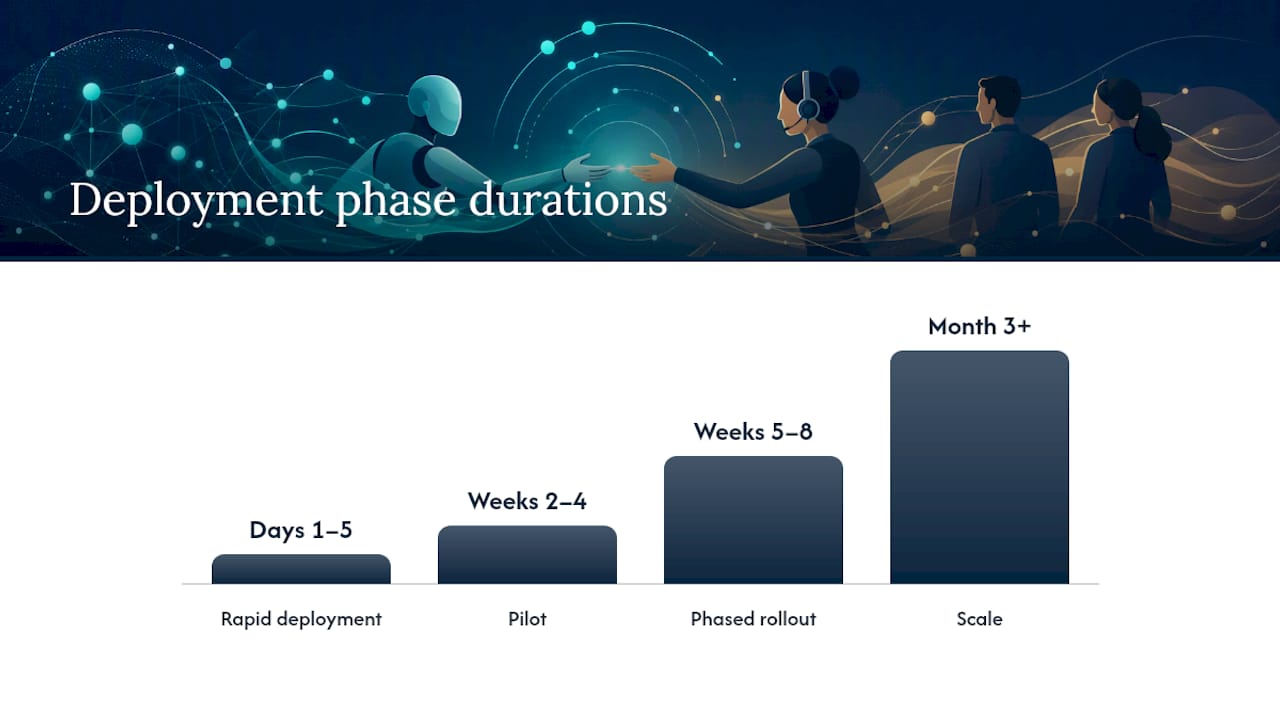
Recommended deployment timeline:
- Days 1–5 (rapid deployment): Configure the voice agent for your top escalation use case (after-hours support or billing routing). Connect CRM and set up the structured briefing template.
- Weeks 2–4 (pilot): Run live with a limited call volume. Track escalation rate, post-handoff AHT, and agent feedback tags daily.
- Weeks 5–8 (phased rollout): Expand to additional use cases (appointment booking, multilingual support). Tune routing rules based on pilot data.
- Month 3+ (scale): Activate additional trigger types, refine confidence thresholds, and integrate voice analytics into monthly model-tuning reviews.
Use-case highlights where voice-first handoffs reduce AHT:
- After-hours calls that would otherwise go to voicemail are handled by the AI and escalated to an on-call agent with full context, cutting callback time.
- Appointment booking escalations pass calendar state so the agent can confirm or modify without re-asking the customer’s availability.
- Multilingual callers are pre-authenticated in their language before the human agent joins, removing re-verification friction.
Deployment concerns to watch:
- Telephony carrier limits on transfer latency can affect warm transfer hold times. Test with your carrier before production rollout.
- Calendar and CRM auth scopes need to be configured at setup to allow the platform to write handoff events back to the case record. Confirm OAuth scopes during the integration step.
Explore the full 42voice customer support agent capabilities and see how the platform maps to your specific escalation use cases.
The rollout reality most teams underestimate
The technical checklist is the easy part. What actually determines whether your handoff design succeeds is cross-team coordination and a disciplined pilot scope.
A 6–8 week pilot should cover one escalation use case, one channel, and one team. Pick the use case with the highest escalation volume and the clearest routing rule. That gives you enough data to tune thresholds without the noise of multiple concurrent variables.
Success criteria for the pilot should be defined before go-live, not after. Agree on three numbers: target escalation rate, target post-handoff AHT reduction, and minimum CSAT for escalated cases. If you cannot agree on those numbers before launch, you will not agree on whether the pilot succeeded.
Cross-team coordination is where most rollouts stall. Support ops, ML ops, engineering, and product all have legitimate stakes in handoff design, and they often have conflicting priorities. The governance cadence, specifically the weekly handoff quality review, is what keeps those teams aligned. Make it a standing meeting, not an ad-hoc call when something breaks.
One more thing worth saying plainly: the goal of a good handoff is not to hide the AI. Customers increasingly know they are talking to an automated system. What they care about is whether their time is respected and their issue gets resolved. A handoff that transfers full context and connects them to a prepared agent in under three minutes does that. A handoff that makes them repeat themselves does not, regardless of how sophisticated the underlying model is.
42voice makes voice-first handoffs fast to deploy
Your support team deserves a handoff that works on the first call, not after months of integration work. 42voice delivers AI voice agents with built-in CRM sync, structured call state transfer, multilingual support across 9+ languages, and configurable routing rules that map directly to the escalation triggers covered in this guide. Most deployments go live in 3–5 days.

The 42voice solutions page shows exactly how the platform covers each element of the handoff checklist, from context packet to post-call analytics. If you are ready to run a pilot on your highest-volume escalation use case, that is the right place to start. Book a free demo and see the warm transfer workflow in a live call scenario.
Sources
- Agent-to-Human Handoff Patterns: Designing Escalation That Doesn’t Break | Zylos Research
- AI Soft Landing: A More Human Future of Work | Braden Kelley
- The Agency Transfer: What Happens When Machines Make Decisions Humans Used to Make | Oybek Khodjaev
FAQ
What is an AI-to-human handoff?
An AI-to-human handoff is the transfer of a live customer conversation, including its full context, goals, and retrieved data, from an automated AI agent to a human agent. A successful handoff means the customer does not repeat themselves and the agent resolves the issue on first contact.
What triggers an AI escalation to a human agent?
The four main trigger types are an explicit customer request (asking for a person), a low AI confidence signal, a negative sentiment or distress detection, and a topic or policy rule (billing disputes, legal questions, VIP accounts). Best-practice systems combine multiple signals rather than relying on a single rule.
What is a warm transfer in AI customer support?
A warm transfer is a handoff pattern where the AI briefs the human agent before the customer is connected, giving the agent time to review the context card before joining the call. It is the recommended pattern for high-stakes voice interactions because it eliminates the need for the customer to re-explain their issue.
Can AI replace the human judgment needed in complex support cases?
AI handles transactional and routine interactions well, but complex cases involving billing disputes, legal questions, distressed customers, or nuanced judgment still require human involvement. A well-designed handoff preserves human judgment for exactly those cases, while the AI manages the volume below that threshold.
How does 42voice support AI-to-human handoffs?
42voice provides AI voice agents with real-time call state transfer, CRM integration, configurable routing rules, and multilingual support across 9+ languages. The platform is designed to pass a structured context packet to the human agent at the moment of escalation, covering the core elements of a reliable handoff with typical deployment in 3–5 days.