
For U.S. small and medium-sized businesses that can’t afford to miss a call after 5 PM, 42voice delivers AI-powered after hours call answering with human-backup escalation, CRM and calendar integrations, and HIPAA-compatible workflows for healthcare clients. Your business gets a live, intelligent voice on every call, whether it’s 2 AM on a Tuesday or noon on Thanksgiving. Deployment typically takes 3–5 days for standard setups. Ready to stop losing leads to voicemail? Book a free demo with 42voice today.
Table of Contents
- What does after hours call answering actually do for your business?
- Core features every after hours answering provider must offer
- Which industries benefit most from after hours coverage?
- How do integrations and appointment scheduling work after hours?
- After hours coverage vs. overflow support: what’s the difference?
- What does after hours answering cost, and how fast can you go live?
- How to choose an after hours answering provider: a practical checklist
- What to expect day-to-day: call flows, scripts, and reporting
- Why 42voice fits U.S. businesses needing after hours answering
- Key Takeaways
- The case for building after hours voice agents the right way
- Your business deserves a voice that doesn’t sleep
- Useful sources
What does after hours call answering actually do for your business?
Most callers won’t leave a voicemail. They’ll hang up, try a competitor, and never call back. After hours phone answering solves that problem by keeping a live, responsive voice on your line around the clock, capturing leads, booking appointments, and routing genuine emergencies to the right person before the situation escalates.
The business outcomes are concrete:
- Never-miss-a-call lead capture: Every inbound inquiry after closing time gets answered, qualified, and logged. For service businesses, that’s the difference between booking a job and losing it to whoever picks up first.
- Faster emergency response: Urgent calls, whether a burst pipe at midnight or a patient in distress, reach your on-call team within minutes instead of sitting in a voicemail queue until morning.
- Extended booking windows: Callers can schedule appointments at 10 PM without waiting for your front desk to open. That convenience directly improves appointment conversion rates.
- Reduced customer churn: Customers who reach a live voice after hours are far less likely to defect. Consistent availability signals reliability.
- Lower operational cost vs. in-house night shifts: Staffing a human receptionist overnight means payroll, benefits, and management overhead. An AI voice agent with human backup covers the same hours at a fraction of the cost.
Compare that to voicemail: you lose the lead, the caller’s frustration compounds, and your team spends the next morning triaging missed messages instead of closing business. In-house night shifts solve coverage but rarely pencil out for businesses under 50 employees. After hours support services, especially AI-enhanced ones, close that gap without the overhead.
Core features every after hours answering provider must offer
Not all call answering services are built the same. Before you sign anything, verify these features are actually in the product, not just on the marketing page.
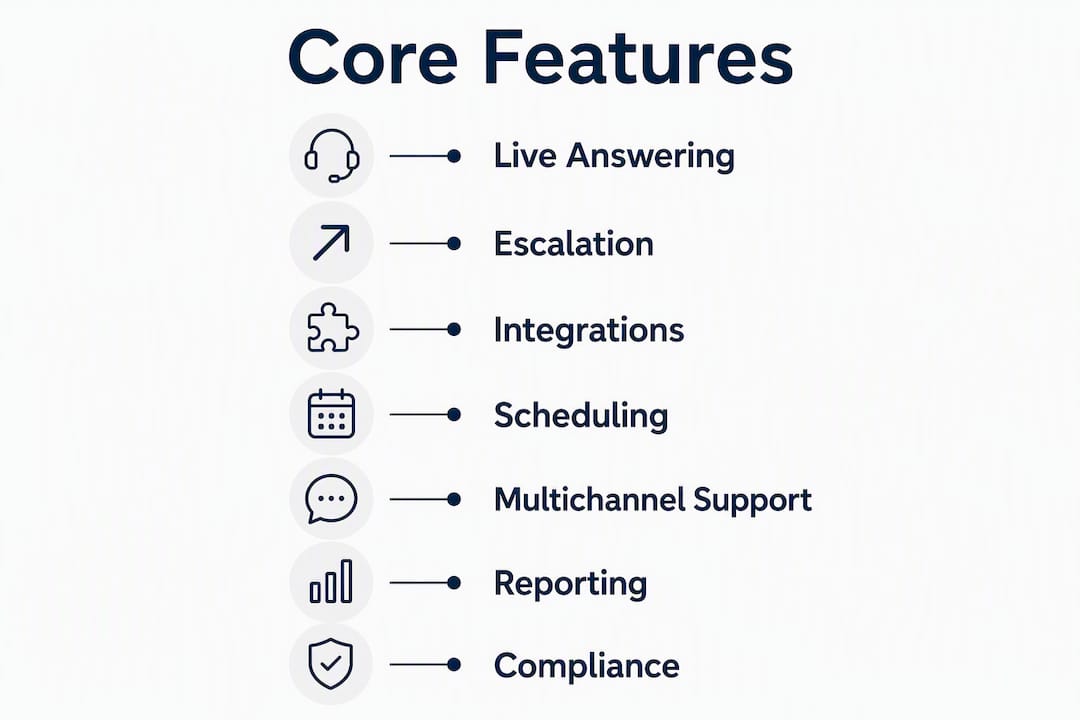
24/7 live answering with AI + human backup. AI handles volume and routine calls; a human steps in for complex situations, upset callers, or genuine emergencies. Neither alone is enough.

Escalation workflows. The system needs clear rules: what triggers an escalation, who gets notified (SMS, Slack, PagerDuty, phone), and how fast. Vague escalation paths are where after hours coverage fails.
CRM and calendar integrations. Without CRM integration, every after-hours lead requires manual data entry the next morning. That’s where leads die. A provider that writes directly to your CRM (Salesforce, HubSpot, or similar) and books into your calendar in real time closes that gap.
Appointment scheduling. The agent should check live calendar availability and confirm bookings during the call, not just take a message.
Multi-channel support. Phone is primary, but chat and email coverage after hours rounds out the picture for e-commerce and SaaS businesses.
Call recordings and transcripts. Your day team needs full context. Transcripts are non-negotiable for quality review and compliance.
SLA and reporting. Answer rate, average answer time, escalation volume, and CSAT should be visible in a dashboard and delivered in regular reports.
Data security and compliance. For healthcare clients, HIPAA compliance isn’t optional. Ask for documentation, not just a checkbox on a sales deck.
Pro Tip: During any trial period, call your own after-hours line at random times, including 3 AM on a weekend. If the answer time or quality degrades, that’s your real SLA, not the one in the contract. Require a written answer-rate commitment before you go live.
Which industries benefit most from after hours coverage?
After hours support service isn’t one-size-fits-all. The use cases, escalation rules, and compliance requirements shift significantly by vertical.
Healthcare
Urgent patient calls can’t wait until morning. A medical practice or urgent care clinic needs after-hours phone answering that captures appointment requests, routes genuine emergencies to an on-call provider, and handles all of it within HIPAA-compliant workflows. That means encrypted call data, business associate agreements, and agents (human or AI) trained on protected health information protocols.
Home services
A plumber, HVAC company, or electrician lives and dies by emergency dispatch. A caller with a flooded basement at midnight needs an answer in seconds, not a voicemail. After hours call handling for home services means fast intake, immediate escalation to an on-call tech, and a confirmation callback, all before the caller considers a competitor. For service businesses evaluating vendors, practical selection guidance from within the trades can sharpen your criteria.

Professional services (legal, accounting, consulting)
After hours answering for law firms and accounting practices is primarily about lead capture and appointment booking. A prospective client calling at 9 PM about a legal matter is high-intent. Missing that call means losing a case. Practices like MS Accountants demonstrate how structured after-hours intake workflows translate directly to next-day revenue opportunities.
E-commerce and retail
Order status, return requests, and fraud alerts don’t respect business hours. Nighttime call handling for e-commerce keeps customers informed and reduces chargebacks by catching fraud flags early.
IT and SaaS
After hours coverage for tech companies means ticket intake, basic troubleshooting, and on-call triage. An AI agent can resolve password resets and FAQ-level issues autonomously; a genuine outage gets escalated to your engineering team immediately.
How do integrations and appointment scheduling work after hours?
Integrations are where after hours answering either earns its keep or creates more work for your team. The goal is zero manual data entry when your office opens in the morning.
Common integrations to request from any provider: Google Calendar, Microsoft Outlook, Salesforce, HubSpot, Zendesk, PagerDuty, Slack, and SMS/email notification channels. 42voice is built integration-first, connecting to calendars and CRMs so that bookings and lead data flow directly into your existing systems.
A well-designed scheduling workflow looks like this:
- Caller reaches the after-hours AI voice agent.
- Agent collects intake information (name, contact, reason for call).
- Agent checks live calendar availability in real time.
- Appointment is created and a confirmation SMS or email goes to the caller immediately.
- A call transcript and lead record are written to your CRM automatically.
- If the call requires escalation, an alert fires to your on-call contact via SMS, Slack, or PagerDuty.
Your day team arrives to a clean queue: every after-hours interaction logged, every appointment already on the calendar, every escalation already handled or flagged. That’s the handoff quality that separates a good off-hours phone support setup from one that just creates morning cleanup work.
After hours coverage vs. overflow support: what’s the difference?
These are two distinct procurement items, and confusing them leads to gaps in coverage or paying for capacity you don’t need.
After hours coverage is scheduled, off-clock support: nights, weekends, and holidays. You know exactly when it runs. It’s designed for predictable off-hours demand, emergency dispatch, and consistent availability outside your core team’s hours.
Overflow support is on-demand surge capacity during your regular business hours. Think Black Friday call volume, a product launch, or tax season. It kicks in when your internal team is overwhelmed, not when they’re asleep.
| Scenario | Coverage Type | Example |
|---|---|---|
| Emergency dispatch at 2 AM | After hours | Burst pipe, urgent patient call |
| Black Friday call surge | Overflow | E-commerce order volume spike |
| Weekend appointment booking | After hours | Clinic, home services, legal |
| Product launch day volume | Overflow | SaaS onboarding, retail campaign |
| Holiday coverage (Thanksgiving) | After hours | Any business closed for the holiday |
| Lunch-hour queue spike | Overflow | Restaurant reservations, service calls |
Many businesses benefit from combining both. A home services company might run scheduled after hours coverage every night while adding overflow capacity during summer peak season. That hybrid model protects SLAs without overpaying for round-the-clock staffing year-round.
What does after hours answering cost, and how fast can you go live?
Pricing for call answering services in the U.S. generally follows a few models:
- Per-minute pricing: You pay for talk time only. Works well for low-volume after hours use. Costs vary by provider and call complexity.
- Per-call pricing: A flat rate per answered call. Predictable for businesses with consistent call patterns.
- Monthly subscription (seat or bundle): A fixed monthly fee for a defined coverage window or call volume. Common for businesses with predictable after hours demand.
- Usage-based hybrid: A base monthly fee plus per-minute or per-call overages. Balances predictability with flexibility for surge periods.
For traditional human-staffed after hours services, typical investment runs $2,500–$4,000 per month for full coverage. AI-first platforms like 42voice operate on subscription and usage-based models that can bring that cost down significantly, particularly for businesses where AI handles the majority of calls autonomously.
Deployment timelines depend on complexity:
- AI-driven platforms (standard setup): 3–5 days to initial deployment. Scripts, integrations, and escalation rules are configured during onboarding.
- Multi-channel with escalation protocols: 2–6 weeks, depending on CRM complexity and call routing requirements.
- HIPAA-compliant or emergency dispatch setups: Up to 6–8 weeks for full compliance documentation, custom escalation workflows, and staff training.
A short, measurable pilot before full commitment is the most reliable way to validate SLA claims and integration quality. Run it for a few weeks, measure answer rate and escalation timing, and review transcripts before signing a longer contract.
How to choose an after hours answering provider: a practical checklist
Use this numbered checklist to evaluate any vendor before you commit.
- Feature fit: Does the provider offer 24/7 AI + human-backup answering, appointment scheduling, and multi-channel support? Confirm each feature is live, not roadmap.
- Integrations: Ask for a documented integration list. Verify your CRM, calendar, and ticketing tools are supported natively, not via workarounds.
- SLA commitments: Get the answer rate and average answer time in writing. Ask what happens when they miss the SLA.
- Security and compliance: For healthcare, require HIPAA documentation and a signed business associate agreement. For any vertical, ask about data encryption, retention policies, and access controls.
- Escalation process: Walk through the exact escalation flow. Who gets notified, by what channel, and within how many seconds? Ask to see a sample escalation script.
- Staffing model: What’s the AI-to-human ratio? How are human agents trained? What’s the backup if the AI fails?
- Reporting: Request a sample report. Confirm you’ll see answer rate, escalation volume, CSAT, and call transcripts.
- References and case studies: Ask for a reference in your vertical. A provider that can’t produce one for your industry is a risk.
- Pricing transparency: Full pricing in writing before you sign. No “custom quote only” without a clear structure.
- Trial or pilot: Any credible provider will offer a time-bound pilot. If they won’t, that’s a red flag.
Questions to ask vendors directly: What’s your live-answer rate during overnight hours specifically? Can I hear a sample call recording? What’s your average escalation response time? How do you handle a caller who insists on speaking to a human immediately?
Red flags: Opaque pricing with no structure, no demo or trial available, escalation flow described vaguely (“we’ll handle it”), no compliance documentation for regulated verticals, and slow response during the sales process (that’s a preview of support quality).
What to expect day-to-day: call flows, scripts, and reporting
A typical after hours call flow looks like this:
Intake: The AI voice agent answers, identifies the caller’s need (emergency, appointment, order status, general inquiry), and collects basic information.
Triage: The agent determines whether the call can be resolved autonomously (appointment booking, FAQ, order status) or requires escalation.
Resolve or escalate: Routine calls are handled and logged. Urgent calls trigger an immediate alert to your on-call contact.
Handoff: A full transcript, call recording, and CRM record are ready for your day team before they start their shift.
For script customization, your provider should let you define tone, brand language, and specific call types. A home services company sounds different from a law firm. Sample intents to script in advance: emergency dispatch, appointment booking, order status, and “I need to speak to someone now” escalation requests.
KPIs to track from day one:
- Answer rate (target: as close to 100% as possible during coverage hours)
- Average answer time (seconds, not minutes)
- Escalation volume and response time
- Unresolved ticket count at shift handoff
- CSAT sampling from after hours callers
Weekly reports and real-time dashboard access are standard expectations from any credible provider. If your vendor only sends a monthly summary, push for more.
Why 42voice fits U.S. businesses needing after hours answering
42voice is built specifically for the use cases that matter most in after hours call answering: AI voice agents that handle inbound calls autonomously, escalate to a human when needed, and integrate directly with your existing systems.
Key capabilities relevant to after hours coverage:
- AI voice agents with human-backup escalation: Handles routine calls autonomously; escalates genuine emergencies to your on-call team via your preferred channel.
- CRM and calendar integrations: Appointments book directly into your calendar; lead data writes to your CRM in real time. No manual entry.
- Multilingual support in 9+ languages: Serves diverse customer bases without additional staffing.
- Customizable scripts and brand voice: Your callers hear your brand, not a generic answering service.
- Rapid deployment: Standard setups go live in 3–5 days. Complex, compliance-heavy configurations take longer, but the baseline is fast.
- HIPAA-compatible workflows: Healthcare clients can configure compliant call handling for patient-facing interactions.
For a home services business, 42voice handles emergency dispatch intake and fires an SMS to your on-call tech within seconds. For a medical practice, it captures appointment requests after hours and routes urgent patient calls through a compliant escalation path. For a professional services firm, it qualifies after hours leads and books consultations directly into your calendar overnight.
To get started: prepare your call scripts, define your escalation rules (who gets called for what, and in what order), and have admin access to your CRM and calendar ready. A 42voice demo takes about 30 minutes and shows you exactly how the agent handles your specific call types.
Key Takeaways
After hours call answering with AI + human backup is the most cost-effective way for U.S. SMBs to capture leads, handle emergencies, and maintain 24/7 availability without overnight staffing.
| Point | Details |
|---|---|
| AI + human backup is the standard | AI handles volume; human escalation preserves quality for complex or urgent calls. |
| Integrations determine ROI | CRM and calendar sync means zero manual entry and clean handoffs for your day team. |
| Deployment can be fast | AI-driven platforms like 42voice go live in 3–5 days for standard setups. |
| After hours and overflow are different | After hours is scheduled off-clock coverage; overflow is surge capacity during business hours. |
| 42voice for U.S. SMBs | 42voice offers AI voice agents with human backup, CRM integrations, and multilingual support for rapid after hours deployment. |
The case for building after hours voice agents the right way
After hours answering is one of those features that looks simple from the outside and turns out to be surprisingly nuanced in practice. The failure mode isn’t usually “the AI didn’t answer.” It’s that the AI answered, said something off-brand, failed to escalate a genuine emergency, or booked an appointment into a calendar slot that didn’t exist.
What most guides underestimate is how much the quality of after hours coverage depends on the handoff design, not the answering itself. A transcript that arrives with no context, a CRM record with missing fields, or an escalation alert that fires to the wrong person at 2 AM creates more problems than voicemail would have. The technology is the easy part. The workflow design is where most implementations succeed or fail.
The businesses that get the most from after hours AI answering are the ones that treat it like a new team member: they write real scripts, define real escalation rules, and review transcripts weekly for the first month. That investment pays off fast. The ones that plug it in and forget it tend to discover the gaps at the worst possible moment, usually during a genuine emergency.
Build it right the first time. The 3–5 day deployment window is real, but the setup work before that window is what determines whether your callers notice the difference.
Your business deserves a voice that doesn’t sleep
Missing after hours calls isn’t a minor inconvenience. It’s lost revenue, lost trust, and a competitor’s gain. 42voice gives your business an AI voice agent that answers every call, books appointments, captures leads, and escalates emergencies, all without adding headcount or overnight payroll.

The pilot is low-commitment and fast: most standard setups go live within 3–5 days. During the pilot, you’ll validate answer rate, integration handoff quality, and escalation timing against your own real call data. 42voice’s onboarding team supports configuration of your scripts, escalation rules, and CRM connections from day one.
Your next step: book a free demo and bring your call scripts and escalation list. Thirty minutes is enough to see exactly how 42voice handles your specific after hours scenarios.
Useful sources
| Source | Type | What it covers |
|---|---|---|
| 42voice — product overview | 42voice (company page) | AI voice agents, after hours answering, integrations, deployment timelines |
| 42voice — lead generation | 42voice (company page) | Lead capture, outbound qualification, appointment booking use cases |
| LocksmithFromMiami — services | Partner resource | Selection guidance for service-based businesses evaluating vendors |
| MS Accountants case file — Tyson Kaye | Partner resource | Professional services workflow context for after hours intake |
| Foundry Solutions Group — after hours | Industry reference | After hours vs. overflow definitions, pricing benchmarks, deployment timelines |
| SD IT Services — after hours support | Industry reference | SLA monitoring, clean handoff protocols, shift reporting |