
Yes, AI can deliver production-grade multilingual customer support across voice and text right now. Support teams using it see faster responses, lower cost per contact, and 24/7 coverage in languages they never staffed for. The catch: none of that happens automatically. It depends on integration work and testing each language against real tickets, not just a vendor’s language count on a pricing page.
Table of Contents
- What Is Multilingual Customer Support AI, and Why Does It Matter?
- How Does AI Handle Multilingual Customer Support?
- Which Features Actually Matter When Evaluating a Vendor?
- How Do You Pilot Multilingual AI Without Breaking Support Operations?
- What ROI Can Support Teams Realistically Expect?
- What Does a Rapid Multilingual Deployment Actually Look Like?
- What Are the Real Risks, and How Do You Avoid Them?
- The Language-Count Obsession Is Costing You Real Deployments
- Ready to Pilot Multilingual Support? Here’s What to Prepare
- Sources
- FAQ
What Is Multilingual Customer Support AI, and Why Does It Matter?
Multilingual customer support AI means software that detects, translates, or natively generates responses in a customer’s language across whatever channel they use: voice calls, webchat, email, or SMS. It spans two jobs support leaders often confuse. Level 1 handles routine questions (order status, hours, appointment changes) in the customer’s own language. Level 2 routes complex or emotionally charged issues to a human who speaks that language, or to an agent working from a real-time translated transcript.
The business case is not abstract. Markets with large non-English-speaking populations represent real revenue that goes unanswered when support is English-only, a pattern visible in US Census demographic data showing how widespread multilingual households are in many regions. Global companies, immigrant-heavy metro markets, and travel or hospitality brands all lose bookings and renewals to language friction that has nothing to do with product quality.
Once you deploy multilingual AI, the KPIs that move are first response time, average handle time, CSAT by language segment, and deflection rate. The teams affected go beyond the contact center. Sales sees it in lead qualification, marketing sees it in conversion, and ops sees it in staffing plans that no longer require hiring a native speaker for every market you enter.
How Does AI Handle Multilingual Customer Support?
Three technical approaches exist, and they are not interchangeable. Real-time translation takes an agent’s English reply and machine-translates it into the customer’s language on the fly. It is fast to deploy but often stiff, missing idiom and tone. Native-language generation has the AI model compose the response directly in the target language using an LLM trained or fine-tuned on that language’s patterns, which tends to sound far more natural and holds up better under scrutiny in support transcripts. Most serious platforms today lean toward native generation for anything customer-facing, using translation layers only as a fallback.
Language detection has to work automatically and mid-conversation. A customer who starts in English and drops into Spanish halfway through a message should not confuse the system or trigger a language-mismatch error. This is where a lot of lower-tier tools break down.
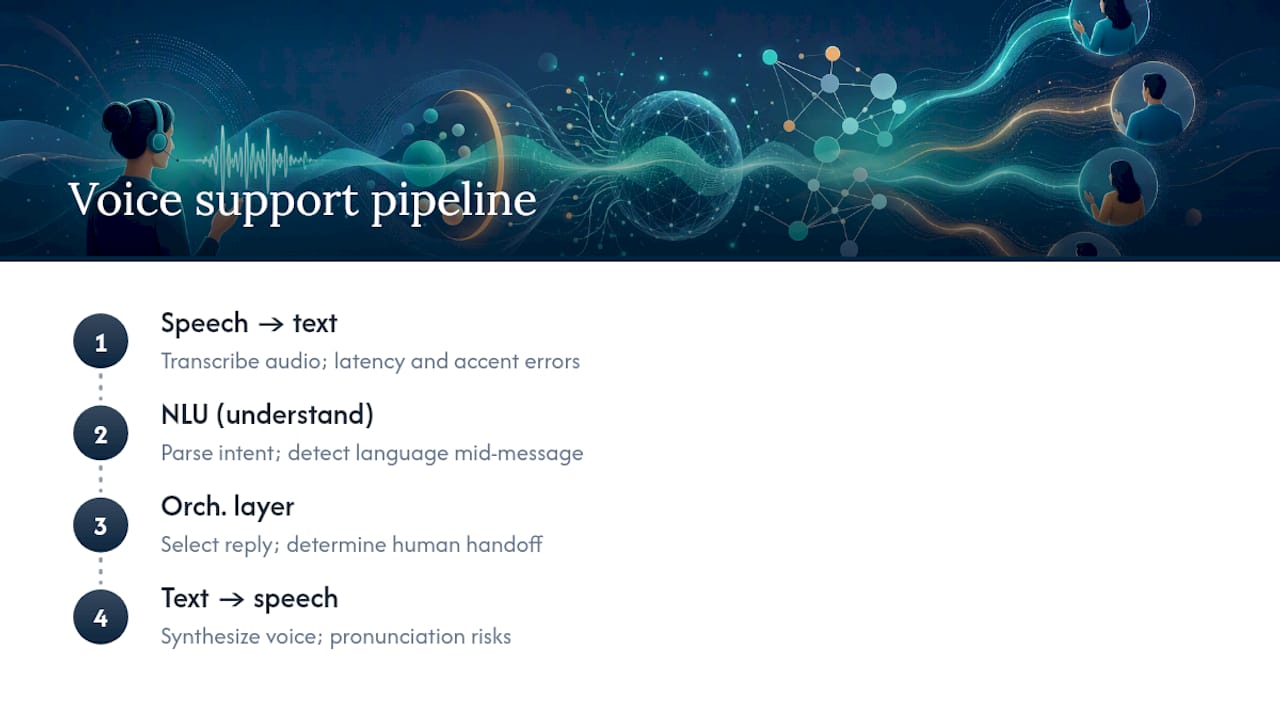
For voice specifically, the pipeline runs through four stages: speech-to-text (STT), natural language understanding (NLU), an orchestration layer that decides what to say and do, and text-to-speech (TTS) that speaks the answer back. Each stage introduces latency, and each stage can mishandle an accent. A voice agent that transcribes English perfectly can still stumble on a Filipino-accented English caller or a Quebec French speaker, so accent coverage deserves its own line item in testing, not an assumption.
Context retention across channels matters just as much as raw translation quality. If a customer emails in French, then calls, the system should recognize their language preference and history rather than starting over. And however good the model, you need a defined human handoff point. Platforms like Live Caption AI illustrate how even mature real-time translation tools still treat human review as a safety net, not an afterthought.
Which Features Actually Matter When Evaluating a Vendor?
Vendor pitch decks love to lead with language counts: “50+ languages supported!” That number tells you almost nothing about whether the AI handles your actual ticket volume in Portuguese or Tagalog well. Production-tested quality against your real customer language mix matters far more than a headline number, a point Language IO’s enterprise clients consistently prioritize over raw coverage claims.
Here’s what to actually check before signing anything:
- Production-tested language quality: ask for a live test with your own sample tickets in your top three non-English languages, not a demo script.
- Integration depth: confirm native connectors to your helpdesk (Zendesk, Freshdesk), your CRM, your phone system or IVR, and your knowledge base, not just a generic API.
- Brand voice preservation: check whether the AI can be tuned to your tone, terminology, and formality level in each language, not just a literal translation of your English macros.
- Latency and code-switching resilience: test how the system handles a customer who switches languages mid-sentence, and measure response delay under load.
- Governance features: verify audit logs, role-based access controls, and configurable data retention windows before rollout, not after an audit request.
Pro Tip: Run your vendor evaluation with the ugliest tickets you have, not the cleanest ones. A support bot that handles a polite billing question in French is not the same bot that can handle an angry, slang-heavy complaint in the same language.
How Do You Pilot Multilingual AI Without Breaking Support Operations?
Treat your first deployment as a scoped, timeboxed experiment, not a full migration. Here’s a sequence that keeps risk low:
- Define pilot scope and metrics. Pick two or three languages, one or two channels, and set target numbers for CSAT, first response time, average handle time, and deflection rate before you start.
- Prepare your knowledge base and translation assets. Translate or regenerate your top 50 to 100 help articles natively rather than machine-translating your English macros wholesale.
- Map edge cases and escalation paths. Decide in advance what happens when the AI can’t confidently answer, and who receives that handoff in which language.
- Integrate with your CRM, helpdesk, and phone/IVR system. This is where most delays happen, so start it in parallel with content prep, not after.
- Test latency and voice quality under real conditions, including accented callers and background noise if voice is in scope.
- Set human-in-loop rules and a QA cadence. Weekly review of a sample of AI-handled conversations catches drift before it becomes a pattern.
- Define scale criteria. Set the specific CSAT and deflection thresholds that trigger expansion to more languages or channels.
Pro Tip: Give your pilot a hard four-to-six-week window with a go/no-go date on the calendar. Open-ended pilots rarely die, but they also rarely scale. They just quietly limp along.
What ROI Can Support Teams Realistically Expect?
Set expectations with benchmarks, not vendor optimism. Enterprise deployments commonly report AI agents resolving 30 to 60 percent of inquiries without human involvement, with some cases showing meaningful reductions in cost per contact alongside CSAT gains. That range is wide because it depends heavily on ticket complexity and how well the AI was trained on your actual content.
The response-time shift is the number worth anchoring on. IBM reports that AI-powered translation can cut non-English response times from hours, or even next-business-day, down to under 5 seconds, while reducing costs versus traditional multilingual staffing models.
Voice-specific deployments add another layer: multilingual voice agents tied to CRM actions can capture bookings around the clock, and case data from platforms like Zipchat shows conversion gains when language barriers are removed at the point of purchase. In your pilot, attribute value by comparing pre- and post-deployment numbers on the same handful of KPIs. Resist the urge to track everything; three or four clean metrics beat a dashboard nobody reads.
What Does a Rapid Multilingual Deployment Actually Look Like?
42voice runs its multilingual agent across voice and text in more than nine languages, built specifically for small and mid-sized support teams that can’t justify hiring native speakers for every market. Deployment typically runs three to five days from kickoff to live agent, which is fast enough to treat as a real pilot rather than a quarter-long project.
Common early use cases include:
- After-hours call answering so non-English callers get a real answer at 2 a.m., not a voicemail.
- Appointment booking and rescheduling handled natively in the caller’s language, synced to your calendar.
- Level 1 inbound support for routine questions, with clean handoff to a human when a call needs one.
What Are the Real Risks, and How Do You Avoid Them?
Data residency and retention deserve a direct question, not an assumption: where is voice audio and transcript data stored, for how long, and can you configure shorter windows for regulated industries? Ask vendors specifically about zero-data-retention options, a feature Language IO highlights as a differentiator for compliance-sensitive deployments.
Governance controls matter just as much. You want audit trails showing what the AI said and why, human-in-loop checkpoints for anything account-sensitive, and enough explainability that you can answer a customer complaint about a bad AI interaction with facts, not guesses.
Two vendor claims deserve extra scrutiny before you sign: the language count (test it, don’t trust the number) and any security certification claim. Ask to see the actual SOC report or ISO/IEC 27001 certificate rather than accepting a logo on a website. Build a monthly QA sample review into your operating rhythm from day one; quality drifts quietly, and nobody notices until CSAT drops.
The Language-Count Obsession Is Costing You Real Deployments
Support leaders keep asking vendors “how many languages do you support?” That’s the wrong question. It’s the same as judging a translator by the number of dictionaries they own. The right question is whether the system handles your actual customers’ actual phrasing, including the slang, the code-switching, and the accented voice calls that never show up in a sales demo.
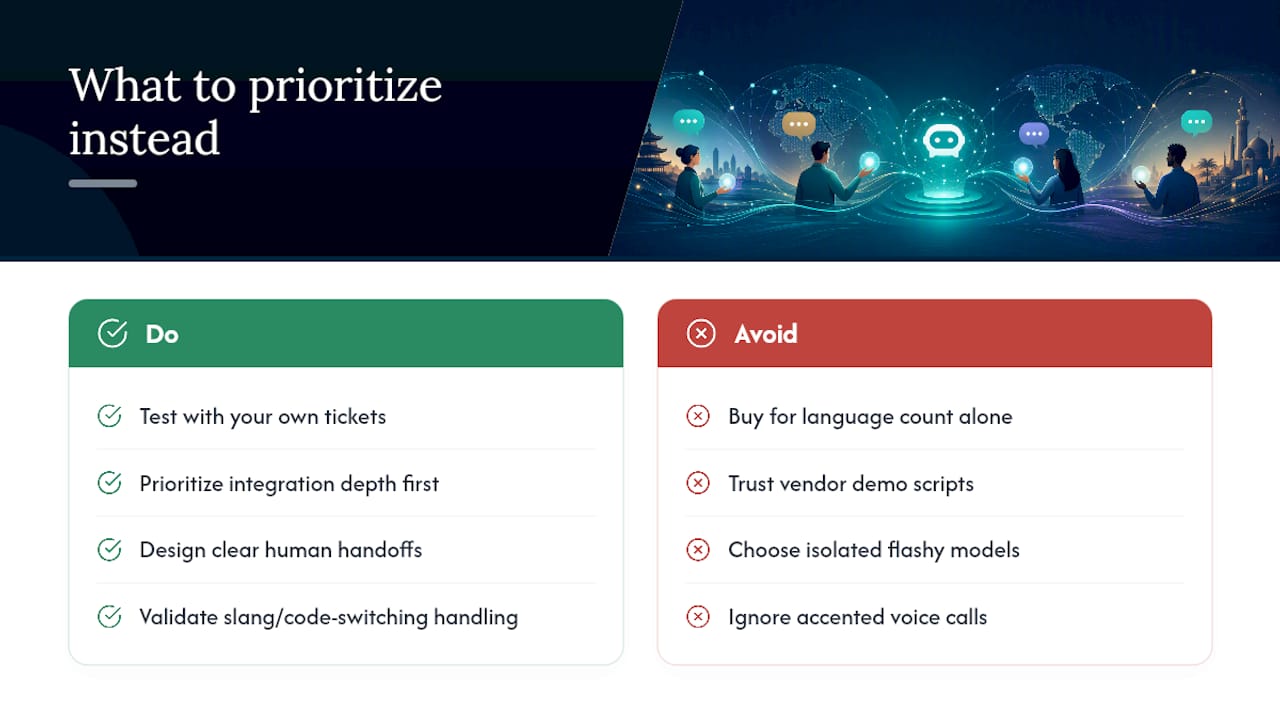
The conventional advice in this space treats multilingual AI as a coverage problem: buy the vendor with the biggest language list and move on. That advice falls apart the first time an angry customer types in a regional dialect the model was never tuned on. Production testing against your own tickets, not the vendor’s demo script, is the single highest-leverage thing you can do before rollout.
If you’re piloting this, prioritize integration depth and human-handoff design before you even look at language count. A multilingual agent that talks to your CRM and knows when to hand off to a person will outperform a flashier model that operates in isolation, every time.
— Jesse
Ready to Pilot Multilingual Support? Here’s What to Prepare
The provider runs the checklist covered above: native-language voice and text agents in multiple languages, calendar and CRM integrations already built, and a deployment window of three to five days instead of a multi-month rollout. That speed matters when you’re testing a hypothesis, not committing to a platform migration.

Before you request a demo, gather three things: a handful of your messiest real support transcripts in your target languages, your top help-center articles you’d want translated natively rather than machine-translated, and access details for whatever CRM or phone system needs to connect. That prep turns a sales call into a working pilot conversation.
If appointment booking or after-hours coverage is your biggest pain point, start with the multilingual agent overview or the customer support agent page to see how the integrations map to your existing systems, then book a demo to scope your own pilot timeline.
Sources
- IBM — Accelerate customer service response time with AI
- Quiq — AI agents for customer experience
- Language IO — Multilingual customer support and translation tools
FAQ
What Does Multilingual Support Mean?
Multilingual support means a business can answer customer questions in more than one language across its channels, whether through human agents, translation tools, or AI systems that detect and respond in the customer’s own language.
How Can AI Be Used for Customer Support?
AI handles customer support through chatbots and voice agents that answer routine questions, route complex issues to humans, detect and translate languages in real time, and integrate with CRM and helpdesk systems to complete actions like booking appointments, with documented reductions in response time and cost.
What Are Multilingual Chatbots?
Multilingual chatbots are AI-driven conversational tools that detect a customer’s language automatically and respond either through real-time translation or native-language generation, often across webchat, SMS, and messaging apps.
What Is Bilingual Customer Support?
Bilingual customer support refers to service available in exactly two languages, usually staffed by agents fluent in both, while multilingual support scales beyond two languages, typically requiring AI tools like 42voice’s multilingual agent to remain cost-effective at volume.
How Long Does It Take to Deploy Multilingual AI Support?
Deployment timelines vary by vendor and integration complexity, but some rapid-deploy platforms typically go live within three to five days for a scoped pilot involving calendar, CRM, and phone system integration.