
AI call automation can handle booking, intake, and after-hours calls so your team never misses a job. It answers every call in seconds, qualifies leads, books estimates directly onto your calendar, and routes emergencies to the right technician, all without a receptionist working overtime. The technology now integrates with the field-service management (FSM) platforms most home services companies already run, and deployment typically takes a few days.
Here’s what that means for your business right away:
- Capture missed jobs: no more voicemail for callers who then dial your competitor
- 24/7 booking: appointments get scheduled at 9 PM on a Sunday just as easily as 9 AM on a Tuesday
- Faster dispatch: intake data reaches your dispatcher the moment the call ends, not after a callback
Table of Contents
- What Is Home Services Call Automation and How Does It Work?
- What Technology Powers an AI Voice Agent?
- How Do You Integrate Call Automation With Your Dispatch System?
- What Should You Check Before Launching a Pilot?
- What Does Call Automation Cost and When Does It Pay Off?
- How 42Voice Builds Call Automation for Home Services
- What Actually Breaks When Home Services Companies Automate Too Fast
- Getting Started With 42Voice for Your Home Services Business
- Sources
- FAQ
What Is Home Services Call Automation and How Does It Work?
Home services call automation uses AI voice agents to answer, qualify, and act on inbound and outbound phone calls for trades businesses, plumbing, HVAC, electrical, roofing, pest control, and similar operations. Instead of a shared front-desk line where calls stack up during peak hours, the system answers every call on the first ring and completes tasks a human dispatcher would otherwise handle manually.
The primary use cases fall into five buckets, and most home services companies start with one or two before expanding.
- Inbound triage. The agent distinguishes an emergency (“water is flooding my basement”) from a routine request (“I need my AC serviced next week”). For HVAC, that might mean asking about a burning smell or complete system failure. For plumbing, it means asking whether water is actively leaking. Electrical calls get flagged immediately if the caller mentions sparking or smoke, and those get escalated to a live technician within seconds.
- Appointment booking. Same-day requests, free estimates, and sales consultations each follow a different flow. The agent checks technician availability in real time and syncs directly to your calendar, so double-booking becomes far less common.
- Lead qualification. The system captures service address, issue type, urgency, and budget signals, then routes hot leads to sales with automated lead qualification and routine service requests straight to dispatch. This mirrors what field-service adoption research finds: operations get the biggest wins when they prioritize scheduling and dispatch integration over generic call answering.
- Payments and billing. Some agents handle autopay enrollment during the call and can capture payment details for after-hours emergency dispatch fees before a technician even leaves the shop.
- Outbound follow-up. Reminder calls before scheduled visits, post-job satisfaction checks, and estimate recovery campaigns for the customer who got a quote three weeks ago and went quiet.
Pro Tip: Start your pilot with the highest-volume, lowest-complexity call type, usually appointment reminders or basic booking, before automating emergency triage. You want the conversation flows battle-tested before they handle a caller with a burst pipe.
What Technology Powers an AI Voice Agent?
Every functional home services call automation platform is built from the same core stack, even when vendors market it differently.
- Telephony layer: routes the call and connects it to the automation engine
- Automatic speech recognition (ASR): converts the caller’s speech to text in real time
- NLU/LLM dialog manager: interprets intent and decides how to respond, often powered by a large language model
- Text-to-speech (TTS): converts the agent’s response back into natural-sounding voice
- Integration layer: pushes captured data into your CRM or FSM system
- Human-in-the-loop (HITL) escalation: hands off to a live person when confidence drops
Azure’s call automation documentation outlines these server-based workflow capabilities, including call recording, which matters for quality review and dispute resolution.
Good conversation design matters more than the underlying model. A well-built script asks the right intake questions, triggers safety escalation for genuine emergencies, discloses pricing transparently instead of dodging the “how much will this cost” question, and knows its own confidence threshold: when uncertain, it hands off rather than guessing.
Multilingual support has become a baseline expectation rather than a premium add-on, since many service areas serve a mix of English and Spanish-speaking households, among others.
Every system has limits worth knowing upfront. Credit card capture over voice carries compliance weight, complex custom-quote sales conversations still benefit from a human closer, and anything touching liability or legal exposure should route to a person immediately. A platform’s failure rate on edge cases matters far more than its performance on routine calls, since the routine calls were never the hard part to begin with.
How Do You Integrate Call Automation With Your Dispatch System?
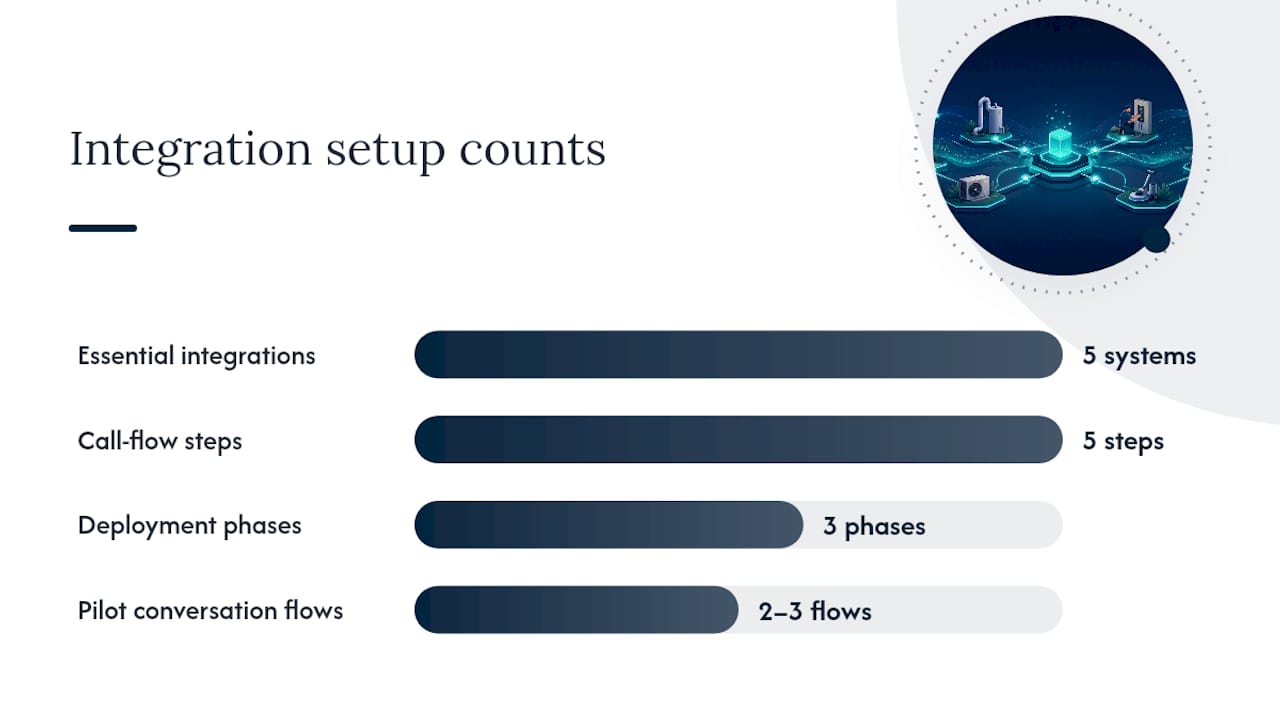
The integration layer determines whether call automation actually saves time or just creates a second inbox nobody checks. Connect these systems before your first pilot call:
- Field-service management platform (for job creation and technician assignment)
- CRM (for lead and customer history)
- Calendar (for real-time availability and booking)
- SMS gateway (for confirmations and follow-ups)
- Payment provider (for autopay and dispatch fee capture)
A typical call flows in five steps: the caller connects, the agent runs intake, a ticket gets created automatically, the customer receives a confirmation text, and the dispatcher gets an alert with all the details already filled in. That last step is the one most businesses get wrong when they try to build this in-house. Integration research from the trades sector shows call automation succeeds fastest when tickets push directly into the existing dispatch workflow, not into a separate inbox someone has to remember to check.
Deployment usually runs through three phases: pilot configuration (connecting systems and building initial scripts), iterative tuning (adjusting based on real call recordings), and scale rollout (expanding to full call volume). A deployment of a few days typically covers the pilot configuration phase, connecting your calendar, FSM, and phone system, plus building your first two or three conversation flows.
Pro Tip: Before going live, confirm your vendor’s policy on call recording disclosure, calling-hour restrictions for outbound campaigns, and data retention. General privacy policy standards offer a useful baseline, but check your local telemarketing and do-not-call rules directly since they vary by jurisdiction.
What Should You Check Before Launching a Pilot?
A rushed pilot is how businesses end up with an automation system nobody trusts. Work through this checklist first.
- Map your service area rules. Confirm which zip codes or regions the agent should quote for, and which get routed to a human for custom pricing.
- Define pricing disclosure. Decide exactly what the agent can and cannot quote over the phone, and where it should say “a technician will confirm pricing on-site.”
- Set escalation triggers. List the specific phrases or situations (gas smell, active flooding, sparking outlet) that bypass the agent entirely.
- Map CRM fields. Match what the agent captures to what your CRM and FSM actually use, so nothing gets lost in translation.
- Question your vendor directly. Ask which FSMs they support natively, how many languages they offer, what the fallback handoff latency looks like, how customizable the scripts are, and what SLA backs the uptime.
Run your pilot with a defined sample and duration over a few weeks and a meaningful slice of your call volume is a reasonable starting point, and test at least two script variants against each other rather than assuming your first draft is optimal.
Track these core KPIs from day one: answer rate, booking conversion, bookings per handled call, average handle time, cost per handled call, and customer satisfaction. Compare each against your pre-automation baseline, not against an industry average, since your baseline is the number that actually tells you whether the pilot worked.

What Does Call Automation Cost and When Does It Pay Off?
Pricing for home services call automation generally falls into three models: flat subscription (predictable monthly cost regardless of volume), per-minute usage (scales with call volume), and per-transaction (charged per completed booking or qualified lead). Subscription pricing suits businesses with steady call volume; usage-based pricing suits seasonal trades like HVAC, where summer call volume can dwarf winter volume by a wide margin.
Your actual cost depends on a few clear drivers:
- Total monthly call volume
- Number of languages supported
- Custom integrations beyond standard FSM connections
- After-hours coverage requirements (24/7 coverage costs more than business-hours-only)
The ROI math is straightforward once you have baseline numbers. Take the number of previously missed calls you now capture, multiply by your average job value, and you get recovered revenue. Add reduced overtime from fewer emergency callbacks and any headcount savings from not staffing a night-shift receptionist. Vendor case studies in the home services space consistently point to scheduling, intake, and billing as the workflows with the fastest measurable payback, since they’re high-volume and highly repetitive.
Non-monetary returns matter too: fewer missed jobs, faster response times that show up in online reviews, and a dispatcher who isn’t drowning in voicemail transcription every Monday morning.
How 42Voice Builds Call Automation for Home Services
42voice’s platform is built around the exact workflows this article covers, not a generic chatbot bolted onto a phone line. The booking agent handles same-day scheduling and estimate bookings with calendar sync. The after-hours agent covers nights and weekends without a live receptionist on call, including multilingual support across nine or more languages. The customer support agent handles level-1 questions and ticket creation, and lead qualification runs as part of the standard intake flow, pushing structured data into your CRM.
A home services company evaluating call automation should expect the pilot phase, connecting calendar, phone system, and FSM, to be functional within days rather than weeks, with script refinement continuing through the first two to three weeks of live calls.
42voice’s typical deployment window runs a few days, covering system integration, initial script build, and first-call testing. That timeline matches what field-service industry resources describe as the standard early-tuning window, where teams refine scripts from actual call recordings during the first one to two weeks of live operation.
Expect to measure success against answer rate, booking conversion, and average handle time from week one, then compare those numbers against your pre-automation baseline before deciding whether to expand call volume.
What Actually Breaks When Home Services Companies Automate Too Fast
Most of the automation failures worth learning from have nothing to do with the AI itself. They come from operators treating a phone system change like a light switch instead of a rollout.
The businesses that get this right start narrow. They automate reminder calls and basic booking first, watch the recordings for two weeks, then expand into intake and after-hours coverage once the script actually sounds right on real customer calls, not just in a demo. The ones that struggle usually skipped straight to full call replacement and only discovered the gaps when a customer complained.
Fee disclosure is where I see the most avoidable damage. If your agent quotes a diagnostic fee but doesn’t mention the after-hours surcharge until the technician arrives, that’s a trust problem no script update fixes retroactively. Say the full price upfront, even if it’s a range.
Skipping integration testing is the second big mistake. A booking that looks confirmed on the call but never lands in your FSM is worse than no automation at all, because now the customer thinks they have an appointment and nobody shows up. Test the full chain, not just the phone conversation, before you trust it with a single real customer.
Pair your automation metrics with actual customer feedback every few weeks. A high booking-conversion number can hide a script that’s technically working but quietly annoying callers.
— Jesse
Getting Started With 42Voice for Your Home Services Business
42voice fits SMB and mid-market home services operators who need call automation live fast and connected to the FSM they already run, whether that’s a single-truck plumbing outfit or a multi-crew HVAC company juggling dozens of daily bookings.

Before booking a demo, gather three things: your average monthly call volume, the FSM or CRM you currently use, and the languages your customer base speaks. That preparation cuts the discovery conversation in half and gets you straight to a pilot design that fits your actual call patterns, not a generic template.
If you’re weighing scheduling automation specifically, the booking and appointment page walks through calendar sync in more detail, and automated appointment reminders shows how outbound follow-up fits alongside inbound booking. For a broader look at what’s deployable across your business, the solutions overview covers the full range, from after-hours coverage to multilingual support. Book a free demo, bring your call volume numbers, and you’ll walk away knowing whether a 3 to 5 day pilot makes sense for your team.
Sources
- Call Automation overview – An Azure Communication …
- AI in the trades – Housecall Pro
- Automated lead qualification: the AI-powered playbook – SemLocal
FAQ
Is There a Free Automated Call Service Available?
Most home services call automation platforms run on paid subscription or usage-based pricing because they require ongoing telephony, AI processing, and integration maintenance. Free trial periods are common, but ongoing free service at production call volume is rare.
What Are the Top Automation Tools for Home Services?
The tools that matter most are the ones covering your highest-volume workflows: inbound triage, appointment booking, lead qualification, and after-hours answering, ideally from a single platform like 42voice rather than five disconnected point solutions.
Can AI Run a Call Center for a Home Services Business?
AI voice agents can handle the bulk of routine inbound and outbound call center work, booking, intake, reminders, and basic support, but emergencies, complex sales, and legal or liability situations still need human escalation built into the flow.
How Do You Create Automated Calls for Your Business?
Start by mapping your highest-volume call type, connect your calendar and FSM to a call automation platform. Build a conversation script with clear escalation triggers, and run a two-to-four week pilot before scaling to full call volume.