
For small to medium-sized businesses ready to automate customer calls and eliminate manual logging, 42voice is the recommended starting point. Book a demo this week. Your AI voice agents can be live in 3–5 days, automatically logging calls, qualifying leads, and booking appointments directly into your CRM without a rep lifting a finger.
Three reasons to act now:
- Faster lead qualification. AI voice agents screen and score inbound leads in real time, so your sales team only talks to prospects who are ready to move forward.
- Automatic call logging. Every call, summary, and transcript syncs to your CRM the moment the call ends, cutting data-entry time to zero.
- 24/7 customer handling. After-hours calls, appointment bookings, and support queries get answered around the clock, even when your team is offline.
Table of Contents
- Why does CRM phone integration matter for your sales team?
- What should you require from any CRM phone system vendor?
- What core features actually move the needle?
- How does 42voice handle CRM integration for SMBs?
- What does a CRM phone integration pilot actually look like?
- What does CRM phone integration actually cost, and what’s the ROI?
- What security and compliance issues apply to phone automation in the US?
- Key Takeaways
- The part most vendors won’t tell you upfront
- Your business deserves a voice that doesn’t sleep
- Useful sources for further research
Why does CRM phone integration matter for your sales team?
Working a phone system that isn’t connected to your CRM forces reps to switch between platforms constantly, which adds friction and chips away at customer satisfaction. The fix is straightforward: connect the two systems so every call event writes itself into the customer record automatically.
The business impact shows up in three places:
- Efficiency. Reps stop copying notes between tools. A rep who saves 20 minutes per day on manual logging recovers about 7 hours of selling time per month. At $30/hour, that’s $210 per rep, per month, in recovered productivity.
- Customer experience. When a caller’s history appears on screen the moment the call connects, your team skips the “can you remind me what we discussed?” moment. Customers notice.
- Revenue data. Integrated analytics on call volumes, conversion rates, and average handle time give managers the numbers they need to coach reps and staff correctly.
A good CRM integration also scales as your team grows, reducing duplicate work and keeping sales and support aligned on the same customer data.
What should you require from any CRM phone system vendor?
The single most important question: does this solution automate the call workflows your team actually runs today? A long feature list means nothing if the integration doesn’t cover your core use case.
Core feature checks:
- Click-to-dial from inside the CRM
- Automatic call logging with timestamps and duration
- AI call summaries and searchable transcripts
- Two-way data sync (not just one-way webhooks)
- IVR and intelligent call routing
- Multilingual support for diverse customer bases
- Calendar and support-ticketing sync
Contract and pricing questions to ask:
- Is pricing per seat, per minute, or hybrid?
- Are AI summaries and transcripts billed separately?
- What are the overage rates for voice minutes?
- Can you bring your own SIP trunk or phone numbers?
- Are there setup fees or minimum contract lengths?
Vendor questions for the demo:
Ask for the published integrations list (HubSpot, Salesforce, Pipedrive). Confirm whether setup uses OAuth one-click install or requires custom API development. Request the onboarding timeline, SLA documentation, and pilot success metrics.

Red flags to walk away from:
No trial or demo available, opaque AI feature pricing, no SOC 2 or equivalent security statement, support for only a single CRM, and vague dev timelines with no roadmap.
Pro Tip: Ask the vendor to show you the embedded calling widget live inside your CRM during the demo. If they can’t demo it in your environment, the integration may be more complex than advertised.
What core features actually move the needle?
Cloud phone solutions integrated with a CRM deliver a predictable set of capabilities. Here’s what each one does for your business:
- Click-to-dial: Call any contact directly from the CRM record. Eliminates manual dialing and misdials.
- Screen pop / contact pop: The caller’s full CRM record appears on screen when the call connects. Reps skip the lookup step entirely.
- Automatic call logging: Call duration, direction, and outcome write to the CRM record without rep input.
- AI call summaries and transcripts: The system generates a written summary after every call. Managers review calls in seconds instead of listening to recordings.
- Call recording: Stored recordings support compliance, coaching, and dispute resolution.
- IVR and call routing: Callers reach the right team or agent without a live receptionist.
- Multilingual IVR and agents: Serve customers in their preferred language without hiring additional staff.
- Real-time analytics dashboards: Track call volume, wait times, and conversion rates as they happen.
- Webhook and API support: Webhooks handle real-time one-way events; APIs are the right choice when you need two-way updates across contact fields and automation triggers.
For HubSpot, Salesforce, and Pipedrive users, confirm whether setup uses OAuth and an embedded SDK for a one-click install or requires a custom API build. The former takes hours; the latter can take 2–6 weeks.
How does 42voice handle CRM integration for SMBs?
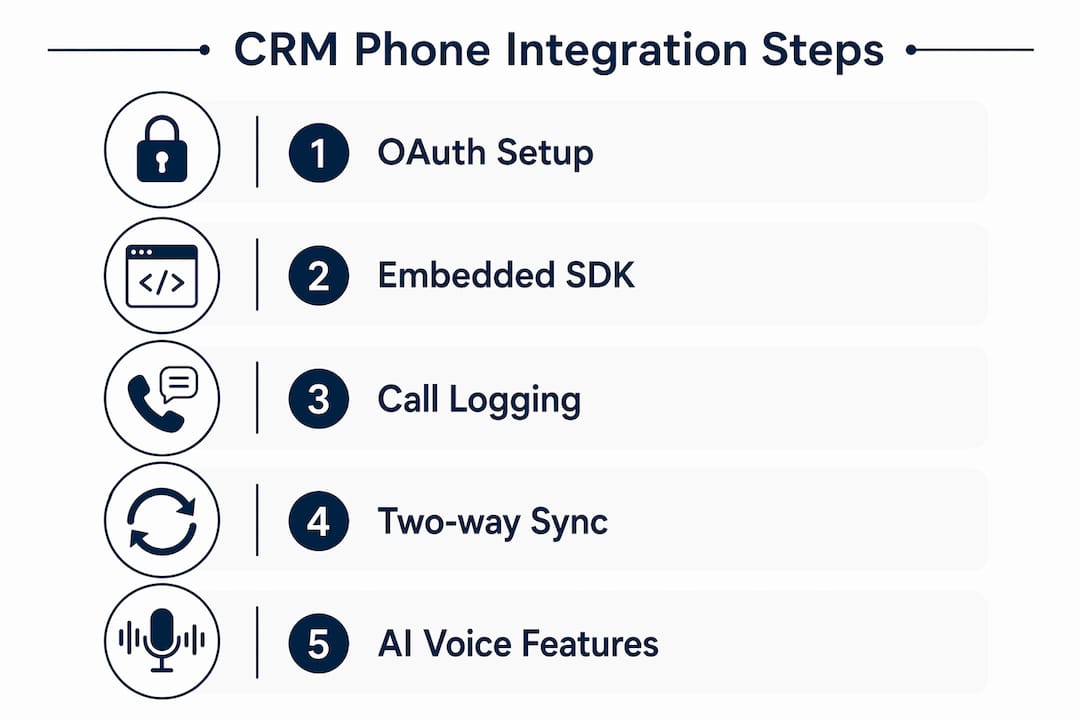
42voice deploys AI voice agents that connect directly to your CRM, calendar, and phone system. The platform covers the full call workflow without custom development.
Platform capabilities:
- AI voice agents for inbound calls, outbound follow-ups, and cold-calling lead qualification
- Automatic CRM sync: call logs, summaries, and transcripts written on call completion
- Multilingual support across 9+ languages
- Calendar integration for real-time appointment booking
- Voice cloning for brand-consistent agent personas
- Real-time analytics and call dashboards
- After-hours call handling with no live agent required
Deployment: Most SMB pilots go live in 3–5 days. The setup covers number provisioning, CRM OAuth connection, call flow scripting, and a test run before full launch.
Example use cases:
- Home services: AI agent answers inbound calls, qualifies the job type, and books the appointment directly into the technician’s calendar.
- Healthcare: After-hours agent handles appointment requests and routes urgent calls to on-call staff.
- Outbound sales: Automated cold-calling sequences qualify leads and hand off warm prospects to human reps.
Pro Tip: Start your pilot with a single phone number and one use case, such as after-hours booking. A narrow scope gives you clean data to measure ROI before expanding.
What does a CRM phone integration pilot actually look like?
- Discovery (1–2 days): Map your top three call flows. Identify which CRM fields need to be written on each call event.
- CRM and system access (Day 1–2): Grant OAuth permissions. Confirm your CRM supports the vendor’s SDK or API.
- Number provisioning (Day 1–3): Port or provision the pilot phone number. Configure IVR routing and call scripts.
- Script and training data (Day 2–3): Build the AI agent’s call scripts. Upload any existing FAQ or product data.
- Testing (Day 3–5): Run live test calls. Verify CRM logging accuracy, transcript quality, and routing logic.
- Go/no-go review (Day 5–14): Measure pilot metrics against your targets. Decide to expand, adjust, or pause.
Pilot metrics to track: call-to-booking conversion rate, average handle time, lead qualification rate, automation coverage percentage (calls handled without a live agent), and customer satisfaction score.
Pro Tip: Pilot programs scoped to a single use case and a small number of phone numbers are the fastest way to prove ROI and validate vendor claims about AI accuracy and integration fidelity.
What does CRM phone integration actually cost, and what’s the ROI?
Pricing typically includes several line items. Common components are a base subscription, per-user fees, per-minute voice charges, AI summary and transcription fees, and per-number charges. Always ask for a fully itemized quote.
Questions to ask every vendor:
- What is the per-minute rate for AI-handled calls?
- Are transcripts and AI summaries billed per minute or per call?
- How many phone numbers are included?
- Is mobile app access included or add-on?
- What are the BYO-SIP or BYO-number fees?
Sample ROI calculation:
| Input | Sample Value |
|---|---|
| Reps on the team | 5 |
| Minutes saved per rep per day (logging + admin) | 20 min |
| Fully loaded hourly rate | $30/hr |
| Monthly productivity value recovered | $210 |
Plug your own numbers in. The math shifts quickly in your favor once you factor in after-hours calls handled without overtime pay.
What security and compliance issues apply to phone automation in the US?
Call recording and automated outbound dialing carry real legal obligations in the United States.
- Call recording consent: Federal law requires one-party consent, but 11 states (including California, Florida, and Illinois) require all-party consent. Verify your state’s rules before recording.
- TCPA compliance: The Telephone Consumer Protection Act restricts automated outbound dialing to cell phones without prior written consent. Violations carry per-call fines. Confirm your vendor’s opt-out mechanisms and auto-dial rate limits before launching outbound campaigns.
- Vendor documents to request: SOC 2 Type II report (or equivalent), data processing addendum (DPA), encryption details (in transit and at rest), incident response SLA, and data residency statement.
- Practical settings to verify: Consent prompts on recorded lines, opt-out handling in outbound flows, rate limiting on automated dialers, and secure webhook signing.
- PII in transcripts: Confirm where transcripts are stored, who can access them, and how long they are retained in your CRM. Limit access to call recordings and transcripts to roles that genuinely need them.
This article is general information, not legal advice. Confirm current TCPA rules and state recording laws with qualified legal counsel for your specific situation.
Key Takeaways
The most effective CRM phone integration for SMBs combines AI voice agents with automatic call logging, two-way CRM sync, and a pilot scoped to a single use case so you can measure ROI in days, not months.
| Point | Details |
|---|---|
| Start with a narrow pilot | Scope to one use case and one phone number to get clean ROI data fast. |
| Require two-way sync | One-way webhooks miss contact-field updates; confirm API-level sync for full data fidelity. |
| Verify compliance upfront | Request SOC 2, DPA, and confirm TCPA opt-out settings before any outbound campaign goes live. |
| Track five pilot metrics | Monitor call-to-booking rate, handle time, qualification rate, automation coverage, and satisfaction score. |
| 42voice for SMB deployment | 42voice deploys AI voice agents with CRM sync and multilingual support, typically live in 3–5 days. |
The part most vendors won’t tell you upfront
Most CRM phone integration guides focus on feature lists. The real differentiator is deployment speed and what happens in the first two weeks.
Vendors who can’t show you a working demo inside your CRM environment are telling you something. A polished slide deck about “AI-powered automation” is not the same as watching an AI agent book an appointment, log the call, and write a summary to a HubSpot or Salesforce record in real time. That gap between the pitch and the pilot is where most SMB buyers lose time and budget.
The businesses that get the fastest results treat the pilot as a measurement exercise, not a technology trial. They pick one call flow, define a success metric before day one, and make a go/no-go decision by day 14. That discipline is what separates teams that scale AI voice automation from teams that run a proof of concept and shelve it.
42voice’s rapid deployment model is built around exactly that approach. Pilots go live in 3–5 days. The data comes back quickly. And the ROI case either holds or it doesn’t. That kind of transparency is what SMB decision makers should be demanding from every vendor they evaluate.
Your business deserves a voice that doesn’t sleep
Missed calls cost revenue. Manual logging costs time. And a phone system that isn’t connected to your CRM costs you both. 42voice gives your business AI voice agents that answer calls, qualify leads, book appointments, and sync every interaction to your CRM automatically, in 9+ languages, around the clock.

Most SMB pilots are live in a few days. No long development timelines, no per-seat pricing surprises, and no calls going unanswered after hours. Book a free demo and see your call flows automated before the end of the week.
Useful sources for further research
Validate compliance requirements and review vendor integration documentation using these authoritative sources:
- FCC Consumer Guide on Robocalls and TCPA: fcc.gov/consumers/guides/stop-unwanted-robocalls-and-texts — primary source for TCPA rules and outbound dialing restrictions.
- HubSpot Calling Integration Docs: developers.hubspot.com/docs/api/crm/extensions/calling-sdk — official SDK documentation for embedded calling widgets and OAuth setup.
- Salesforce CTI and Phone Integration Docs: help.salesforce.com/s/articleView?id=sf.cti_overview.htm — covers Open CTI, softphone setup, and CRM sync configuration.
- Pipedrive Phone Integration Overview: pipedrive.com/en/blog/business-phone-solutions — explains click-to-call, call logging, and CRM sync options for Pipedrive users.
- Vendor documents to request during evaluation: SOC 2 Type II report, data processing addendum (DPA), data residency statement, encryption policy, and published integrations list.