
Choose an integrated system that sends SMS and email reminders AND includes automated voice reminders with two-way confirmation and calendar sync. That combination delivers the highest contact rates, handles rescheduling without staff involvement, and fits small-business budgets. If your business operates in healthcare or another regulated sector, HIPAA compliance (including a signed Business Associate Agreement) and TCPA-compliant consent flows are non-negotiable requirements, not optional add-ons.
The short list of what your system must do:
- Send reminders across at least two channels (SMS + email minimum; add voice for maximum reach)
- Capture two-way replies so customers can confirm, cancel, or reschedule without calling your office
- Sync with your calendar in real time so every reminder reflects actual availability
- Log consent records and delivery receipts for TCPA and HIPAA audits
Pro Tip: Start with your highest-revenue service or busiest location. Run a 30-day pilot, track delivered reminders, confirmed appointments, and no-show rate, then scale what works.
Table of Contents
- What do automated appointment reminders actually do for your business?
- Core channels and features every reminder system should include
- Integrations and calendar sync: what to connect and why
- Compliance and security checks every buyer must verify
- Implementation and typical setup timeline for small businesses
- Pricing models and how to estimate ROI from reminders
- How to choose the right solution: questions to ask and red flags to watch
- How AI voice agents extend standard reminders beyond SMS and email
- Key Takeaways
- Why most businesses set up reminders wrong
- What 42voice delivers for your appointment workflow
- Authoritative sources and next reading
What do automated appointment reminders actually do for your business?
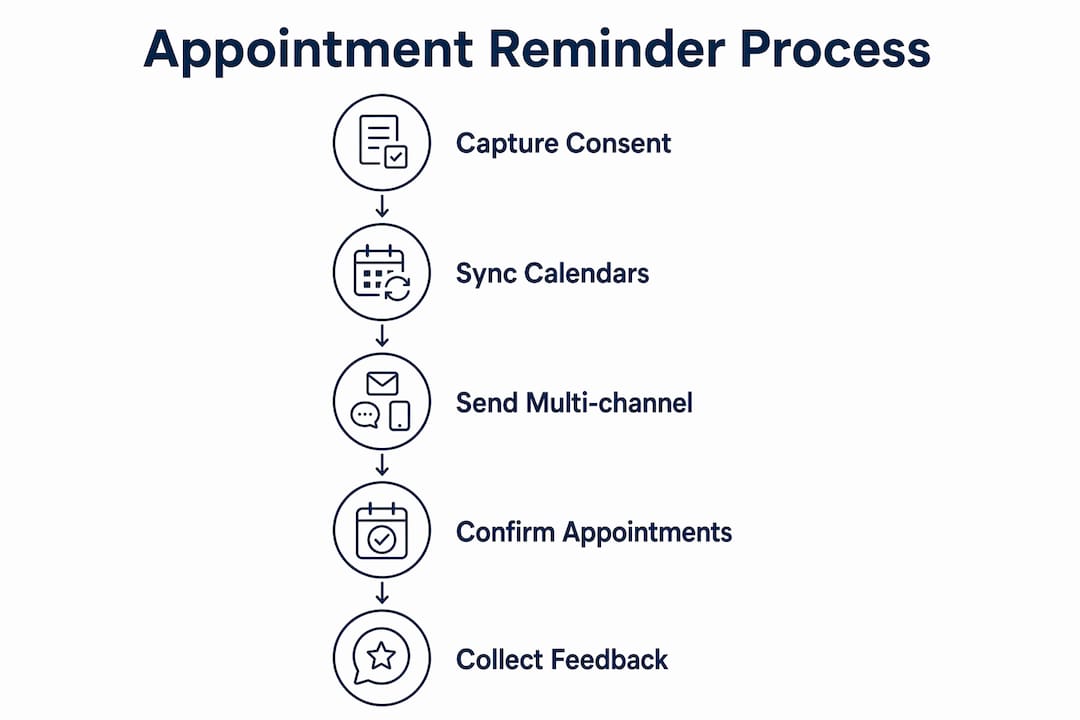
A reminder system works like this: a booking triggers a scheduled sequence. The system sends an SMS, email, or automated voice call at preset intervals before the appointment. The customer replies to confirm, cancel, or reschedule. That response writes back to your calendar or CRM automatically. No staff member picks up a phone. No appointment falls through a gap.
The business impact goes well beyond just filling seats. When customers confirm in advance, your team knows exactly who is coming. Staff can prepare, allocate resources, and avoid scrambling for last-minute coverage. Late cancellations surface early enough to backfill the slot, which protects revenue that would otherwise disappear.
Voice reminders, specifically, drive 46% more confirmations or cancellations than text alone, and 1 in 3 patients answer voice reminder calls.
Beyond the numbers, there is a subtler benefit: clients who receive a clear, personalized reminder arrive better prepared. They know the location, the prep instructions, and what to bring. That reduces the friction at check-in and improves the overall experience on both sides.
Key business benefits at a glance:
- Fewer no-shows and late cancellations caught early enough to backfill
- Staff time freed from manual reminder calls and follow-up
- Clearer prep instructions delivered automatically before each appointment
- Rescheduling handled without a phone call to your office
- Delivery logs and confirmation records for compliance and performance tracking
Core channels and features every reminder system should include
Not all reminder platforms are built the same. Here is what a solid system covers, and which features actually move the needle on no-shows versus which are just nice extras.

Channels that matter
| Channel | Primary strength | Best use case |
|---|---|---|
| SMS | High open rates, instant delivery | Confirmations, short reminders, rescheduling links |
| Detailed content, attachments | Prep instructions, policy reminders, longer messages | |
| Automated voice/IVR | Reaches landlines and call-preferred customers | Older demographics, detailed instructions, fallback |
Multi-channel outreach with fallback rollovers is the key design principle. When a text fails because the number is non-textable or the message bounces, the system automatically rolls the outreach to a voice call or email. That single feature alone recovers a meaningful share of contacts that single-channel systems miss entirely.
Features that reduce no-shows
- Two-way confirmations: customers reply “C” to confirm or press a keypad option during a voice call; the system logs the response and updates the calendar
- Rescheduling links: a URL in the SMS or email lets customers self-serve without calling your office
- Dynamic fields: customer name, appointment date, time, location, and provider name pulled automatically from your booking data
- Answer detection for voice: the prerecorded message plays only when a human answers, not into voicemail or a busy signal, preventing wasted voice minutes and false confirmations
- Scheduled sequences: send a reminder 72 hours out, another 24 hours out, and a same-day nudge based on appointment type
- Multilingual templates: serve customers in their preferred language without manual translation work
Nice-to-have features for scaling
- Bulk messaging for high-volume days or event-style appointments
- Mobile app or web portal for customers to manage their own bookings
- Delivery reporting dashboards with per-channel open and confirmation rates
- Opt-out management that automatically routes around customers who unsubscribe from one channel
Integrations and calendar sync: what to connect and why
A reminder system is only as accurate as the data feeding it. If your calendar shows a slot as available when it is not, your reminders go out for appointments that do not exist. Real-time sync eliminates that problem.
Essential calendar integrations:
- Google Calendar and Outlook for real-time availability and automatic trigger accuracy
- Popular booking platforms (e.g., online booking pages) that write new appointments directly into the reminder queue
- Multi-location calendar support so reminders reflect the correct office, provider, and time zone
CRM and POS connections:
- Sync customer records so dynamic fields (name, service type, provider) populate correctly
- Store consent flags in the customer record so your opt-in proof travels with the contact
- Attach reminder delivery status and confirmation responses to the transaction record for ROI tracking and compliance
Telephony and voice agent integrations:
When you add AI voice agents to the mix, the integration requirements go one level deeper. Map each conversational outcome (confirm, cancel, reschedule) to an explicit calendar action, and write that intent back into your calendar or CRM in real time. This prevents sync drift, where the voice agent logs a reschedule but the calendar still shows the original time.
Here is how a complete voice integration flow works:
- Booking is created in your scheduling system
- Reminder sequence triggers automatically at preset intervals
- AI voice agent calls the customer, conducts a natural-language confirmation
- Customer confirms, cancels, or requests a new time during the call
- The agent writes the outcome back to the calendar and CRM immediately
- Staff see an updated schedule with no manual data entry required
Compliance and security checks every buyer must verify
Skipping compliance checks is the single most expensive shortcut in this category. For healthcare businesses, a data breach or TCPA violation can cost far more than any reminder system saves.
HIPAA requirements for healthcare buyers:
- Signed Business Associate Agreement (BAA) from the vendor before any patient data touches their system
- Encrypted data storage and transport (TLS in transit, AES-256 at rest as a baseline)
- Message templates that minimize Protected Health Information (PHI) in the body of SMS and email messages, since those channels are not inherently secure
- Role-based access controls so only authorized staff can view patient records and delivery logs
TCPA requirements for SMS and voice outreach:
- Documented prior express written consent for marketing messages; express consent for informational reminders
- Clear opt-out paths in every message (e.g., “Reply STOP to unsubscribe” in SMS; “Press 9 to opt out” in voice calls)
- Consent records stored with timestamps and source documentation
- Autodialer disclosure where required, particularly for prerecorded voice messages
Operational security checklist:
- Audit logs that record who accessed what data and when
- Data deletion policy with defined retention periods
- Role-based permissions that separate admin access from standard user access
- Vendor’s own security certifications (SOC 2 Type II is a strong signal)
Pro Tip: Capture consent at the point of booking, not as a separate step. Embed the opt-in language in your booking confirmation page or intake form so the consent record is created automatically and tied to the appointment.
Healthcare buyers should insist on a BAA and configurable message templates that avoid PHI in unsecured channels. For regulated industries, the vendor’s ability to provide that signed BAA is a procurement deal-breaker, not a feature comparison point.

Implementation and typical setup timeline for small businesses
Most small businesses underestimate how fast a well-supported reminder system can go live. Simple SMS and email setups can be running the same day. Integrated voice plus CRM deployments typically take 3–10 business days depending on telephony complexity.
Common setup milestones:
- Account provisioning and phone number registration (sender IDs, long codes, or short codes)
- Calendar and CRM integration configuration
- Message template creation and approval (especially for SMS, which may require carrier registration)
- Test sends across all channels with real appointment data
- Go-live and first-week monitoring
Step-by-step onboarding sequence:
- Connect your calendar (Google Calendar, Outlook, or booking platform)
- Import or sync your customer contact list with consent flags
- Build your message templates with dynamic fields for name, date, time, and location
- Set your reminder schedule (e.g., 48 hours out, 24 hours out, same day)
- Configure opt-out language and fallback channel rules
- Run test appointments through the full sequence end-to-end
- Go live and monitor delivery reports for the first week
Configuration items to complete before go-live:
- Sender ID or Caller ID registered to your business name or office number
- Opt-out language verified in every template
- Resend rules defined (e.g., resend if no confirmation received within 12 hours)
- Voicemail fallback message recorded for unanswered voice calls
- Staff notification rules set for cancellations and reschedule requests
For AI voice agent deployments, 42voice typically goes live in 3–5 business days for standard setups, including calendar and CRM integration.
Pricing models and how to estimate ROI from reminders
Common pricing structures
| Model | How it works | Best for |
|---|---|---|
| Monthly subscription | Flat fee for a set number of contacts or reminders | Predictable volume, budget certainty |
| Per-message / per-minute | Pay only for what you send | Variable or seasonal appointment volumes |
| Blended / tiered | Subscription base plus usage overages | Growing businesses scaling into higher volumes |
What to verify in any quote:
- Message throughput limits (how many reminders per hour or per day)
- Long-code vs. short-code charges (short codes cost more but deliver faster and at higher volume)
- Voice minutes pricing and whether answer detection minutes count separately
- Phone number rental fees (some vendors charge per number per month)
- Overage rates when you exceed your plan tier
Sample ROI calculation
Pro Tip: Run this calculation with your own numbers before your first vendor call. It tells you exactly what the system needs to recover to pay for itself.
- Average appointment value: $150
- Current monthly no-show rate: 10% of 100 appointments = 10 no-shows = $1,500 lost revenue
- Expected no-show reduction: even a conservative 30% reduction saves 3 appointments = $450/month recovered
- Reminder system cost: $99–$199/month for a typical small-business plan
- Payback: the system pays for itself if it prevents fewer than 2 no-shows per month
Most businesses see payback within the first month. The math gets stronger as appointment volume grows.
How to choose the right solution: questions to ask and red flags to watch
Vendor questions worth asking before you sign
- Which calendars and CRMs do you integrate with natively, and how long does integration take?
- What is your uptime SLA, and how do you notify customers during outages?
- How do you store and produce consent records for TCPA audits?
- What delivery reporting do you provide, and can I export confirmation logs?
- What is your support response time, and do you offer live support during business hours?
- Do you provide a signed BAA for healthcare customers?
Red flags that should stop a purchase decision
- No BAA available for healthcare buyers
- Consent capture is manual or undocumented
- No delivery reporting or confirmation logs
- Two-way replies not supported (customers cannot confirm or reschedule from the message)
- Pricing is opaque or overage rates are not disclosed upfront
- No fallback channel when primary delivery fails
Prioritized decision framework
Must-have:
- SMS + email reminders with two-way confirmation
- Calendar sync with real-time availability
- Opt-out management and consent record storage
- Delivery reporting and confirmation logs
Should-have:
- Automated voice reminders with answer detection
- Rescheduling links and self-service rebooking
- Multilingual templates
- CRM integration
Nice-to-have:
- Mobile app for customer self-management
- Bulk messaging for high-volume campaigns
- Advanced analytics and A/B testing for message timing
- Voice cloning or branded voice for AI calls
How AI voice agents extend standard reminders beyond SMS and email
SMS and email reminders work well for most appointments. But they have a ceiling. A customer who ignores two texts and misses an email is not going to be recovered by a third text. That is where AI voice agents change the outcome.
What AI voice adds that text cannot:
- Natural-language conversation: the agent asks “Can you make it Thursday at 2 PM?” and the customer answers in plain speech, not a keypress
- Complex rescheduling in one call: the agent checks availability, offers alternatives, and books the new slot without transferring to a human
- Live-interaction fallback: when text fails entirely, a voice call reaches landline users and call-preferred demographics that SMS misses
- Intent capture: the agent logs not just “confirmed” or “canceled” but the reason, which feeds back into your CRM for follow-up
42voice AI voice agents handle inbound and outbound appointment interactions in 9+ languages, integrate with your calendar and CRM, and typically go live within 3–5 business days for standard deployments. Industries including home services, hospitality, and healthcare use 42voice to automate confirmation calls, handle after-hours booking, and manage rescheduling without adding headcount.
Pro Tip: Map every conversational outcome your voice agent might encounter (confirm, cancel, reschedule, no answer, voicemail) to an explicit calendar action before you go live. Gaps in that mapping cause sync drift and missed updates.
Typical 42voice deployment timeline:
- Day 1: Account setup, calendar and CRM integration configured
- Day 2: Voice agent scripts and multilingual templates built
- Day 3: Test calls run across all scenarios (confirm, cancel, reschedule, voicemail)
- Day 4: Delivery reporting and CRM write-back verified
- Day 5: Go-live with live monitoring and support
Key Takeaways
An integrated SMS + email + AI voice reminder system with calendar sync and two-way replies is the most effective class of solution for small businesses aiming to cut no-shows and free up staff time.
| Point | Details |
|---|---|
| Choose multi-channel with voice | SMS + email + voice with fallback rollovers maximizes contact rates across all customer demographics. |
| Compliance is non-negotiable | Healthcare buyers must secure a signed BAA; all buyers need documented TCPA consent flows before going live. |
| ROI is fast | Preventing even 2–3 no-shows per month typically covers the full monthly cost of a reminder system. |
| Setup is faster than you think | Simple SMS/email setups can go live same-day; integrated AI voice deployments like 42voice typically take 3–5 business days. |
| 42voice for voice automation | 42voice extends standard reminders with AI voice agents that confirm, reschedule, and log outcomes back to your calendar in real time. |
Why most businesses set up reminders wrong
The conventional wisdom says “just send a text the day before.” That advice is not wrong, it is just incomplete. A single SMS 24 hours out is better than nothing, but it leaves a lot of recoverable no-shows on the table.
The businesses that see the sharpest drop in missed appointments are the ones that treat reminders as a conversation, not a broadcast. They send an early reminder to plant the appointment in the customer’s mind, a mid-range reminder to prompt a confirmation, and a same-day nudge for customers who have not yet responded. When a text goes unanswered, they roll to a voice call. When the voice call hits voicemail, they leave a clear message with a callback number.
The other mistake I see constantly: skipping the consent capture step because it feels like friction. It is not friction. It is the difference between a compliant outreach program and a TCPA liability. Build consent into your booking flow from day one, store the records automatically, and you will never have to scramble to prove compliance after the fact.
The businesses that get this right do not just reduce no-shows. They build a communication rhythm that customers actually appreciate, because the reminders are timely, relevant, and easy to act on.
What 42voice delivers for your appointment workflow
No-shows cost your business real money every week. 42voice gives you AI voice agents that do more than send a text: they call your customers, confirm appointments in natural conversation, handle rescheduling on the spot, and write every outcome back to your calendar automatically, in 9+ languages, around the clock.

The setup is fast. Most businesses are live within 3–5 business days, with calendar and CRM integrations already connected. Whether you run a medical practice, a home services operation, or a hospitality business, 42voice fits your workflow without requiring a dedicated IT team.
Ready to see it in action? Book a free demo and find out how quickly your no-show rate can move. If you are in a regulated industry, request a BAA conversation at the same time so compliance is covered from day one.
Authoritative sources and next reading
Compliance and regulatory guidance:
- U.S. Federal Communications Commission (FCC) TCPA resources for consent requirements and autodialer rules
- U.S. Department of Health & Human Services HIPAA guidance for healthcare data handling and BAA requirements
Implementation and feature references:
- Appointment reminder calls and multi-channel outreach overview covering answer detection, IVR, and fallback rollovers
- Voice reminder confirmation rate data showing the impact of voice on confirmation and cancellation rates
42voice resources:
- 42voice platform overview and deployment details for AI voice agent capabilities, integration specs, and demo scheduling
- 42voice AI voice agent product page for multilingual support, calendar/CRM integration documentation, and onboarding timelines