
AI voice agents deliver the most measurable business value in three places: customer service (deflecting routine calls around the clock), sales (qualifying leads and booking appointments), and operations (routing tasks and status updates without a human touching the phone). The payoff shows up as lower cost per interaction, more captured leads, and fewer missed bookings. Below, you’ll find concrete examples and a pilot checklist you can act on this quarter.
Table of Contents
- What Is an AI Voice Agent, and How Is It Different From an IVR?
- The Technology Stack Behind a Working Voice Agent
- Where AI Voice Agents Deliver the Clearest ROI
- Industry Applications: Healthcare, Home Services, Hospitality, and Finance
- Your Pilot Checklist: From Kickoff to Measurable Results
- What Can Go Wrong: Privacy, Accuracy, and Escalation Planning
- How 42voice Fits These Use Cases in Practice
- What I’d Pilot First If I Were You
- Ready to Pilot Your First AI Voice Agent?
- Sources
- FAQ
What Is an AI Voice Agent, and How Is It Different From an IVR?
An AI voice agent listens, reasons, and speaks in real time, carrying a multi-turn conversation the way a trained employee would. It doesn’t just route callers. It resolves their request inside the same call, using natural language instead of “press 1 for billing.”
That’s the core difference from legacy IVR systems: an IVR maps a caller’s input to a fixed menu tree and hands off the actual work to a human. A voice agent connects to your calendar, CRM, or payment system and completes the task itself: booking the slot, updating the record, confirming the charge. Industry explainers describe this shift plainly. Modern voice agents now routinely handle tasks like appointment booking, lead qualification, and tier-1 support resolution end to end, not just call triage.
Two architectures show up across most deployments. A scripted flow follows a decision tree with some natural-language flexibility layered on top. It’s cheap, predictable, and fine for high-volume, low-complexity tasks like appointment confirmations. A reasoning-driven agent uses a large language model to interpret intent, pull data from your systems, and adapt mid-conversation. That flexibility matters when a caller says something like “actually, can you move it to Thursday and also ask about the deposit,” and the agent needs to handle both requests in one breath.
For most business use cases, the right choice depends on how much variation shows up in real caller requests. Simple, repetitive tasks don’t need the heavier reasoning layer. Anything involving judgment, exceptions, or multi-step requests does.
The Technology Stack Behind a Working Voice Agent
Four components determine whether a voice agent actually completes tasks or just sounds impressive in a demo: automatic speech recognition (ASR) to transcribe the caller, an NLU or LLM layer to interpret intent and reason through the request, function calling to execute actions in outside systems, and text-to-speech (TTS) to respond in a natural voice. Realtime session management ties all four together so the conversation doesn’t stall while the system “thinks.”
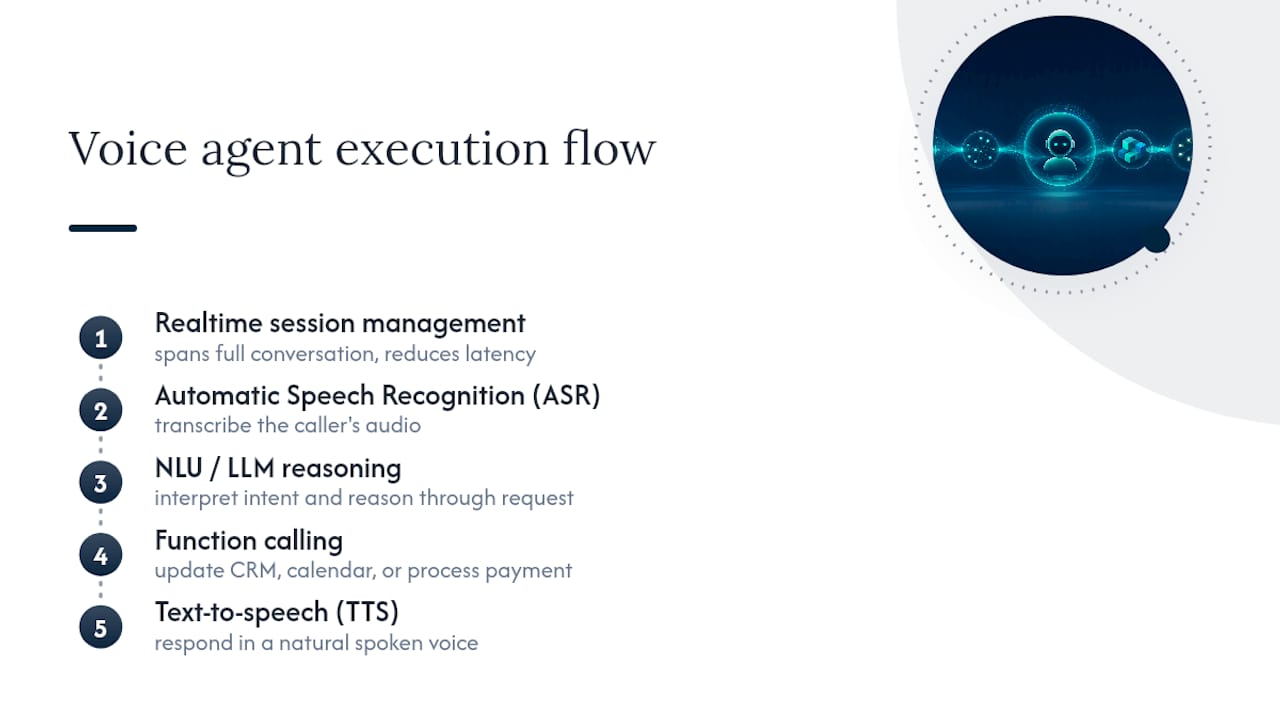
Where those components run matters more than most buyers realize. OpenAI’s developer documentation describes two dominant patterns: live-audio realtime sessions, which minimize latency for fluid back-and-forth conversation, and chained pipelines, which convert speech to text at each step, run that text through separate logic, and produce durable transcripts along the way. Realtime sessions feel more natural, which matters for sales calls and complex support. Chained pipelines create a clean audit trail, which matters for regulated transactions like payments or identity checks where you need a written record of exactly what was said and confirmed.
Engineering guidance on architecture choice is blunt about sequencing: decide where inference runs (on-device or cloud) before anything else, because that single choice sets your privacy exposure, latency ceiling, and cost trajectory as call volume scales. A cloud-based managed API is faster to launch. An on-device or hybrid setup costs more upfront but avoids per-minute fees that compound once you’re running thousands of calls a month.
None of this matters without integrations. A voice agent that can’t write to your CRM, check your calendar, or process a payment is a very articulate answering machine. The real automation happens when the agent’s function calls touch the same systems your staff already uses, so a completed call actually updates a record instead of generating a note someone has to type in later.
Where AI Voice Agents Deliver the Clearest ROI
Not every phone task is worth automating. The use cases below are ranked by how directly they connect to cost savings or revenue, based on what’s already working in production deployments.
Inbound customer service: deflect the calls that shouldn’t need a human
The highest-volume, lowest-complexity calls in almost any business are FAQ requests, order status checks, and “where is my stuff” (WISMO) questions. A voice agent handles these by pulling live data (an order record, a service ticket, a store hours lookup) and answering on the spot, with no hold music.
- FAQ automation: hours, pricing, policy questions answered instantly, freeing staff for calls that need judgment.
- WISMO deflection: the agent checks a shipping or CRM record and gives a status update without a transfer.
- Intelligent triage: the agent asks two or three clarifying questions, then routes urgent or complex issues to a human with context already attached, instead of a caller repeating themselves.
Expect the biggest gains in average handle time and after-hours coverage. A caller phoning at 9 PM about a delivery doesn’t need to wait until 9 AM.
Outbound and sales support: turn the phone into a lead engine
Salesforce frames this shift as turning the contact center from a pure cost center into a revenue channel, automating lead qualification and appointment setting to increase conversions rather than just cut headcount. That reframe matters for how you pitch a pilot internally: this isn’t only about savings, it’s about capturing leads you’re currently losing.
- Lead qualification calls: the agent asks budget, timeline, and fit questions on inbound leads within minutes of form submission, when interest is highest.
- Follow-up calls: reps often let warm leads go cold after the third unanswered call attempt; a voice agent keeps dialing on a schedule and logs every outcome.
- Abandoned cart or quote recovery: an outbound call referencing the specific item or quote converts better than a generic email blast, because it feels personal and immediate.
Metrics to track here: contact rate, qualification rate (percentage of calls that produce a sales-ready lead), and cost per qualified lead compared to your current outbound team’s numbers. A structured approach to lead qualification tends to outperform ad hoc scripts because the agent asks the same disqualifying questions every time, with no fatigue by the fiftieth call of the day.
Appointment booking and rescheduling: the highest-leverage single use case
If you pick only one pilot, this is usually it. Booking and rescheduling connect directly to a calendar, require relatively simple logic, and touch nearly every service business: clinics, salons, home services, real estate showings. The agent checks availability, confirms a slot, and sends a reminder, then handles the inevitable reschedule request without a staff member ever picking up the phone.
The metric that matters most is no-show rate. Voice-driven reminders and easy rescheduling (versus a caller giving up when they can’t reach anyone) tend to reduce missed appointments, because the friction of changing a booking drops to a thirty-second call instead of a voicemail nobody returns. A voice-first booking setup also captures after-hours requests that would otherwise go to a competitor who answers first.
Transactional flows: payments and identity verification
This is where architecture choice matters most. Microsoft’s guidance on voice agent design recommends pairing deterministic tool calls, such as identity verification or payment processing, with dynamic voice responses for natural clarification. In practice, that means the agent uses a fixed, auditable function to actually charge a card or verify an identity document, while using generative language to handle the surrounding conversation (“sorry, could you repeat that card number?”).
Don’t let a language model freelance the actual transaction logic. Keep payment amounts, account lookups, and identity checks inside deterministic, testable code paths, and reserve the generative layer for conversation flow around them.
Internal operations: the quiet automation nobody notices
IT help desk password resets, HR benefits questions, and routine status notifications (shipment updates, appointment reminders, service alerts) are lower-visibility use cases, but they add up. These calls rarely require judgment, which makes them nearly risk-free automation candidates and a good place to build internal confidence before tackling customer-facing flows.
Industry Applications: Healthcare, Home Services, Hospitality, and Finance
The same underlying technology plays out differently depending on the regulatory weight and urgency of the industry.
Healthcare carries the highest stakes and the tightest oversight requirements. Voice agents can handle symptom triage questions, appointment scheduling, and chronic care check-ins (medication adherence reminders, symptom tracking calls). A review in npj Digital Medicine found generative voice agents show promising accuracy in large simulated evaluations, but the same review stresses that clinical deployment needs supervised rollout and ongoing validation. No clinic should let a voice agent give a diagnosis or clinical advice unsupervised. Scheduling and check-ins are safe starting points; anything touching symptoms needs a clinician reviewing the protocol.
Home services businesses (HVAC, plumbing, electrical, landscaping) lose a disproportionate share of leads simply because nobody answers the phone during a job. Voice agents here capture the lead, book the appointment, and can push ETA updates to a customer waiting for a technician, routing urgent jobs to the right field worker’s dispatch queue.
Hospitality benefits from multilingual guest support most other industries don’t need at the same intensity. A guest calling a hotel front desk at midnight in a language the overnight clerk doesn’t speak is a real, recurring problem. Voice agents can also handle reservation upsells (room upgrades, late checkout, spa bookings) as a natural extension of a booking confirmation call.
Finance and telecom lean heavily on transactional accuracy: identity verification, billing inquiries, and payment processing where a wrong answer has real financial consequences. These flows need the deterministic-plus-generative pairing described above, with every transaction logged for compliance review.
- Healthcare: scheduling and check-ins yes; unsupervised clinical advice no.
- Home services: lead capture and ETA updates, with routing to live dispatch for complex jobs.
- Hospitality: multilingual support and upsell offers tied to existing reservations.
- Finance/telecom: identity checks and billing questions inside deterministic, audited flows.
Your Pilot Checklist: From Kickoff to Measurable Results
A good pilot proves value in weeks, not quarters. Practitioner guidance on reliable voice agent deployment consistently points to the same starting move: pick one narrow flow, map it exactly to your existing systems, and instrument everything before you scale.
- Choose one narrow use case with a clear KPI. Appointment booking (no-show rate), lead qualification (cost per qualified lead), or FAQ deflection (percentage of calls resolved without a transfer) are all good starting points. Avoid trying to automate five workflows at once.
- Map the required integrations. At minimum you’ll need calendar access for booking, CRM write access for lead data, and possibly a payment gateway or identity check for transactional flows. Confirm these connections work before writing a single conversation script.
- Build guardrails and hand-off triggers first, not last. Define exactly when the agent transfers to a human: repeated failed attempts, explicit caller request, or detected frustration. Set a clear transcript and data retention policy before the first live call.
- Test with real conditions, not clean audio. Engineering best practice for voice testing calls for testing with real accents, background noise, partial sentences, and interruptions, and measuring end-to-end task completion, not just transcription accuracy. A pilot that only gets tested on a quiet office line will fail the moment a caller phones from a car.
- Run an A/B comparison against your current process. Route a percentage of calls to the agent and keep the rest on your existing process for a direct comparison on cost, conversion, and satisfaction.
Pro Tip: Keep a manual DTMF fallback (“press 1 to speak with a person”) active during your first month. It costs nothing to include and gives cautious callers an exit ramp while you’re still tuning the conversation flow.
What Can Go Wrong: Privacy, Accuracy, and Escalation Planning
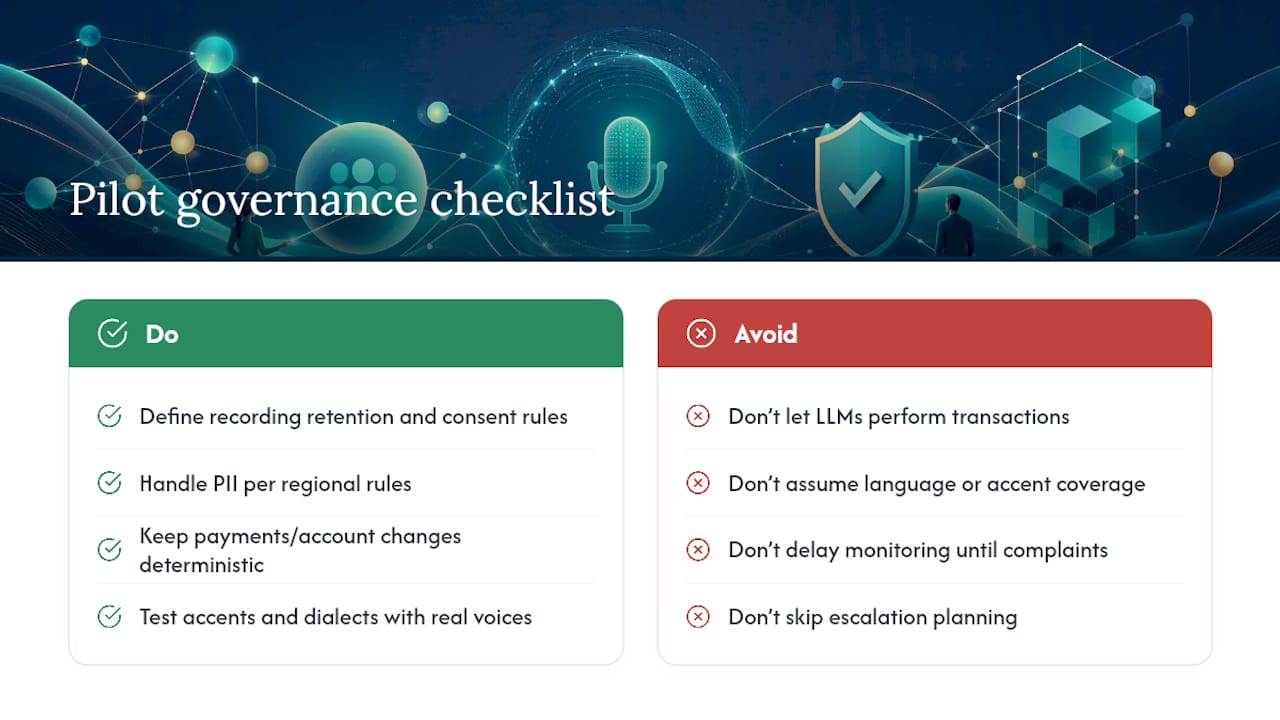
Every pilot needs a governance plan before it needs a bigger budget. Privacy comes first: define how long call recordings and transcripts are retained, how personally identifiable information gets handled, and whether your region imposes specific consent or disclosure rules for recorded calls.
Accuracy risk shows up most in generative components. Keep payment amounts, account changes, and identity verification inside deterministic, testable logic rather than letting a language model reason through the actual transaction. Save the generative layer for conversation and clarification, per the deterministic-plus-dynamic pairing Microsoft recommends for exactly this reason.
Bias and language coverage need explicit testing, not assumption. An agent tuned on one accent or dialect will underperform on others unless you test with the actual voices of your customer base. Finally, watch for silent operational failures: a hand-off that quietly drops instead of transferring, or a call that stalls without anyone noticing. Build monitoring and alerting into the pilot from day one, not after the first complaint.
How 42voice Fits These Use Cases in Practice
42voice builds AI voice agents specifically for the use cases covered above: inbound call handling, appointment booking, outbound lead qualification, after-hours coverage, and level-one customer support. The platform supports multilingual conversations across nine or more languages, which matters directly for the hospitality and home services scenarios discussed earlier.
Deployment typically runs three to five days, connecting to the calendars and CRMs businesses already use rather than requiring a system overhaul. For a small or midsize business evaluating where to start, that combination (fast setup, existing-system integration, and coverage for booking, support, and lead qualification in one platform) maps directly onto the highest-ROI use cases: appointment scheduling, after-hours capture, and qualified lead follow-up.
What I’d Pilot First If I Were You
Skip the FAQ bot as your opening move. It’s low risk, but it’s also low visibility, and you need a win that gets noticed. Start with appointment booking or lead qualification instead. Both connect directly to revenue, both have a clean, measurable KPI (no-show rate or cost per qualified lead), and both fail loudly and quickly if something’s wrong, which is exactly what you want in a pilot.
Staff it lightly but deliberately: one person owning transcript review for the first two weeks, and a hard rule that anything outside the narrow script escalates to a human immediately. Guardrails aren’t a compliance chore here. They’re what let you trust the data your pilot produces.
— Jesse
Ready to Pilot Your First AI Voice Agent?
If the use cases above sound like problems your business already has, appointment booking or lead qualification are the fastest paths to a measurable result. Deploys multilingual voice agents with fast setup and integrations to calendars and CRMs to enable testing without rebuilding existing systems.

The platform covers the priority use cases from this article directly: inbound support, outbound lead qualification, appointment booking and rescheduling, and after-hours coverage, all customizable for your industry whether that’s home services, hospitality, healthcare, or finance. Browse the full solutions overview to see how each use case maps to a specific configuration, and book a free demo to see a live call flow before you commit to anything.
Sources
- Extend AI voice support: introducing real-time voice agents in Microsoft Copilot Studio
- AI Voice Agents: A Complete Guide
- How generative AI voice agents will transform medicine | npj Digital Medicine
- OpenAI docs: Voice agents guide
- AI Voice Agents: The Complete Engineering Guide
FAQ
What Is an AI Voice Agent, Exactly?
An AI voice agent is software that listens to a caller, reasons through the request using natural language understanding, and completes the task, such as booking an appointment or answering a billing question, without routing to a human.
How Is an AI Voice Agent Different From a Chatbot?
A voice agent operates over live phone conversation with real-time speech recognition and generation, while a chatbot handles typed text; the underlying reasoning engine is often similar, but the latency and audio-processing demands differ sharply.
Which Business Use Case Should I Pilot First?
Appointment booking and rescheduling is typically the strongest starting point because it connects directly to a calendar, has a clear KPI (no-show rate), and applies to almost any service-based business.
Are AI Voice Agents Safe to Use for Healthcare Calls?
They work well for scheduling and check-in calls, but clinical research stresses supervised deployment and ongoing validation for anything involving symptom assessment or medical advice.
How Long Does It Take to Deploy an AI Voice Agent?
Deployment timelines vary by vendor and integration complexity; some platforms launch a working pilot within a few days when connecting to existing calendar and CRM systems.
What Metrics Should I Track During a Pilot?
Track task completion rate, average handle time, cost per qualified lead or booking, and no-show or deflection rate, depending on which use case you’re piloting.