
For most small and medium-sized businesses, the right approach to 24/7 call answering is a hybrid model: AI handles routine intake, scheduling, and after-hours overflow, while human agents step in for complex or emotionally sensitive calls. Done right, you never miss a lead, follow-up gets faster, and every caller hears the same professional voice, day or night.
Table of Contents
- What Does 24/7 Call Answering Actually Get You?
- Human, AI, or Hybrid: Which Answering Model Fits Your Business?
- What Features Separate Real Capability From Vendor Marketing?
- How Much Should 24/7 Call Answering Cost?
- How Do You Actually Evaluate a Call Answering Vendor?
- Where 42voice Fits in Real-World Deployments
- How Long Does Onboarding Actually Take?
- What SLA Terms Should You Actually Expect?
- Is Your Caller Data Actually Protected?
- Which Industries Benefit Most From Round-the-Clock Coverage?
- An Editor’s Take on Piloting This Right
- Ready to Try a Hybrid Setup? Here’s Where to Start
- Sources
- FAQ
What Does 24/7 Call Answering Actually Get You?
24/7 call answering means every inbound call gets picked up, day or night, weekday or holiday, by a live agent, an AI voice agent, or some combination of the two. The value isn’t novelty. It’s arithmetic: every call that goes to voicemail is a chance a prospect hangs up and dials your competitor instead.
The math behind lead capture is straightforward. A caller with an urgent need (a burst pipe, a toothache, a rental inquiry before a weekend showing) rarely leaves a voicemail. They call the next number on the list. Immediate pickup, even by an AI agent that books the appointment on the spot, keeps that lead in your pipeline instead of someone else’s. Scalable lead generation strategies consistently point to combining automation for routine intake with human agents for high-value conversations as the model that actually converts.
Typical use cases break down into a few patterns:
- Overflow handling: your front desk is busy, so calls route to a backup line instead of ringing out.
- After-hours and weekend coverage: calls placed at 9 p.m. or on a Sunday get answered, not queued for Monday.
- Emergency routing: urgent calls get flagged and escalated to an on-call human immediately.
- Appointment booking: callers get scheduled directly into your calendar without a callback loop.
Pro Tip: Track your after-hours call volume for two weeks before choosing a service. Most owners are surprised how many calls hit after 6 p.m.
Hiring internal staff to cover nights and weekends means paying for shifts nobody wants, plus overtime and turnover. Outsourcing (human, AI, or hybrid) usually costs a fraction of a full-time hire for the same coverage window.
Human, AI, or Hybrid: Which Answering Model Fits Your Business?
The three service models solve different problems, and picking the wrong one wastes money either way.
Human-only answering delivers the highest empathy per call. A trained receptionist handles nuance, tone, and unexpected questions better than any script. It’s also the most expensive option, generally billed per minute or per call, and quality varies by staffing and training at the vendor.
Hybrid (AI plus human escalation) is built for scale without sacrificing the moments that need a real person. AI agents handle intake, FAQs, and booking around the clock; calls that need judgment, de-escalation, or complex troubleshooting get routed to a live agent. This model gives you cost control on routine volume and human backup exactly when it matters.
AI-first answering is the cheapest and fastest to deploy, and it never sleeps, gets sick, or has a bad day. Its limit is nuance: an AI agent can book an appointment flawlessly but may struggle with an angry customer demanding a refund explanation.
A few signals point you toward one model over another:
- High call volume with mostly repetitive questions → AI-first or hybrid.
- Sensitive industries (healthcare, legal, high-touch sales) → human-only or hybrid with tight escalation rules.
- Tight budget, moderate volume → hybrid, since it caps cost while keeping a human safety net.
Most SMBs land on hybrid because it matches empathy to the calls that need it and automation to the calls that don’t.
What Features Separate Real Capability From Vendor Marketing?
Every vendor claims “24/7 support” and “seamless integration.” The features below separate the ones that deliver from the ones that just talk.
CRM and calendar integration matters more than almost anything else on this list. If a captured lead doesn’t land in your CRM automatically, someone on your team has to re-enter it manually, and that delay costs conversions. Look for native connections to the calendar and CRM tools you already run, not a generic webhook you have to build yourself.
Custom scripting and brand voice determine whether callers feel like they reached your business or a call center. Ask how much you can control the greeting, tone, and escalation triggers before committing.
Escalation and transfer rules decide what happens when a call exceeds the AI’s or the junior agent’s authority. A weak vendor has one fallback: voicemail. A strong one has tiered rules, by call type, urgency, or caller history.
SLA and answer-time guarantees tell you what “24/7” actually means in practice. Ask for a documented answer-time target, not a vague promise. Reliable VoIP infrastructure and auto-attendant configuration directly affects whether after-hours routing actually holds up when volume spikes.
Here’s how the core features stack up when you’re comparing options:
| Feature | Why it matters | What to ask the vendor |
|---|---|---|
| CRM/calendar sync | Prevents manual re-entry and lost leads | “Which CRMs and calendar tools integrate natively?” |
| Custom scripting | Preserves brand voice on every call | “Can I edit scripts and escalation triggers myself?” |
| Escalation rules | Routes complex calls to the right human | “What triggers a transfer, and to whom?” |
| SLA/answer time | Sets a measurable service standard | “What’s your documented average answer time?” |
| Multilingual support | Serves diverse caller bases without a second vendor | “Which languages are live agents, not just scripts?” |
| Transcripts and reporting | Gives you a paper trail and QA data | “Do I get call transcripts and analytics by default?” |
Multilingual support and transcript access round out the checklist. If your caller base isn’t monolingual, ask specifically which languages are handled by trained agents versus a translation layer bolted onto a single script.
How Much Should 24/7 Call Answering Cost?
Pricing generally takes one of two shapes: a monthly bundle with included minutes, or pay-as-you-go per-minute billing. Bundles suit businesses with predictable call volume; pay-as-you-go suits businesses with unpredictable spikes, though it can get expensive fast if you underestimate usage.
Watch for the mechanics that inflate a bill beyond the sticker price:
- Per-call minimums: a 40-second call billed as a full minute, every time.
- Rounding up: six-second increments rounded to the nearest minute add up across hundreds of calls.
- Holiday and weekend surcharges: some vendors charge premium rates for the exact hours you’re paying for 24/7 coverage to cover.
- Overage penalties: exceeding your bundle triggers a much higher per-minute rate than advertised.
A transparent vendor states minute-rounding rules and confirms in writing that holiday coverage carries no surcharge. If a sales rep can’t answer that question directly, treat it as a red flag rather than an oversight.
How Do You Actually Evaluate a Call Answering Vendor?
Vendor selection comes down to three steps: interview, pilot, and watch for red flags.
- Run the interview. Ask for their documented SLA, a list of native CRM/calendar integrations, the onboarding timeline, and how agents get trained on your specific scripts.
- Run a pilot call yourself. Call the number after hours. Listen for hold time, tone, and whether the agent (human or AI) asks the right qualifying questions. A short, measurable pilot that tests real CRM updates is the fastest way to separate a vendor’s marketing from its actual performance.
- Verify the CRM update. After your test call, check your CRM within the promised notification window. If the lead isn’t there, or the details are wrong, that’s your answer.
Before signing anything, check the vendor’s reputation on independent review platforms, watching for consistent patterns across dozens of reviews rather than one glowing testimonial.
Pro Tip: Call your own test line at 2 a.m. and again on a Sunday afternoon. If the experience feels different from your weekday test, ask why before you sign.
Red flags worth walking away from: opaque billing that won’t specify rounding rules, no integration options for your existing tools, and any vendor unwilling to run a short pilot before you commit to a contract.
Where 42voice Fits in Real-World Deployments
42voice builds its service model around the hybrid approach most SMBs actually need: AI voice agents that handle inbound calls, appointment booking, and lead qualification, with human-style escalation logic built into the routing. Deployment typically runs 3 to 5 days, integrated directly with the calendar and CRM tools a business already uses.
Real deployments follow a few consistent patterns:
- A home services company routes after-hours emergency calls straight to booking, no hold music, no missed job.
- A hospitality client uses multilingual agents to handle reservation calls in the caller’s own language.
- A healthcare practice offloads appointment confirmations and reschedules so front-desk staff can focus on patients in the room.
A hybrid setup means the AI agent qualifies the lead and books the slot; the human layer only gets pulled in when the conversation needs judgment the script can’t provide.
The pattern that repeats across industries: automation absorbs the repetitive volume, and humans stay available for the calls that actually need them.
How Long Does Onboarding Actually Take?
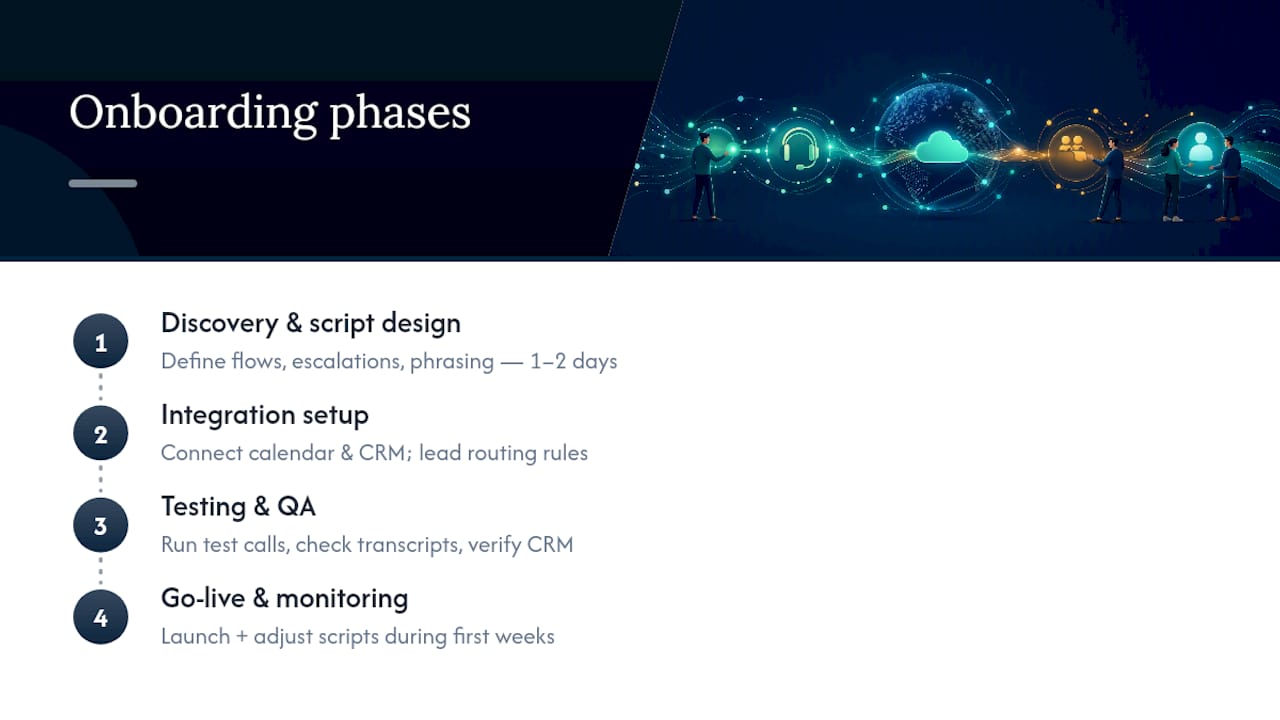
Most 24/7 answering deployments follow a similar sequence, whether the vendor is AI-first, human-only, or hybrid. Expect four broad phases.
Discovery and script design comes first, typically one to two days. You define call flows, escalation triggers, and the specific phrases that match your brand voice. This is where you decide what the AI or the agent says when a caller asks something outside the script.
Integration setup connects the answering service to your calendar and CRM. This step determines whether captured leads land automatically in your pipeline or require manual entry, so it deserves real attention rather than a rushed checkbox.
Testing and QA means running real test calls, checking transcripts, and confirming the CRM updates land correctly and on time. Skipping this step is how businesses end up with a live service that quietly drops half its leads.
Go-live and monitoring rounds out the process. A well-run vendor doesn’t just flip a switch. They monitor the first weeks of live calls and adjust scripts based on what actual callers ask.
AI-supported platforms tend to compress this whole sequence dramatically. Where a human-only call center might need several weeks to hire, train, and staff a 24/7 rotation, an AI-supported deployment can go live in a matter of days because there’s no staffing curve to climb. That speed matters most for businesses that need coverage now, not next quarter.
What SLA Terms Should You Actually Expect?
An SLA (service level agreement) is the document that turns “24/7 coverage” from a marketing phrase into an enforceable standard. At minimum, it should specify an answer-time target (how many seconds before a call is picked up), an uptime commitment for the platform itself, and a defined notification window for passing captured leads into your CRM.
Answer-time guarantees matter more than most buyers realize. A vendor that answers in under 10 seconds delivers a fundamentally different caller experience than one that takes 45. Ask for the specific number in writing, not a general assurance of “fast response.”
Notification methods deserve equal scrutiny. Some vendors push lead data instantly via API into your CRM; others batch it into an email digest every few hours. For a business trying to call back a hot lead within minutes, that difference decides whether the appointment gets booked or goes cold.
Performance guarantees should also cover what happens when the SLA is missed: a credit, a service adjustment, or an escalation path. A vendor confident in its own uptime will put that remedy in writing without hesitation. One that resists is telling you something about how often it expects to miss its own targets.
Is Your Caller Data Actually Protected?
Every call answering vendor handles personal data: names, phone numbers, addresses, and sometimes health or financial details depending on your industry. That makes compliance a real evaluation criterion, not fine print to skim.
For businesses serving European callers, GDPR governs how personal data gets collected, stored, and processed, including caller information captured during a routine booking call. For healthcare practices in the United States, HIPAA sets specific requirements around protected health information, which applies directly to any answering service handling patient scheduling or symptom intake.
Ask a vendor directly where call data is stored, how long transcripts are retained, and whether staff or AI systems handling your calls have documented data-handling agreements in place. A vendor operating across multiple industries should be able to point to specific compliance measures for your sector rather than a generic privacy policy. If your business handles regulated data, get written confirmation of compliance before signing, not a verbal assurance during the sales call.
Which Industries Benefit Most From Round-the-Clock Coverage?
Some businesses lose more by going unanswered than others, and that gap determines how much 24/7 coverage is actually worth to you.
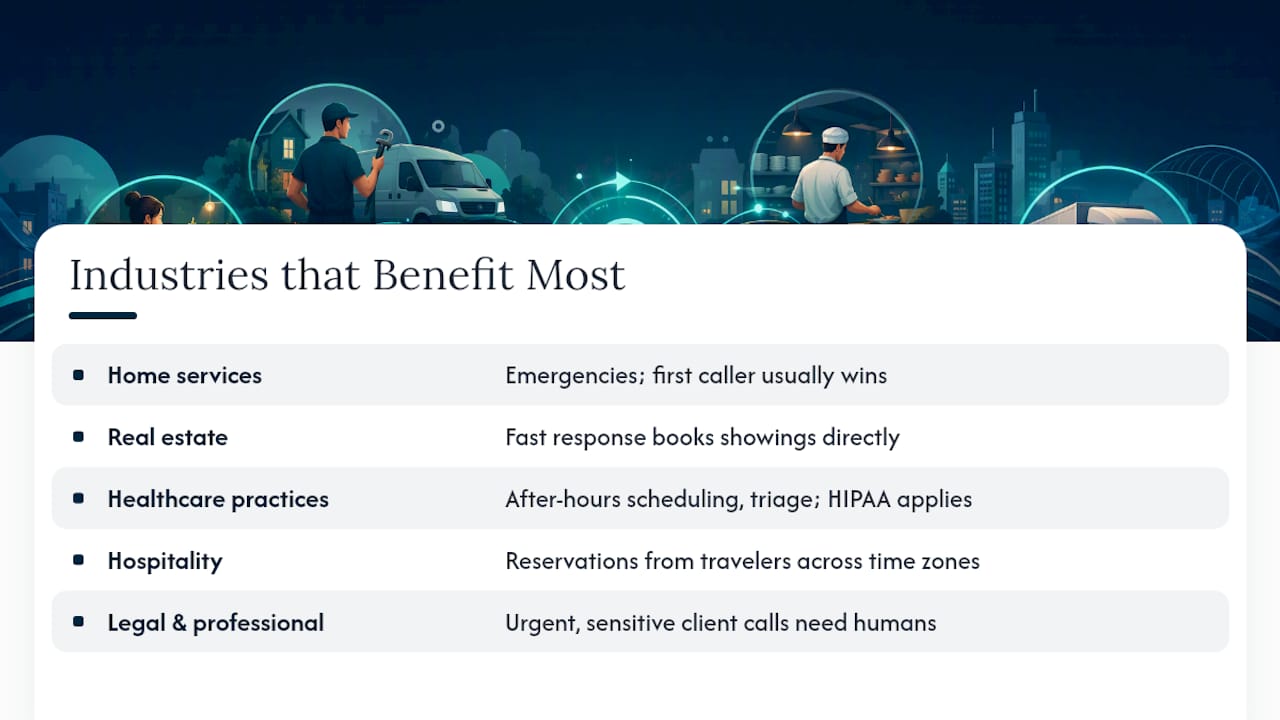
Home services (plumbing, HVAC, electrical) sit at the top of the list. Emergencies don’t wait for business hours, and the first company to answer usually gets the job.
Real estate depends on speed, since a showing inquiry that goes to voicemail on a Friday night often gets a competing agent’s callback first. A dedicated call answering setup for real estate that books showings directly into an agent’s calendar closes that gap.
Healthcare practices need after-hours coverage for appointment scheduling, prescription questions, and triage routing, though anything touching patient health data needs the HIPAA safeguards covered above.
Hospitality businesses (hotels, restaurants, event venues) field reservation and inquiry calls around the clock, often from travelers in different time zones who won’t call back if nobody answers.
Legal and professional services benefit from a human-sensitive hybrid model, since a new client’s first call often carries urgency or distress that a purely automated flow handles poorly.
Across all five, the common thread isn’t industry. It’s whether a missed call has a real dollar cost attached. If it does, 24/7 coverage pays for itself quickly.
An Editor’s Take on Piloting This Right
Run any vendor on a 30 to 90 day pilot before committing further, tracking answer rate, leads captured, and appointments actually booked. Those three numbers tell you more than any sales deck. If the data holds up, expand automation gradually. Start with intake and booking, the tasks where AI is already reliable, and add complexity only once you trust the escalation logic to catch what it can’t handle.
— Jesse
Ready to Try a Hybrid Setup? Here’s Where to Start
If your business is choosing between hiring a night-shift receptionist and gambling on voicemail, 42voice offers a third option: AI voice agents that answer every call, book appointments, qualify leads, and hand off to a human only when a conversation genuinely needs one. Deployment runs 3 to 5 days, not weeks, and agents integrate directly with the calendar and CRM tools you’re already running.

Coverage extends across after-hours call handling, appointment booking, and multilingual support for businesses with diverse caller bases, all built on the same hybrid model covered throughout this guide. If you’re weighing human-only against AI-first, the fastest way to find out which fits is to test it directly. Explore 42voice’s full solution set or complete the client setup form to get a pilot running this week.
Sources
- What is scalable lead generation? Strategies for growth – The Lead Lab
- Professional Services VoIP Features List for 2026 | California Telecom
FAQ
Do Telephone Answering Services Still Exist?
Yes. Traditional human answering services are still widely used, though many now operate alongside or have been replaced by AI-supported platforms like 42voice that handle routine calls automatically and escalate complex ones to a live agent.
Is There an App to Answer Phone Calls Automatically?
Several apps and platforms offer automated call answering, ranging from basic voicemail-to-text tools to full AI voice agents that book appointments and qualify leads in real time, then sync that data directly to your CRM.
Is There a Free Virtual Answering Service Available?
Free options exist but are typically limited to basic voicemail transcription or call screening. Full-featured 24/7 answering with live agents, AI voice agents, CRM integration, and reporting almost always requires a paid plan.
How Much Does an AI Call Answering Service Cost?
Pricing varies by provider and typically follows either a monthly bundle with included minutes or a pay-as-you-go structure. Costs depend on call volume, the number of languages needed, and how many integrations you require. Ask specifically about rounding rules and holiday surcharges before comparing quotes.